

How to clean and maintain smart devices for longevity
TL;DR:
- Proper cleaning of smart devices involves careful, evidence-backed methods that prevent damage and extend lifespan. Regular dry wiping, careful port cleaning, and cautious disinfection when necessary are essential for optimal performance and warranty maintenance. Consistent, simple routines outperform complex procedures in protecting devices from wear, contamination, and faults.
Most people assume a quick wipe with a kitchen cloth or a spritz of surface spray is perfectly fine for their smartphone or tablet. It is not. These common habits strip protective coatings, push debris deeper into ports, and can cause faults that look for all the world like hardware failure. For DIY repairers and professional technicians alike, understanding the evidence-backed approach to smart device cleaning is not optional — it is the difference between a device that lasts four years and one that barely makes it through two.
Table of Contents
- Why smart device cleaning matters for performance and longevity
- Safe cleaning steps for smartphones, tablets and wearables
- Disinfecting smart devices and protecting coatings
- Maintaining device reliability: Beyond cleaning
- What professionals often miss in smart device maintenance
- Need expert support or professional repair services?
- Frequently asked questions
Key Takeaways
| Point | Details |
|---|---|
| Stick to safe materials | Use microfibre cloths and gentle solutions to avoid damaging smart devices. |
| Avoid direct liquid contact | Never spray or pour cleaning liquid directly onto device screens or ports. |
| Maintain a routine | Combine regular cleaning with firmware and battery checks for long-term device health. |
| Tailor for wearables | Clean wristbands with appropriate methods since they often harbour bacteria. |
| Balance cleaning and disinfection | Prioritise daily cleaning with water/microfibre and save disinfectants for special cases to preserve coatings. |
Why smart device cleaning matters for performance and longevity
Smart devices accumulate far more than fingerprints. Every time you set your phone down on a desk, tuck it into a pocket, or hand it to a customer across a counter, it picks up dust, skin oils, food particles, and environmental grime. This build-up does not stay on the surface. It migrates into speaker grilles, charging ports, microphone apertures, and sensor windows, where it quietly degrades performance over weeks and months.
Dust buildup affects performance on devices used frequently, and the consequences are surprisingly varied. Touchscreens become less responsive. Proximity sensors misread, keeping your screen lit when it should be dark. Speaker output drops. Charging becomes intermittent. None of these faults show up in a diagnostic as “dirty device,” so technicians often chase hardware problems that a proper cleaning would have resolved.
Here are the most common performance issues directly linked to poor cleaning habits:
- Overheating caused by dust blocking ventilation channels and heat dissipation paths
- Accelerated battery drain as the processor works harder to compensate for sensor errors
- Speaker and microphone faults from compacted debris in grilles
- Camera lens blur from oils smeared across the lens by incorrect wiping
- Charging port failures from lint accumulation that prevents secure connector contact
- Sensor misreads on ambient light and proximity sensors covered in grime
For repair professionals, this matters commercially. A device returned to a customer with a clean bill of health that then develops a port fault six weeks later looks like your fault, even if it was not. Proper cleaning is your professional safety net.
| Risk of improper cleaning | Benefit of correct cleaning |
|---|---|
| Stripped oleophobic coating | Preserved screen sensitivity and glide |
| Port corrosion from moisture | Reliable charging and data transfer |
| Sensor blockage | Accurate proximity and ambient light readings |
| Void manufacturer warranty | Maintained warranty compliance |
| Bacterial contamination | Safer device for user and technician |
| Premature component failure | Extended device lifespan and resale value |
“Keeping electronics clean and avoiding aggressive or incorrect cleaning methods is one of the most cost-effective ways to extend their working life.” — Consumer Reports via WISN
Cleaning keeps electronics working longer and for repair shops especially, recommending this to customers builds long-term loyalty. Pair your cleaning habit with practical steps to extend phone lifespan tips and you will see a measurable reduction in repeat faults. Understanding how to reduce device wear and tear sits at the very foundation of responsible device maintenance.
Safe cleaning steps for smartphones, tablets and wearables
Appreciating what is at stake, let us move into the evidence-backed step-by-step routine for safe and effective cleaning.
The single most important rule is this: dry first, damp second, never wet. Many faults attributed to “water damage” actually originate from a well-intentioned clean with a wet wipe or a spray applied directly to the device. Never spray liquids directly into ports, speakers, microphones, or camera openings; always use a dampened microfibre cloth applied to the surface first.
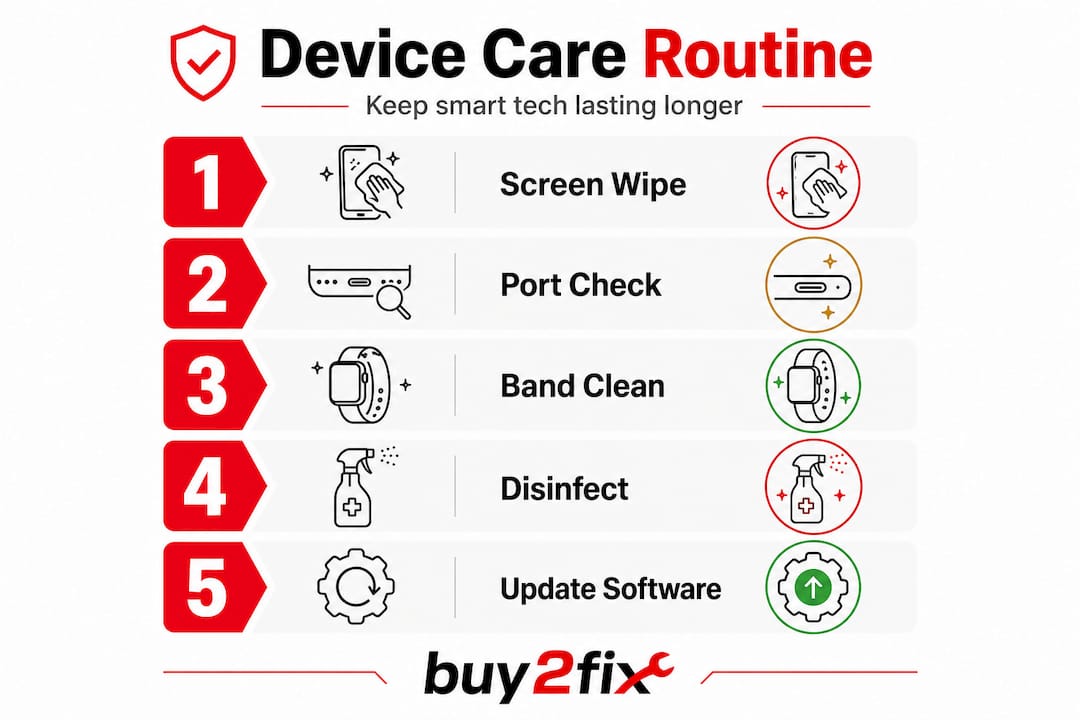
Here is the step-by-step routine for safe cleaning:
- Power down the device completely and remove it from any case or sleeve
- Disconnect all cables including charging leads, earphones, and data cables
- Remove SIM and memory cards if ports are accessible and require cleaning
- Dry-wipe the screen with a clean, lint-free microfibre cloth using gentle circular motions
- Dampen a second microfibre cloth with a small amount of clean water (wring out thoroughly) and wipe the screen and body
- Address ports and grilles using a soft-bristled brush or a wooden or plastic toothpick, never metal
- For wristbands and straps, use a separate damp cloth and mild, fragrance-free soap, rinsing without submerging electronics
- Allow the device to air dry for at least 15 minutes before reconnecting cables or powering on
- Replace the case only once the device is fully dry
For cleaning charging ports, the dry brush method is the safest starting point. Work the bristles in a single direction rather than scrubbing back and forth, which can push debris further in. Compressed air in short, controlled bursts works well for loosening compacted lint.
Pro Tip: Use a clean wooden cocktail stick to dislodge lint from USB-C or Lightning ports. Angle it along one wall of the port and gently scoop outward. Never use sewing needles or metal implements as they can damage the contact pins.
Wristbands are widely contaminated and require tailored cleaning methods; avoid chemical solvents on both the band and the watch body, as these degrade silicone and leather materials rapidly.

| Device type | Primary cleaning need | Recommended method | Avoid |
|---|---|---|---|
| Smartphone screen | Oil, fingerprints | Dry microfibre, then damp microfibre | Alcohol wipes daily, abrasive cloths |
| Tablet screen | Smears, dust | Dry microfibre, gentle pressure | Window cleaner, paper towels |
| Charging ports | Lint, debris | Dry brush, compressed air | Metal tools, moisture |
| Smartwatch body | Sweat, oils | Damp cloth, mild soap | Solvent-based cleaners |
| Silicone wristband | Bacteria, grime | Soap and water, air dry | Bleach, alcohol solutions |
| Leather wristband | Oils, moisture | Dry cloth, leather conditioner | Water submersion |
Addressing common smartphone issue solutions before they escalate almost always starts with this kind of methodical cleaning check.
Disinfecting smart devices and protecting coatings
Disinfecting poses unique risks, so here is how to sanitise safely without harming device materials.
There is a critical distinction between cleaning and disinfecting. Cleaning removes visible dirt and oils. Disinfecting kills pathogens. You should always clean before you disinfect, not instead of it. Applying disinfectant to a grimy surface simply traps the contaminants beneath a chemical film. In a repair shop context, this distinction matters enormously for the health and safety of both technicians and customers.
Mix 70% isopropyl alcohol with 30% water, apply to a cloth rather than the device directly, and wipe gently. This ratio kills the widest range of pathogens without being so aggressive that it degrades device coatings immediately. Higher concentrations above 90% actually evaporate too fast to be effective and are more likely to cause harm.
When should you disinfect, and when should you hold back?
- Disinfect when: a device has been used during illness, handled by multiple people in a shop setting, or exposed to known contamination
- Disinfect when: returning devices to vulnerable customers such as those in healthcare settings
- Do not disinfect daily as a routine; this strips oleophobic coatings faster than normal use would
- Do not disinfect if the device already has visible screen damage, as alcohol can penetrate hairline cracks and reach the display underneath
- Do not use antibacterial wipes containing bleach, hydrogen peroxide, or ammonia on any display surface
Pro Tip: Always clean with a plain, slightly damp microfibre cloth first, allow to dry, and only then apply the diluted alcohol solution if disinfection is genuinely needed. This two-step process removes debris that would otherwise reduce the effectiveness of the disinfectant.
Over-cleaning with chemical solutions can measurably lower touchscreen responsiveness over time. The oleophobic coating (the invisible layer that makes your screen repel fingerprints) wears away with repeated alcohol exposure, leaving the glass feeling sticky and less responsive to swipes. For phone virus cleaning tips and broader hygiene guidance, the golden rule is restraint combined with correct technique.
Maintaining device reliability: Beyond cleaning
With hygiene and cleaning covered, it is crucial to pair these routines with broader maintenance habits.
Physical cleaning addresses the surface. But a device can be spotless and still perform poorly if firmware is outdated, the battery is degrading, or the camera lens has micro-scratches from repeated incorrect wiping. True device longevity requires a maintenance mindset that encompasses both physical and digital upkeep.
Periodic firmware updates, security patches, lens cleaning, and battery health checks all extend device life significantly. An outdated operating system is not just a security risk — it often contains bugs that cause battery drain, app crashes, and connectivity problems that masquerade as hardware faults.
Here is a practical maintenance checklist for shops and home users alike:
- Check for firmware and security updates at least once a fortnight and install promptly
- Inspect the camera lens for micro-scratches and smears; clean with a lens cloth only
- Check battery health using built-in settings (iOS Battery Health or third-party tools for Android)
- Test port integrity by gently inspecting connectors for bent pins or debris after each cleaning
- Inspect the screen for hairline cracks that may worsen with temperature changes
- Review app permissions and background activity to ensure no rogue processes are draining power
- Check case and screen protector for damage that may be trapping moisture or grit against the device
Signs that a device needs immediate attention:
- Noticeably warmer than usual during light tasks
- Charging that stops and restarts repeatedly
- Speaker crackling even at low volumes
- Touchscreen zones becoming unresponsive
- Camera images with persistent soft focus or haze despite lens cleaning
| Maintenance activity | Recommended frequency |
|---|---|
| Screen wipe with dry microfibre | Daily |
| Full cleaning routine | Weekly |
| Port inspection and dry brushing | Fortnightly |
| Firmware and security update check | Fortnightly |
| Battery health review | Monthly |
| Camera lens inspection | Monthly |
| Full disinfection if warranted | As needed |
For anyone serious about keeping devices running well, tips to extend battery life should sit alongside the physical cleaning routine as standard practice. The right accessories and device longevity choices — protective cases, quality screen protectors, and proper charging accessories — reduce how much cleaning and remedial maintenance you need to do in the first place.
What professionals often miss in smart device maintenance
With all essential tasks on the table, it is time to highlight what most guides and professionals miss. This is where the real marginal gains are found.
Most repair shops, in our experience, over-prioritise disinfecting. A technician receives a device, applies isopropyl alcohol, wipes it down, and considers the job done. But they skip the dry step first. They skip the port brush. They certainly skip the firmware update. What happens? The screen coating wears faster than it should, the customer eventually notices the port charging intermittently, and the shop gets a call it cannot easily explain.
Here is a counterintuitive truth: a simple, consistently followed process applied by all staff outperforms an elaborate cleaning protocol that only the senior technician follows correctly. Complicated routines with UV sanitisers, exotic chemical sprays, and ultrasonic baths have their place for specific jobs. But the day-to-day maintenance that actually protects devices — and protects your shop’s reputation — is a dry microfibre wipe, a port brush, and a firmware check. That is it. Done consistently, it prevents more repeat visits than any deep cleaning technology.
Another thing professionals miss is the preventive dimension. Recommending the right protective case and screen protector to a customer at point of sale removes a significant portion of your future cleaning burden. A well-fitted case keeps lint out of ports. A quality screen protector takes the brunt of repeated screen wipes. This is not just good advice for the customer — it means fewer devices returning with cosmetic damage that complicates a repair assessment.
Firmware and software maintenance also tend to get dismissed as “not really our job” by hardware technicians. But a device that is running optimally at the software level will report accurate battery readings, handle thermal management correctly, and give you cleaner diagnostic data. An expert guide to upgrading devices makes clear how closely physical upkeep and software health are intertwined.
The professionals who build reputations for reliability are not necessarily the ones with the most sophisticated equipment. They are the ones who do the basics properly, every single time, and train their staff to do the same.
Need expert support or professional repair services?
For those seeking even more efficient maintenance or expert backup, Buy2fix offers tailored professional solutions.
At Buy2fix, we supply the parts, accessories, and guidance that both DIY repairers and professional technicians rely on across the UK. Whether you need quality microfibre cloths and cleaning accessories, replacement charging ports and screens, or genuine parts for iPhone, Samsung Galaxy, Huawei, Xiaomi, and OPPO devices, our inventory is built around what repair professionals actually need. Every order benefits from free UK mainland shipping, a 30-day return policy, and warranty support on eligible items. If a repair has gone beyond what cleaning can fix, we have the parts to put it right.
Frequently asked questions
How often should I clean my smartphone or tablet for best results?
Wipe screens and cases with a dry microfibre cloth daily and carry out a full cleaning routine weekly. Avoid over-cleaning with chemical solutions to protect your device’s oleophobic coating; reserve alcohol-based disinfection for periods of illness or heavy multi-user handling.
Can I use ordinary household cleaning products on my smart devices?
No. Household cleaners, bleach-based sprays, and solvent products damage screens, strip coatings, and corrode internal components. Harsh cleaners damage devices; use only clean water, diluted isopropyl alcohol (70:30), and lint-free microfibre cloths.
Is it safe to clean charging ports myself?
Yes, provided you use a dry, soft-bristled brush or controlled bursts of compressed air. Use only safe methods for ports; never insert metal tools or apply any liquid directly into a charging port.
Do smartwatches really need separate cleaning steps?
Absolutely. Wristbands carry significant bacterial contamination and many strap materials are damaged by alcohol-based cleaners. 95% of wristbands are contaminated, making tailored cleaning methods for both the watch body and the strap essential.
How can I ensure my cleaning routine will not void warranties?
Follow manufacturer guidance precisely: power off the device before cleaning, use only microfibre cloths and recommended solutions, and keep all moisture away from ports and openings. Safe cleaning methods protect warranty compliance and prevent accidental damage that manufacturers could attribute to improper care.
Recommended
Let customers speak for us
I have purchased several items from this store before. Recently, I encountered an issue with my latest order. After reporting the problem to customer support, they were consistently attentive and made every effort to resolve the situation. Upon investigation, they acknowledged the issue and promptly fixed it. This experience has increased my level of trust in this store.
Thank you so much. I'm so happy.

très bien

BC70 Car Bluetooth 5.0 FM Transmitter Radio Adapter Dual Display Wireless Handsfree Call MP3 Music Player QC3.0 PD USB Charger

A quite sturdy cover, if you are looking for full protection and a more business-like style, this cover perfectly fulfills its purpose.
The shipping was fast, and it was delivered in perfect condition.

For LG TV Bluetooth Handheld Infrared Voice Multi-Function Remote Control(AKB75855501)

Tusen tack för bästa service och produkt som jag vänlig önskar dig tack

Works correctly and no issues so far

Took a while to get here but it was all good, watch looks brand new after replacement

What a fantastic 👏🏻 stylish case that has helped my phones temperature in the heatwave!!
Perfect 👌🏻 also it's cool as f##k

I love it!

The acid test of any company is how they respond when things go wrong. The Buy2Fix team were efficient in dealing with my emails and resolved the issue to my complete satisfaction

For Samsung Galaxy A26 SM-A266B Original Earpiece Speaker with Cable

Very good communication throught. Good product

Well made part very strong easy to fit great value for the money
