


Nachrichten
Protect your phone screen: expert tips for lasting durability
TL;DR:
- Most screen damage results from daily habits like drops, sharp objects, or pressure, not luck.
- Tempered glass protectors with 9H hardness and full edge coverage offer optimal impact and scratch resistance.
- Proper application and cautious habits greatly extend screen lifespan, regardless of protection quality.
One small slip. Your phone slides off the kitchen counter, face-down onto the tiled floor, and you already know before you pick it up. That spiderweb of cracks across the screen costs anywhere from £80 to £300 to fix, depending on your model. Screen damage is the single most common reason people bring phones in for repair, yet most of it is entirely avoidable. This guide walks you through the real risks, the right protective gear, how to apply it properly, and what to do when the worst happens despite your best efforts.
Table of Contents
- Understanding key risks to phone screens
- Choosing the best screen protection: types and features
- How to apply a screen protector: step-by-step guide
- Handling cracks and emergency fixes
- Why the small daily habits matter most for phone screen survival
- Need expert help or quality parts? Buy2Fix is here
- Frequently asked questions
Key Takeaways
| Point | Details |
|---|---|
| Avoid key risks | Keep your phone away from sharp objects, sand, and careless placement to prevent micro-scratches or cracks. |
| Choose the right protector | Select a tempered glass screen protector with 9H hardness for the best defence against drops and scratches. |
| Apply protection correctly | Clean thoroughly and apply in a dust-free area for bubble-free, long-lasting screen safety. |
| Know emergency measures | For cracked screens, use temporary fixes but arrange prompt repair for long-term use. |
Understanding key risks to phone screens
Your phone screen faces threats every single day, most of which you probably never think about. Understanding where damage actually comes from is the first step to stopping it.
The most obvious risk is dropping your phone onto a hard surface. But here is the part that surprises most people: the angle and height of the drop matter far less than what the screen lands on. A short drop onto concrete or a sharp edge can shatter a screen that survived a longer fall onto carpet. The geometry of impact concentrates force into a tiny point, and that is where glass fails.
Sharp objects are a subtler but equally destructive threat. Sand is particularly dangerous because quartz, the mineral that makes up most sand, rates 7 on the Mohs hardness scale. Most phone glass sits around 6 to 6.5. That means a single grain of beach sand in your pocket can permanently scratch your display every time the phone moves. Coins and keys cause similar micro-damage over time.
Pressure damage is often overlooked entirely. Sitting on your phone in a back pocket, placing a heavy bag on top of it, or even gripping it too tightly during a stressful moment can flex the glass just enough to cause internal fractures that are not immediately visible.
Here is a quick breakdown of the most common daily hazards:
- Carrying your phone loose in a pocket with keys or coins
- Placing the phone face-down on textured or gritty surfaces
- Leaving it in a back pocket and sitting down
- Exposing it to extreme heat or cold, which weakens adhesive bonds
- Setting it near the edge of a table or desk
- Vibration on hard surfaces, such as a running washing machine
As Google’s own guidance makes clear, you should avoid pocketing with keys, back pockets, extreme temperatures, and leaving your phone on uneven surfaces.
| Risk factor | Damage type | Frequency |
|---|---|---|
| Drops onto hard floors | Cracks, shatter | Very common |
| Sand and grit in pockets | Micro-scratches | Common |
| Keys and coins | Deep scratches | Common |
| Back pocket pressure | Internal fractures | Moderate |
| Extreme temperatures | Adhesive failure | Less common |
For a broader look at what puts your device at risk, the guide on common causes of phone damage covers these hazards in detail.
“The majority of screen damage is not bad luck. It is the result of repeated small habits that most users never even notice.”
Choosing the best screen protection: types and features
Understanding the main risks is only half the battle. Choosing the right protective solution is just as important.
There are two main categories of screen protector on the market: tempered glass and plastic film. Each has its place, but they are not equal.
Tempered glass protectors are made from chemically strengthened glass that has been heat-treated to increase its resistance to impact and scratches. They feel exactly like the phone’s original screen, maintain touch sensitivity, and do not distort colours or brightness. The key specification to look for is 9H hardness, which refers to the pencil hardness scale. A 9H rating means the protector resists scratching from materials up to and including a 9H pencil, which covers most everyday objects including keys.
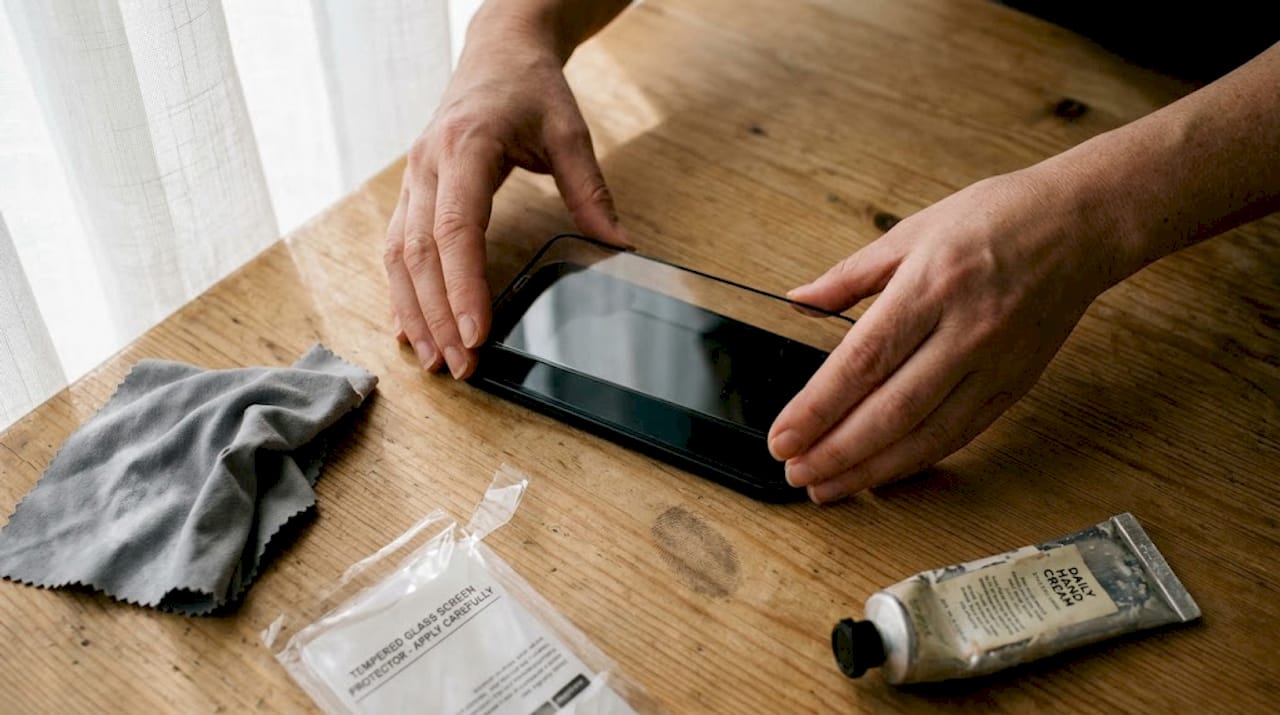
Plastic film protectors are thinner and cheaper but offer significantly less impact protection. They scratch more easily and can develop a cloudy appearance over time. They are useful for older devices or situations where budget is the primary concern.
Edge-to-edge coverage is another critical feature. A protector that does not reach the curved or bevelled edges of your screen leaves those vulnerable zones exposed. Phones with curved displays, such as many Samsung Galaxy models, require protectors specifically designed for that curve geometry.
According to Google’s screen protector advice, using a tempered glass protector with full edge-to-edge coverage and a 9H hardness rating provides the best defence against both scratches and impacts.
| Feature | Tempered glass | Plastic film |
|---|---|---|
| Scratch resistance | Excellent (9H) | Moderate |
| Impact absorption | Good | Limited |
| Touch sensitivity | Unchanged | Slight reduction |
| Clarity | High | Can yellow/cloud |
| Typical lifespan | 6 to 12 months | 3 to 6 months |
| Cost | Moderate | Low |
Key things to look for when buying a screen protector:
- 9H hardness rating clearly stated on packaging
- Full edge-to-edge or model-specific fit
- Oleophobic (fingerprint-resistant) coating
- Includes installation kit with cleaning cloths and dust stickers
- Compatible with your phone’s fingerprint sensor type
Replace your protector when you notice visible scratches, reduced smoothness, or lifting at the edges. The oleophobic coating that repels fingerprints typically lasts six to eight months before it degrades noticeably.
How to apply a screen protector: step-by-step guide
Once you have chosen the ideal protector, the next crucial step is getting the installation right. A poorly applied protector is almost as bad as no protector at all, since trapped dust and bubbles reduce clarity and can lift the edges over time.
The single biggest mistake people make is rushing the process. Give yourself ten minutes in a clean, well-lit space. A bathroom immediately after a hot shower is surprisingly effective because the steam settles airborne dust particles.
As stress-free application guidance confirms, thorough cleaning and precise alignment are the two factors that determine whether your installation succeeds or fails. Auto-align kits, which use a frame to position the protector perfectly, reduce errors significantly.
Here is the step-by-step process:
- Wash your hands thoroughly and dry them completely.
- Clean the screen using the microfibre cloth provided, wiping in one direction to avoid redepositing oils.
- Use the dust removal sticker to lift any remaining particles. Pay close attention to the edges and corners.
- Hold the protector by its tabs and peel back just the first layer of protective film.
- Align carefully before touching the screen. Line up the camera cutout and speaker grille first.
- Make contact at the centre of the screen and let the protector fall naturally toward the edges.
- Use the squeegee card to push any bubbles outward from the centre toward the edges.
- Peel the top protective film once all bubbles are cleared.
Pro Tip: If a small bubble remains after squeegeeing, try pressing it firmly with a clean microfibre cloth and leaving the phone face-up for 24 hours. Most minor bubbles disappear on their own as the adhesive settles.
| Common error | What causes it | How to fix it |
|---|---|---|
| Dust bubbles | Skipping dust removal step | Re-lift and use dust sticker |
| Misalignment | Rushing the positioning | Peel off slowly and realign |
| Edge lifting | Wrong protector size | Replace with model-specific fit |
| Persistent bubbles | Air trapped at edges | Press firmly and wait 24 hours |
Handling cracks and emergency fixes
Even with the best precautions, accidents happen. Knowing what to do when a screen cracks can limit further damage and keep your phone usable until you arrange a proper repair.
The first thing to do is assess the damage. A single hairline crack in a corner behaves very differently from a shatter that spreads across the entire display. A small crack can remain stable for weeks if handled carefully. A large shatter will continue to spread with every flex of the chassis.
As temporary cracked screen fixes guidance explains, applying clear packing tape or a new screen protector over a cracked screen prevents the cracks from spreading further and protects your fingers from sharp glass edges.
Immediate steps to take after cracking your screen:
- Apply a tempered glass protector or clear packing tape over the crack immediately
- Avoid pressing hard on the damaged area
- Back up your data as soon as possible in case the display fails further
- Keep the phone away from moisture, which can enter through cracks and damage internal components
- Do not attempt to peel away cracked glass yourself
Pro Tip: If your screen is cracked but still functional, enable voice controls or gesture navigation to reduce the number of times you need to press the damaged area directly.
“A cracked screen is not just a cosmetic problem. Moisture, dust, and pressure can all exploit that crack to cause far more expensive internal damage.”
Signs that you need professional repair rather than a temporary fix include: the display showing dead pixels or colour distortion, the touchscreen becoming unresponsive in areas, visible light bleeding from the edges, or the crack spreading rapidly. The guide on fixing a cracked screen covers your repair options in detail, and if cost is a concern, the resource on affordable screen repair outlines the most budget-friendly routes available in the UK.
Why the small daily habits matter most for phone screen survival
Here is something most repair guides will not tell you: the best screen protector in the world cannot compensate for consistently careless habits. We see this constantly. Someone invests in a premium tempered glass protector, applies it perfectly, and still cracks their screen within a month because they keep setting the phone face-down on rough surfaces or tossing it into a bag with loose change.
The mindset shift that actually makes a difference is treating your phone like the precision instrument it is, rather than a durable tool. It sounds obvious, but most screen damage happens during moments of distraction, not genuine accidents. You put the phone down without looking. You shove it in a pocket already full of objects. You balance it on an uneven surface and walk away.
Building simple prevention habits costs nothing and extends screen life dramatically. Always place the phone face-up. Always keep it in a dedicated pocket. Always set it flat on a stable surface. These are not complicated behaviours. They just require a small amount of consistent attention that most people never bother to develop.
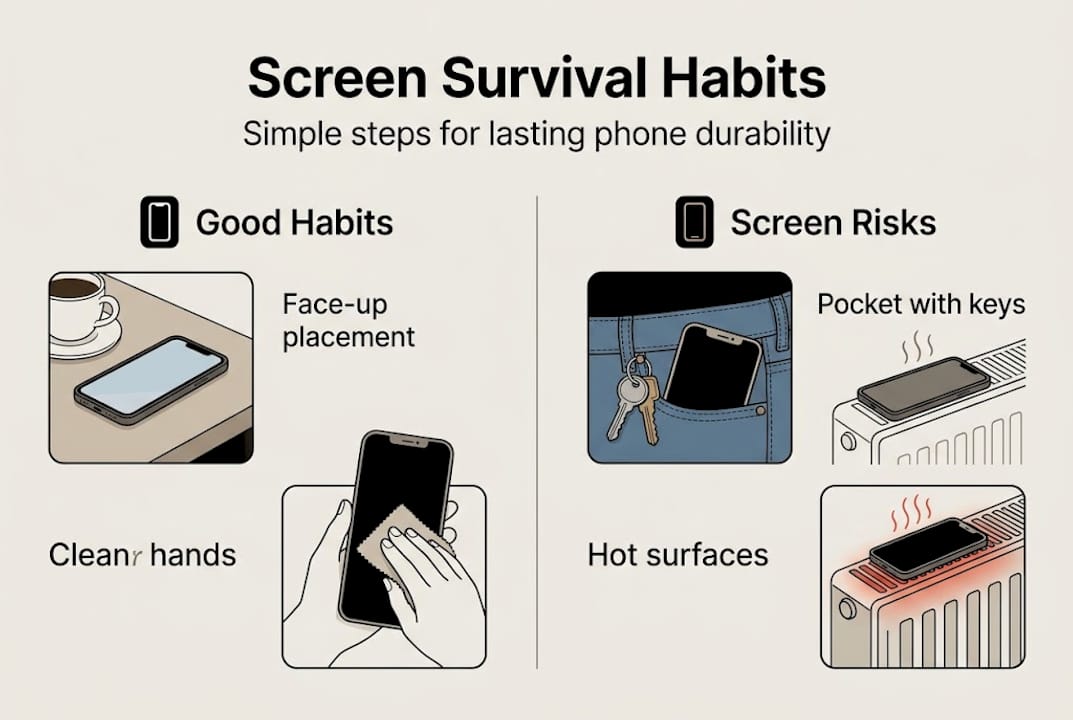
Protection products matter. But the habit of using them correctly matters far more.
Need expert help or quality parts? Buy2Fix is here
If you have worked through this guide and still find yourself facing a screen that needs more than a DIY fix, Buy2Fix has everything you need in one place. We stock high-quality screen protectors, replacement LCD assemblies, and repair components for iPhone, Samsung, Huawei, Xiaomi, and many other brands. All parts come with a one-year warranty, free UK mainland shipping, and rigorous quality checks before dispatch. Whether you are a DIY repairer sourcing parts or you simply need reliable guidance on what to do next, our complete cracked screen guide is a strong starting point. We are here to help you get your device back to full working order quickly and affordably.
Frequently asked questions
What is the toughest phone screen protector material?
Tempered glass with a 9H hardness rating provides the best scratch and impact resistance for most modern smartphones.
How can I prevent bubbles when applying a screen protector?
Thorough cleaning, a dust-free environment, and applying from the centre outward using a squeegee card are the most effective ways to avoid bubbles.
Is it safe to use a phone with a cracked screen temporarily?
You can use a cracked screen temporarily if you cover it with tape or a screen protector, but professional repair is essential for a long-term solution.
How often should I replace a screen protector?
Replace your screen protector every six to eight months, or sooner if you notice visible scratches or reduced smoothness, as the oleophobic coating degrades over time.
Recommended
- Best screen protectors for durability and clarity 2025 – buy2fix
- Why Phone Screens Crack – Impact, Materials, and Prevention – buy2fix
- Replace a phone screen safely: complete DIY guide 2026 – buy2fix
- Screen Replacement Best Practices: Ensuring Lasting Repairs – buy2fix
- How to keep your glasses scratch-free with expert care – MINISTRY OF SIGHT
Let customers speak for us
item was packaged safely, no damage. it’s now October and since replacing it in January i’ve had no issues.

Great

They had what I was looking for ... ordering was easy, payment was easy, delivery was as promised.
-

Absolutely love this case! Heavy, sturdy and full coverage

Thank You! I really love it! 😊

For Garmin Forerunner 165 20mm Two Color Textured Silicone Watch Band(Teal)

For Samsung Galaxy S26+ 5G R-JUST Sliding Camera Life Waterproof Holder Phone Case(Black)

I ❤️ love it, it's absolutely amazing I'm sooo happy 😊

Great

I saw this item and it was just what I was looking for. I found it here but not in Amazon or e-bay. However, it was in UK, I was surprised to find that they were able to ship it to the US. Excellent company, would do business with again

This is great for when out and about, to sharpen either coloured pencils, or watercolour pencils….would order again.

Great items would bye again

I have purchased several items from this store before. Recently, I encountered an issue with my latest order. After reporting the problem to customer support, they were consistently attentive and made every effort to resolve the situation. Upon investigation, they acknowledged the issue and promptly fixed it. This experience has increased my level of trust in this store.
Thank you so much. I'm so happy.
