

What is an LED LCD display? A clear guide for 2026
TL;DR:
- Most consumer “LED TVs” are actually LED-backlit LCD screens, combining liquid crystal panels with energy-efficient LEDs. LED backlighting improves LCDs by reducing power consumption, enabling thinner designs, increasing lifespan, and enhancing local dimming for better contrast. Genuine direct-view LED displays, like OLED and Micro-LED, use self-emissive pixels, offering deeper blacks and faster response times, but are typically more expensive and used for large signage or premium devices.
An LED LCD display is an LCD panel that uses light-emitting diodes as its backlight source, combining liquid crystal image formation with energy-efficient LED illumination. The term gets used loosely across consumer electronics, which creates genuine confusion. Samsung, LG, and Sony all market their televisions as “LED TVs,” yet almost every one of them is technically an LED-backlit LCD. Understanding what that actually means helps you make smarter choices when buying a monitor, TV, or replacement screen for a device you are repairing.
What is an LED LCD display and how does it work?
An LED LCD display consists of two core components working together: a liquid crystal display panel that forms the image, and an LED backlight that illuminates it from behind. The liquid crystals do not produce light on their own. They act as a shutter, blocking or allowing light to pass through to create the pixels you see on screen.
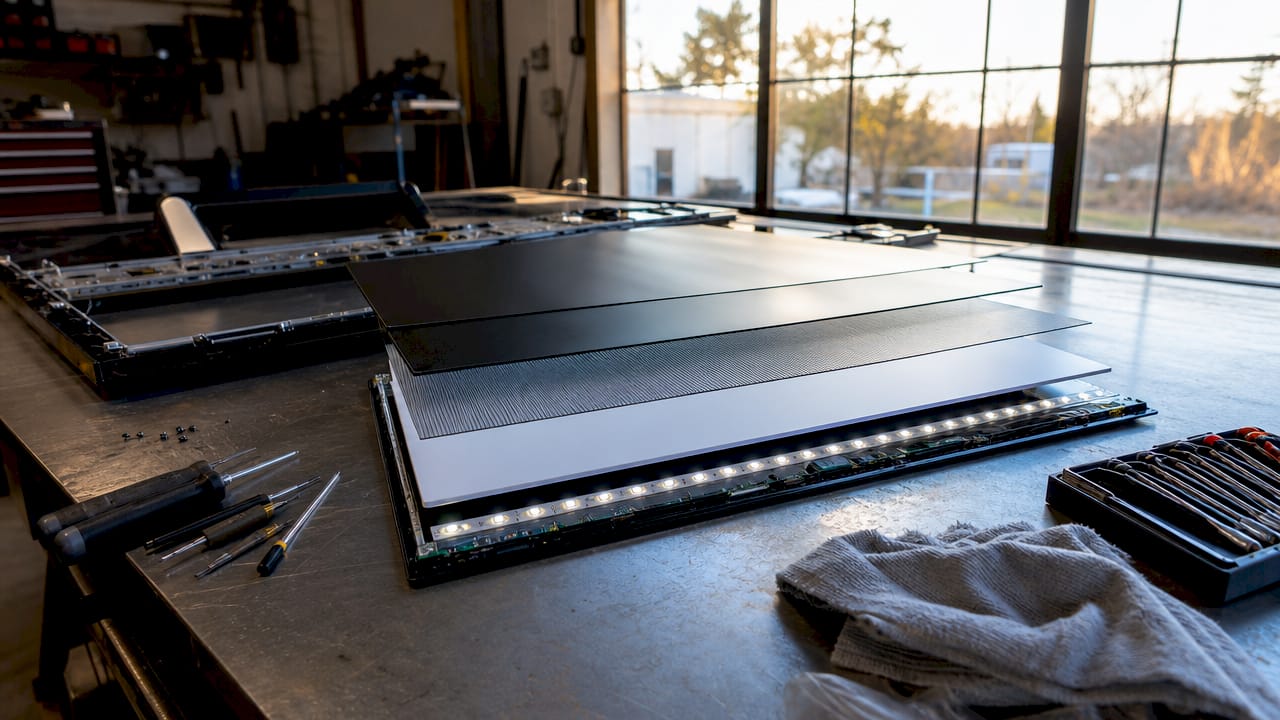
The LCD layer sits between two polarising filters and a colour filter array. When voltage is applied to individual liquid crystal cells, they twist or untwist to control how much backlight passes through. The colour filters then split that light into red, green, and blue sub-pixels to produce the full range of colours you see. The LED backlighting behind this panel is what distinguishes a modern LED LCD from older LCD designs.
Manufacturers including Samsung, LG, and BOE have standardised LED backlighting across virtually their entire consumer display ranges. The result is that the phrase “LED display” has become, as Android Authority notes, largely a marketing term for LCDs with improved backlights rather than a fundamentally different technology. That distinction matters enormously when you are comparing products.
How LED backlighting improved on older LCD technology
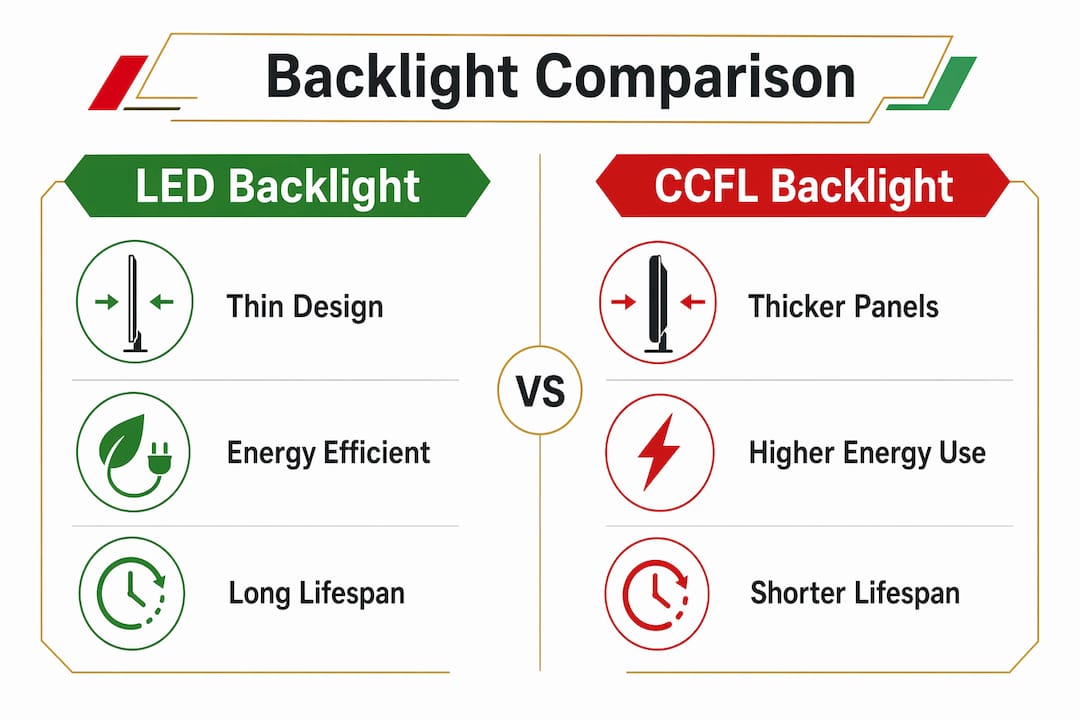
Cold cathode fluorescent lamps, known as CCFL, were the standard backlight for LCD panels throughout the 1990s and 2000s. They worked, but they had real drawbacks: bulky tubes, slow warm-up times, mercury content, and relatively short lifespans. LED backlighting replaced CCFL across the industry for good reasons.
Here is how the transition changed LCD displays in practical terms:
- Energy efficiency. LED-backlit LCDs consume 20 to 30% less power than their CCFL predecessors. For a monitor running eight hours a day, that reduction adds up meaningfully on an electricity bill over a year.
- Thinner form factor. LED strips or arrays take up far less physical space than fluorescent tubes. This is why modern televisions can be just a few millimetres thick, something impossible with CCFL backlighting.
- Longer lifespan. LED-backlit monitors last 50,000 to 100,000 hours compared to 30,000 to 60,000 hours for CCFL panels. That is a meaningful difference for anyone buying a display for long-term professional use.
- Better brightness control. LED arrays can be dimmed or brightened in zones, enabling local dimming features that improve contrast in dark scenes.
- No mercury. CCFL lamps contained mercury, making disposal complicated. LED backlights carry no such environmental concern.
The shift from CCFL to LED backlights allowed manufacturers to produce thinner, more efficient displays without sacrificing image quality. It is one of the more consequential engineering changes in consumer display history.
Pro Tip: When buying a replacement backlight strip for a laptop or monitor repair, always confirm whether the original panel used CCFL or LED backlighting. The two are not interchangeable, and fitting the wrong type will either fail to power on or damage the driver board.
LED LCD vs direct-view LED: what is the actual difference?
This is where terminology gets genuinely confusing, and getting it wrong leads to poor purchasing decisions. An LED LCD display uses LEDs only as a backlight. The image is still formed by liquid crystals. A direct-view LED display, by contrast, uses LEDs as the actual pixels. Each LED emits its own light directly, with no liquid crystal layer involved.
Technologies like Micro-LED and OLED fall into the self-emissive category. Self-emissive LED displays light pixels individually, achieving deeper black levels and faster response times than any backlit LCD can manage. OLED, used in high-end phones like the iPhone 15 Pro and Samsung Galaxy S24 series, works on the same self-emissive principle, though it uses organic compounds rather than inorganic LEDs.
Here is a direct comparison of the two approaches:
| Feature | LED LCD display | Direct-view LED (Micro-LED, OLED) |
|---|---|---|
| Image formation | Liquid crystals with LED backlight | Self-emissive pixels |
| Black levels | Limited by backlight bleed | True black (pixel off = no light) |
| Peak brightness | Typically 300 to 1,000 nits | Over 5,000 cd/m² for outdoor LED |
| Typical use | Monitors, TVs, laptops | Large signage, premium phones, high-end TVs |
| Cost | Lower, widely available | Significantly higher |
| Lifespan concern | Backlight degradation over time | Organic burn-in risk (OLED) |
The practical takeaway is straightforward. For a desktop monitor, laptop screen, or household television, you are almost certainly buying an LED LCD. Direct-view LED technology is mainly found in large-format commercial signage, stadium screens, and premium flagship devices. Almost all consumer “LED” TVs are LED-backlit LCDs, not true self-emissive displays.
For a deeper look at how OLED compares to LCD in mobile devices, the LCD vs OLED comparison at Buy2fix covers the key differences clearly.
Advantages and limitations of LED LCD monitors and TVs
LED LCD technology dominates the consumer market for good reasons, but it is not without trade-offs. Understanding both sides helps you set realistic expectations.
Where LED LCD performs well:
- Brightness in ambient light. LED-backlit panels handle well-lit rooms better than OLED screens, which can appear washed out under direct overhead lighting.
- Longevity. With a lifespan of up to 100,000 hours, an LED LCD monitor used daily for eight hours would last over 34 years before the backlight degrades to half brightness.
- Price accessibility. A quality 27-inch IPS LED LCD monitor from brands like Dell, BenQ, or ASUS costs a fraction of an equivalent OLED panel.
- No burn-in risk. Unlike OLED screens, LED LCDs do not suffer from permanent image retention caused by static on-screen elements.
- Smart brightness adjustment. Modern LED LCD monitors use ambient light sensors to automatically reduce power consumption when the room is bright or the screen is idle.
Where LED LCD falls short:
- Contrast ratios. Even with local dimming, LED LCD panels cannot match the infinite contrast ratio of self-emissive displays. Blacks appear dark grey rather than true black.
- Backlight bleed. Light from the LED array can leak around the edges or through the panel unevenly, which is visible on dark content.
- Viewing angles. This depends heavily on panel type. TN panels have narrow viewing angles, while IPS panels are significantly better but still trail OLED in uniformity.
The panel type underneath the LED backlight governs colour accuracy and viewing angles independently of the backlight itself. An IPS LED LCD will look very different from a TN LED LCD, even though both carry the same “LED” label on the box.
How to choose between LED LCD and other display types
Choosing the right display comes down to three factors: viewing distance, budget, and intended use. Getting these right matters more than chasing specifications on a product page.
- Assess your viewing distance first. LCDs perform better for close, text-heavy use, such as desk work, coding, or photo editing. Direct-view LED installations suit large spaces where viewers are several metres away. Pixel pitch on LED panels becomes visible at close range, which is why you would never use a commercial LED sign as a desktop monitor.
- Match panel type to your use case. IPS panels offer the best colour accuracy and viewing angles for creative work. VA panels deliver higher native contrast ratios, making them strong choices for film watching. TN panels have the fastest response times, which suits competitive gaming. All three come with LED backlighting.
- Consider Mini-LED if budget allows. Mini-LED is a refinement of standard LED LCD technology that uses thousands of smaller LEDs in the backlight array, enabling far more precise local dimming zones. Apple’s Pro Display XDR and Samsung’s Neo QLED range use Mini-LED backlighting to close the gap with OLED contrast performance while avoiding burn-in risk.
- Look beyond the LED or LCD label. Refresh rates and contrast ratios are more meaningful specifications than the backlight type alone when judging display quality. A 144Hz IPS LED LCD monitor will outperform a 60Hz OLED panel for gaming, regardless of the technology label.
- Factor in repair and replacement costs. LED LCD screens are widely available as replacement parts. OLED and Micro-LED panels are significantly more expensive to source and fit, which matters if you are buying a device you expect to repair or maintain over several years.
Pro Tip: If you are choosing a monitor for colour-critical work such as graphic design or video editing, look for an IPS LED LCD panel with at least 99% sRGB coverage and a Delta E rating below 2. These figures tell you far more about real-world colour accuracy than the backlight type.
For a detailed breakdown of how IPS, VA, and TN panels differ in practice, the LCD panel types guide at Buy2fix is worth reading before you buy.
Key takeaways
LED LCD displays combine liquid crystal image formation with LED backlighting, and understanding the distinction between backlight type and panel type is the single most useful thing you can know before buying or repairing any screen.
| Point | Details |
|---|---|
| LED LCD definition | An LCD panel illuminated by LED backlights, not a self-emissive display technology. |
| Energy and lifespan gains | LED backlights use 20 to 30% less power and last up to 100,000 hours versus 60,000 for CCFL. |
| Marketing confusion | “LED TV” almost always means LED-backlit LCD, not a true direct-view LED display. |
| Panel type matters | IPS, VA, and TN panels govern colour and viewing angles independently of the LED backlight. |
| Choosing wisely | Prioritise refresh rate, contrast ratio, and panel type over the LED or LCD label on the box. |
Why the LED label still misleads buyers in 2026
I have spent years reading product listings, handling replacement screens, and talking to repair technicians about display technology. The single most persistent source of confusion I encounter is the word “LED” on a television or monitor box. People assume it means something fundamentally different from LCD. It almost never does.
The marketing worked brilliantly for manufacturers. Calling a TV an “LED TV” rather than an “LED-backlit LCD TV” made it sound like a new category of product. In reality, the liquid crystal panel doing the actual image work has not changed. What changed was the light source behind it, and that is a meaningful engineering improvement, but not the revolution the branding implied.
What I find more interesting now is where the technology is genuinely heading. Mini-LED backlighting is a real step forward, not a rebrand. Panels like the AMOLED displays found in flagship phones show what self-emissive technology can do at small scale. Micro-LED promises to bring those advantages to larger screens without the burn-in risk of OLED. But for the next several years, LED LCD will remain the dominant technology in most homes and offices simply because it is affordable, reliable, and good enough for the vast majority of uses.
My advice to anyone buying a display in 2026 is to stop asking whether it is LED or LCD and start asking what panel type it uses, what its local dimming zones are, and what refresh rate it supports. Those questions will get you to the right screen far faster than the backlight label ever will.
— Adewale
Find LED LCD replacement parts and screens at Buy2fix
Buy2fix stocks a broad range of LED LCD screens and replacement parts for smartphones, tablets, and laptops from brands including iPhone, Samsung Galaxy, Huawei, Xiaomi, and OPPO. Whether you are a professional repair technician sourcing a replacement panel or a DIY buyer fixing your own device, Buy2fix carries quality-checked components with free UK mainland shipping and a 30-day return policy. Every part goes through checks before dispatch, so you are not guessing about compatibility or condition. Browse the full range of display replacement parts at Buy2fix and find the right screen for your repair today.
FAQ
What is an LED LCD display in simple terms?
An LED LCD display is a screen that uses a liquid crystal panel to form images and LED lights behind it to illuminate them. The LEDs replace older fluorescent backlights but the image-forming technology remains LCD.
Is LED or LCD better for everyday use?
LED-backlit LCD is the standard for everyday use and offers better energy efficiency, longer lifespan, and thinner design than older CCFL-backlit LCD panels. For most monitors and televisions, LED LCD is the practical choice.
What is the difference between LED and LCD displays?
The difference is in the backlight. LCD describes the image-forming technology using liquid crystals, while LED refers to the light source behind the panel. Nearly all modern LCD screens use LED backlighting, making the two terms closely linked.
Are LED TVs actually LCD screens?
Yes. Almost all consumer LED TVs are LED-backlit LCD panels, not true self-emissive LED displays. The “LED” label refers to the backlight type, not a different screen technology.
What is better for gaming: LED LCD or OLED?
OLED offers superior contrast and faster pixel response for gaming, but LED LCD panels with high refresh rates (144Hz or above) and IPS or VA panels remain strong performers and cost significantly less. For competitive gaming on a budget, a high-refresh-rate LED LCD is often the smarter choice.
Recommended
Let customers speak for us
The acid test of any company is how they respond when things go wrong. The Buy2Fix team were efficient in dealing with my emails and resolved the issue to my complete satisfaction

For Samsung Galaxy A26 SM-A266B Original Earpiece Speaker with Cable

Very good communication throught. Good product

Well made part very strong easy to fit great value for the money

Well packed, with fast shipping :)

Exactly what the doctor ordered…great color, comfort, and durability. Trust this watch band!

Brilliant strap, second purchase, bought bracelet before. Excellent value. Thank you

Great item for splitting your Audio signal

Outstanding product!
Next level customer service.

Very satisfied but the delivery needs to get more faster...

Good price,quick delivery

Best phone case ever! This is my second one as I broke my first. Would defo recommend

Great fitting Apple Watch bands

For Apple Watch Ultra 3 / 2 / 1 49mm RedPepper Armor Metal Case Integrated Silicone Watch Band(Steel Black White)

Good price and quick postage
