


1
/
von
7
No reviews
HXSJ P8 Mobile Phone Keyboard Mouse Converter for Android System(Black)
HXSJ P8 Mobile Phone Keyboard Mouse Converter for Android System(Black)
SKU: EDA001776101A
Normaler Preis
£19.19
Normaler Preis
Verkaufspreis
£19.19
Versand wird beim Checkout berechnet
Duties & Import Tax Information
Duties are only included if shown at checkout. Otherwise, your local government may apply customs fees, which your courier will collect directly from you before delivery.
In Stock
CHN
This item is shipped from China.
Processed in 0–3 days
Anzahl
Verfügbarkeit für Abholungen konnte nicht geladen werden
Shipping info
To find all available shipping methods and exact delivery times, add the product to your cart and check using our shipping calculator.
30-day returns
Fast refunds: Once we receive and check your item, we aim to process your refund within 48 hours.
Return postage: Just changed your mind? You'll need to cover the return postage. If the item arrived faulty, we'll cover the cost to get it back to us.
Your details are safe
We treat your data the way we'd want ours treated. Your payment details are locked down with bank-level encryption. We never actually see your credit card numbers, and we will absolutely never sell your personal information.
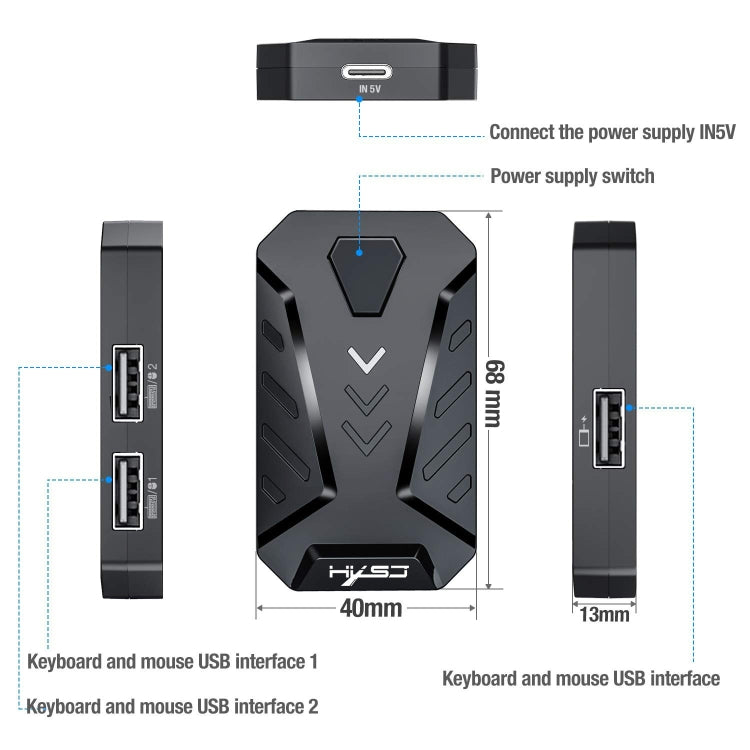
1. Wired interface: USB
2. Mouse and keyboard interface: USB
3. Number of interfaces: 4PCS
4. Input voltage/current: 5V/2A
5. Data cable length: 80cm
6. Data line interface: TYPE-C
7. Adaptation system: Android 6 and above
8. Product weight: 21g
9. Product size: 68x40x13mm
How to use:
This mode is only available for MediaTek phones
1: Switch mode, press the keyboard, as in the picture in the manual: Combination: Ctrl+F3, the P8 converter switches to "MediaTek Mode", the status light will turn purple
2: Click "Connect Device", such as the picture in the manual
3: Find "LITE-A-XX" BT and connect
4: Return to the main interface of the APP, the device will automatically activate
5: If it is not activated, you need to click the "Activate" option, follow the APP prompts to enter "Developer Options", and turn on the "USB debugging function"
Wired connection purpose:
1: Install APP
1) Scan the QR code below to download "geekgamer"
2) Operate "geekgamer"
3) When you open "geekgamer", you will be asked whether to allow the floating window to make the application work normally, click "Allow"
4) Open "Floating Window" to allow
5) Enter the homepage and click +Add game"
6) Select the game you want to play from the list. For example, "PUBG" click "Add"
2: Connect the device
1) Follow the instructions to connect the device to the phone, select "Charge only" and allow USB debugging
3: Android wired connection method (MediaTek mobile phone does not have this method, you need to turn off Bluetooth when using it)
1) Switch the mode, press the keyboard combination: Ctrl+F4, the Mix Lite converter switches to "Android Wired Mode", the status light will turn red
2) Click "ENTER"
2. Mouse and keyboard interface: USB
3. Number of interfaces: 4PCS
4. Input voltage/current: 5V/2A
5. Data cable length: 80cm
6. Data line interface: TYPE-C
7. Adaptation system: Android 6 and above
8. Product weight: 21g
9. Product size: 68x40x13mm
How to use:
This mode is only available for MediaTek phones
1: Switch mode, press the keyboard, as in the picture in the manual: Combination: Ctrl+F3, the P8 converter switches to "MediaTek Mode", the status light will turn purple
2: Click "Connect Device", such as the picture in the manual
3: Find "LITE-A-XX" BT and connect
4: Return to the main interface of the APP, the device will automatically activate
5: If it is not activated, you need to click the "Activate" option, follow the APP prompts to enter "Developer Options", and turn on the "USB debugging function"
Wired connection purpose:
1: Install APP
1) Scan the QR code below to download "geekgamer"
2) Operate "geekgamer"
3) When you open "geekgamer", you will be asked whether to allow the floating window to make the application work normally, click "Allow"
4) Open "Floating Window" to allow
5) Enter the homepage and click +Add game"
6) Select the game you want to play from the list. For example, "PUBG" click "Add"
2: Connect the device
1) Follow the instructions to connect the device to the phone, select "Charge only" and allow USB debugging
3: Android wired connection method (MediaTek mobile phone does not have this method, you need to turn off Bluetooth when using it)
1) Switch the mode, press the keyboard combination: Ctrl+F4, the Mix Lite converter switches to "Android Wired Mode", the status light will turn red
2) Click "ENTER"
Verified Compatible
Guaranteed fit for device in the title. Wrong part? Full refund including shipping.
Teilen


£19.19