

Components of professional phone repair: a complete guide
TL;DR:
- Professional phone repair involves systematic inspection, component-level work, and quality control to ensure full device functionality. Accurate diagnostics and the use of specialized tools like ESD protection, microscopes, and calibrated heat sources are essential for lasting repairs. Properly testing software and physical components prevents faults and reduces costly repeat visits.
Professional phone repair is defined as a structured, diagnostic-led process that restores full device functionality through systematic inspection, component-level repair, and verified quality control. The components of professional phone repair extend well beyond swapping out a cracked screen. They include calibrated diagnostic tools, ESD-safe handling protocols, precision hand tools, microsoldering equipment, and post-repair software verification. Whether you are a technician building out your workshop or a DIY repairer wanting to understand what separates a proper fix from a botched one, knowing each component in this workflow is the difference between a lasting repair and a repeat visit.
1. What are the essential diagnostic stages in professional phone repair?
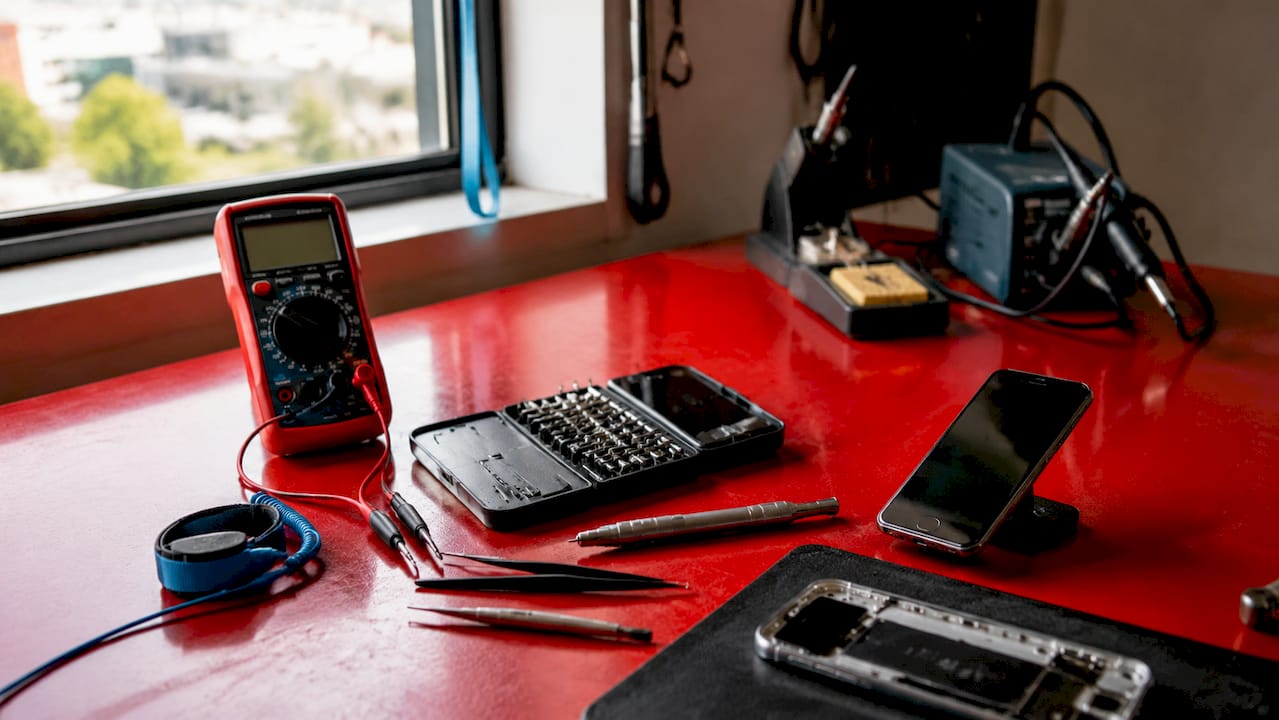
Professional phone repair follows a defined workflow: check-in and inspection, diagnostic testing, the repair itself, software checks, and quality control before the device is returned. Skipping any stage increases the risk of misdiagnosis and repeat faults. Accurate diagnostics is the skill that separates a competent technician from someone who simply swaps parts.
The initial inspection covers both visual and functional checks. A technician examines the chassis for cracks, corrosion, and liquid damage indicators, then tests core functions including the touchscreen, buttons, cameras, audio, and charging port. This stage catches obvious faults before any tools are picked up.
Advanced diagnostics go deeper. Multimeters measure voltage and resistance across charging circuits. Dedicated battery health tools read cycle count and capacity. Diagnostic software tests sensors, wireless modules, and audio paths simultaneously. These tools confirm whether a fault is hardware or software in origin, which prevents unnecessary part replacements.
- Visual inspection: chassis, ports, display, and liquid damage indicators
- Functional testing: touchscreen response, button actuation, camera, audio, and charging
- Battery health analysis: capacity, cycle count, and charging circuit integrity
- Sensor and wireless testing: GPS, Bluetooth, Wi-Fi, NFC, and proximity sensor
- Software diagnostics: OS stability, app conflicts, and malware presence
Pro Tip: Run a full diagnostic before quoting a repair price. Faults often cluster. A phone brought in for a broken speaker may also have a failing battery that the customer has not yet noticed.
2. What precision tools and equipment are required for safe phone repairs?
Diagnostic toolkits include ESD mats, wrist straps, precision screwdrivers, heat guns, multimeters, microscopes, and soldering stations. Each tool serves a specific purpose in the repair workflow. Using the wrong tool, or skipping a protective measure, can destroy a component that was otherwise undamaged.
ESD protection
Electrostatic discharge (ESD) is invisible and silent, but it kills integrated circuits. An ESD mat grounds the work surface. A wrist strap grounds the technician. Together, they prevent static charge from reaching sensitive components during disassembly. This is non-negotiable on any modern smartphone.
Precision hand tools
- Precision screwdrivers (Phillips, Pentalobe, Torx, Tri-point): Modern iPhones use Pentalobe screws at the base. Samsung Galaxy devices use Torx and Phillips. A full set covers the major brands.
- Spudgers and opening picks: Plastic spudgers prise connectors without shorting them. Metal spudgers are reserved for tougher adhesive bonds where plastic would snap.
- Tweezers (straight and angled): Fine-tip tweezers place and lift flex connectors, screws, and small components that fingers cannot reach safely.
- Suction cups: Used to lift display assemblies on devices with strong perimeter adhesive, such as the iPhone 14 series and Samsung Galaxy S range.
Heat tools
A heat gun or hot air station softens the adhesive bonding screens and back panels to the chassis. Temperature control matters. Too cool and the adhesive does not release. Too hot and the display or battery is damaged. Professional stations allow precise temperature and airflow settings.
Microscopes and lighting
Trinocular stereo microscopes are standard for microsoldering. They magnify the board to a level where individual solder joints and lifted pads are visible. A ring light or adjustable LED arm eliminates shadows that hide hairline cracks in solder.
Pro Tip: Invest in a quality trinocular microscope before a soldering station. Seeing the fault clearly is more valuable than the ability to solder if you cannot locate the problem first.
3. How are common phone issues like screen and motherboard faults professionally repaired?
Screen replacement and motherboard repair are the two most technically demanding jobs in mobile repair. They require different tools, different skills, and different levels of diagnostic depth.
Screen replacement
Most cracked phone screens must be replaced as full assemblies, not glass only. This is because the glass, touch digitiser, and display panel are factory bonded into a single unit. Attempting to separate and replace only the glass introduces air gaps, touch inaccuracies, and display defects. Typical crack repairs complete in 30–60 minutes when the correct assembly is available.
Recalibration is required after screen replacement on devices with Face ID or under-display fingerprint sensors. Calibration and programming of biometric components such as Face ID require dedicated tools and procedures beyond physical component replacement. Skipping this step leaves the customer with a repaired screen but a broken biometric function.
| Repair type | Typical time | Key tools required | Calibration needed |
|---|---|---|---|
| Screen assembly replacement | 30–60 minutes | Heat station, suction cup, spudger, screwdrivers | Yes, for Face ID and fingerprint |
| Motherboard fault diagnosis | 1–4 hours | Multimeter, microscope, thermal camera | Yes, for logic board IDs |
| Battery replacement | 15–30 minutes | Heat station, spudger, screwdrivers | No |
| Charging port replacement | 30–90 minutes | Soldering station, hot air station, tweezers | No |
Motherboard repair
Motherboard faults often require microscopic inspection and microsoldering because modern stacked boards are not visually traceable. Common fault categories include power shorts, signal opens, and cold solder joints. Modern stacked motherboards necessitate electrical fault isolation rather than visual inspection, using resistance measurements and thermal imaging to locate faults precisely. A thermal camera identifies hot spots caused by short circuits, which a multimeter then isolates to a specific component or trace.
4. What role do software checks and quality control play in professional phone repair?
Software checks include OS updates, malware scans, app conflict resolution, and verification that the hardware repair did not degrade system performance. A phone that passes a physical inspection can still underperform if the software is unstable. Running a clean OS check after every hardware repair is standard practice in professional workshops.
Quality control is the final gate before the device is returned. It confirms that every function works, not just the one that was repaired. A technician who replaces a screen but returns a phone with a non-functional earpiece has completed half a repair.
Post-repair quality control covers:
- Touchscreen accuracy and multi-touch response
- Battery charging speed and health reading
- Speaker, microphone, and earpiece audio output
- Front and rear camera focus, flash, and video recording
- Biometric functions: Face ID, Touch ID, and under-display fingerprint
- Connectivity: Wi-Fi, Bluetooth, NFC, and mobile data
- All physical buttons and the silent/vibrate switch
Structured device intake checklists and data logging prevent hidden faults from causing customer dissatisfaction and support optimal repair decisions. A written record of the device’s condition at intake and at return protects both the technician and the customer.
5. What best practices and overlooked components contribute to repair success?
ESD-safe handling and controlled heat application are among the most critical professional practices to prevent damage during repair. These are also the practices most commonly skipped by technicians working quickly or without proper training. A single ungrounded touch to a logic board can destroy a Wi-Fi chip that was never part of the original fault.
Intake testing is equally undervalued. Device intake testing uses checklists covering identity, IMEI status, screen, battery health, cameras, audio, ports, buttons, and data wipe confirmation. Comprehensive intake testing reduces missed faults and customer disputes later. Documenting the device’s condition before touching it removes ambiguity about what was damaged before the repair and what was not.
“Professional repair is not mere parts swapping. Accurate diagnostics and quality control ensure repairs address root causes and prevent recurring faults.”
Tool maintenance is another overlooked component. Soldering iron tips oxidise and lose heat transfer efficiency. Screwdriver bits wear and strip screws. Replacing worn tips and bits regularly costs very little compared to the cost of a stripped screw on an iPhone logic board bracket. A well-maintained toolkit is a direct investment in repair quality.
Pro Tip: Keep a dedicated tray for each repair job. Place every screw and bracket in the order it was removed. This eliminates the most common cause of post-repair faults: the wrong screw in the wrong hole.
You can find a detailed breakdown of the phone repair process steps on the Buy2fix blog, which covers each stage from intake to return in practical terms.
Key takeaways
Professional phone repair requires a structured workflow, the right tools, and verified quality control at every stage to restore full device functionality reliably.
| Point | Details |
|---|---|
| Diagnostics before repair | Run full hardware and software diagnostics before starting any repair to identify root causes. |
| Full assembly replacement | Replace cracked screens as complete assemblies to preserve touch accuracy and biometric functions. |
| ESD and heat control | Use ESD mats, wrist straps, and calibrated heat tools on every job to protect sensitive circuits. |
| Post-repair quality control | Test every function after repair, not just the one that was originally faulty. |
| Intake checklists | Document device condition at check-in to prevent disputes and catch hidden faults early. |
Why diagnostics matter more than the parts you stock
I have worked with repair technicians at every level, from bedroom fixers to multi-bench workshops, and the pattern is consistent. The ones who struggle are not short of parts. They are short of diagnostic discipline.
Modern smartphones, particularly the iPhone 15 Pro and Samsung Galaxy S24 series with their stacked board architecture, cannot be repaired by instinct. A phone that will not charge might have a faulty charging port, a blown fuse, a damaged USB controller IC, or a software conflict with a third-party app. Replacing the port without testing the circuit first is an expensive guess.
The shift toward AI-assisted diagnostic testers and thermal imaging has made fault isolation faster, but it has not replaced the need for a technician who understands what they are looking at. Tools surface the data. The technician interprets it. That interpretive skill only comes from understanding each component in the repair workflow, not just the physical parts.
My honest advice: spend as much time learning your diagnostic tools as you do practising your soldering. The repair that takes four hours because you misdiagnosed it costs you more than the repair you got right in forty-five minutes. Speed comes from accuracy, not from rushing.
— Adewale
Buy2fix: parts and tools for professional phone repair
Buy2fix stocks replacement parts for iPhone, Samsung Galaxy, Huawei, Xiaomi, and OPPO, alongside the tools and accessories that professional technicians rely on daily. Whether you need a replacement screen assembly, a battery, or a full professional repair kit, Buy2fix carries quality-checked stock with free UK mainland shipping and a 30-day return policy. The catalogue covers everything from precision screwdriver sets to flex cables and charging ports, sourced for both DIY buyers and workshop technicians. For a closer look at the tools that belong in every repair setup, the Buy2fix guide to essential phone repair tools is a practical starting point.
FAQ
What are the main components of professional phone repair?
Professional phone repair comprises diagnostic testing, precision hand tools, ESD protection equipment, controlled heat tools, component-level repair, and post-repair quality control. Each stage is required to restore full device functionality reliably.
Why can’t a cracked phone screen be repaired with glass only?
Modern phone screens are factory bonded as a single assembly combining glass, touch digitiser, and display panel. Separating them introduces touch inaccuracies and display defects, so full assembly replacement is the professional standard.
How long does a professional phone screen replacement take?
A professional screen replacement typically takes 30–60 minutes when the correct assembly is in stock. Devices requiring biometric recalibration, such as those with Face ID, may take slightly longer.
What is ESD protection and why does it matter in phone repair?
ESD (electrostatic discharge) protection uses grounded mats and wrist straps to prevent static electricity from damaging integrated circuits during disassembly. A single uncontrolled discharge can destroy components that were not part of the original fault.
Do software checks form part of a professional phone repair?
Software checks are a standard part of the professional repair workflow. They include OS updates, malware scans, app conflict resolution, and hardware function verification to confirm the repair has not introduced new performance issues.
Recommended
Let customers speak for us
Well made part very strong easy to fit great value for the money

Well packed, with fast shipping :)

Exactly what the doctor ordered…great color, comfort, and durability. Trust this watch band!

Brilliant strap, second purchase, bought bracelet before. Excellent value. Thank you

Great item for splitting your Audio signal

Outstanding product!
Next level customer service.

Very satisfied but the delivery needs to get more faster...

Good price,quick delivery

Best phone case ever! This is my second one as I broke my first. Would defo recommend

Great fitting Apple Watch bands

For Apple Watch Ultra 3 / 2 / 1 49mm RedPepper Armor Metal Case Integrated Silicone Watch Band(Steel Black White)

Good price and quick postage

Perfect fit.

Absolutely necessary

Second Purchase and still a very happy customer. Keep up the good work.
