

Galaxy phone overheating: causes, fixes & prevention
TL;DR:
- Most Galaxy phone overheating issues come from software problems or usage habits, though persistent warmth during light tasks signals hardware faults. Removing obstructions like thick cases, updating software, and avoiding high-performance tasks during charging can prevent thermal issues. When overheating continues despite troubleshooting, hardware components like the battery or charging circuit likely require professional repair.
Galaxy phone overheating is defined as the device exceeding its safe thermal operating range, typically above 35°C ambient temperature, due to software faults, hardware stress, or environmental conditions. Samsung Galaxy phones are built to operate safely between 0°C and 35°C, with internal protection mechanisms triggering above 45°C. That protection matters because unchecked heat degrades your battery, throttles performance, and can cause permanent component damage. The good news is that roughly 80% of overheating cases trace back to software and usage factors you can fix yourself.
What causes galaxy phone overheating?
Galaxy phone overheating rarely has a single cause. It usually results from several factors working together, and knowing which one applies to your situation is the fastest route to a fix.
Software culprits are the most common source of Samsung phone heat issues. Rogue background apps, outdated firmware, and aggressive multitasking all push the processor harder than necessary. A social media app refreshing constantly in the background, for example, can keep your CPU busy even when your screen is off. Keeping your Galaxy’s software updated is not optional maintenance. It directly reduces the frequency of these thermal spikes.
Hardware and charging factors add another layer of complexity. Charging generates heat chemically, and fast charging or wireless charging amplifies that effect significantly. Using your Galaxy S23 or S24 while it charges compounds the problem because the processor and the battery are both generating heat simultaneously. A worn battery also runs hotter than a healthy one, so older devices tend to feel warmer under the same workload.
Environmental and behavioural causes are easy to overlook. Direct sunlight raises the device’s surface temperature before you have even opened an app. Poor cellular signal forces the phone’s power amplifier to work at higher voltage, generating noticeable heat even when you are not actively using the device. Streaming 4K video, playing graphics-heavy games, or running GPS navigation for extended periods all push the GPU and CPU into sustained high-load territory.
Pro Tip: If your Galaxy feels warm while sitting idle in a low-signal area, switch to aeroplane mode briefly. If it cools down quickly, weak signal was the culprit.
How do you know if your galaxy is overheating abnormally?
Not all warmth is a warning sign. A warm phone is expected; a hot phone that is uncomfortable to hold for more than a few seconds is a different matter entirely.
The clearest signs of abnormal overheating are:
- Performance throttling. Samsung intentionally slows the CPU and dims the display when the device overheats to protect internal components. If your Galaxy suddenly feels sluggish mid-task, heat management may be the reason.
- On-screen temperature warnings. Samsung’s One UI displays a direct notification when the device reaches a critical temperature, sometimes restricting charging or camera use until it cools.
- Automatic shutdown. The phone powers off without warning to prevent hardware damage. This is a last-resort protection, not a normal occurrence.
- Battery drain spikes. Open Settings, then Battery and Device Care, and check which apps are consuming the most power. Any single app using over 30% of battery resources is a strong indicator of abnormal activity driving heat.
One scenario that confuses many users is overheating after a software update. ART optimisation re-compiles apps for up to 48 hours after a major update, causing the phone to run warm even at idle. This is normal and resolves on its own. If the heat persists beyond two days, something else is wrong.
If your Galaxy runs hot during light tasks like reading emails or making calls, that points toward a hardware fault rather than a software issue. Battery degradation or a faulty charging circuit are the most likely candidates in that scenario.
How to fix galaxy phone overheating: step-by-step
These steps address the most common causes of overheating Galaxy S series devices and apply to most One UI models.
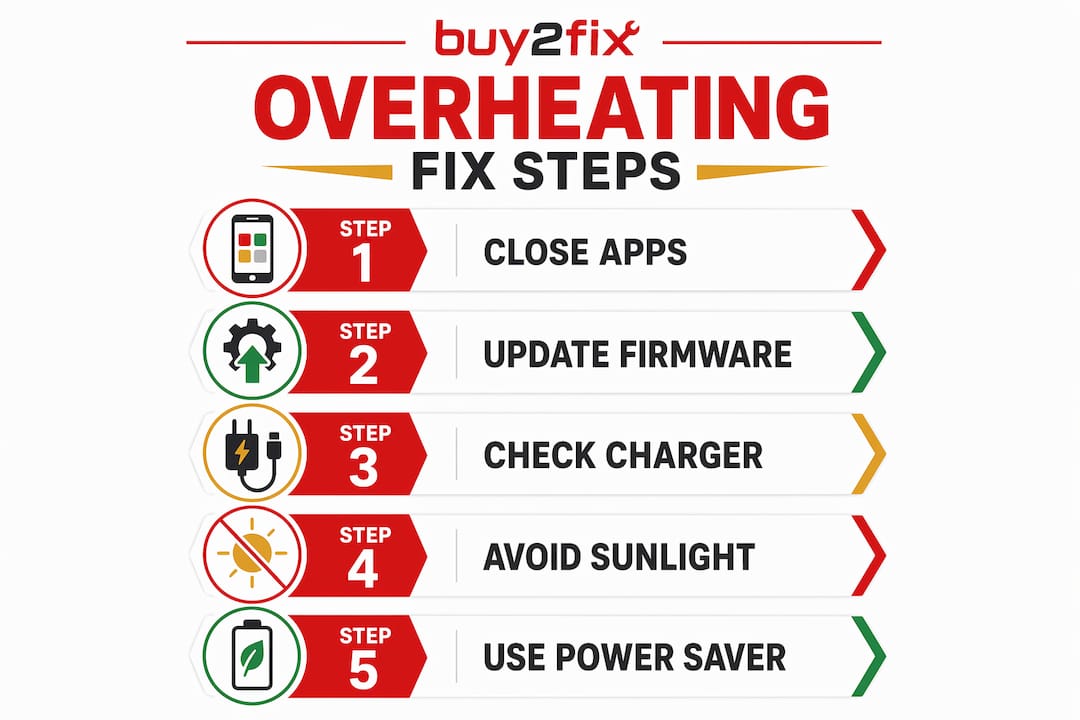
- Close background apps and use Device Care. Go to Settings, then Battery and Device Care, and run the optimisation tool. Samsung’s built-in Device Care identifies and closes apps consuming excessive resources. Do this before reaching for any third-party app cleaner.
- Remove your phone case. Thick plastic or rubber cases trap heat and prevent the device from dissipating it naturally. If your Galaxy is running hot, take the case off and let it cool on a flat, hard surface. Fabric or padded surfaces restrict airflow further.
- Move out of direct sunlight and poor signal areas. Both conditions force hardware to work harder without any user input. A Galaxy left on a car dashboard in summer can exceed safe operating temperatures within minutes.
- Reduce screen brightness and disable unused radios. GPS, Bluetooth, and Wi-Fi all consume power and generate heat when active but unused. Turning them off when not needed is one of the simplest Galaxy phone cooling solutions available.
- Update your software. Samsung releases firmware patches specifically to address bugs that cause excessive CPU usage. Go to Settings, then Software Update, and install any pending updates.
- Charge responsibly. Avoid fast charging while actively using the device. Unplug once the battery reaches 100% rather than leaving it connected overnight. Both habits reduce thermal stress on the battery over time.
Pro Tip: Enable Power Saving Mode during heavy use sessions. It caps CPU performance and reduces background activity, which keeps temperatures lower without noticeably affecting most everyday tasks.
For a broader look at phone overheating causes, the Buy2fix knowledge base covers both Galaxy-specific and general factors in more detail.
When does overheating signal a hardware problem?
Persistent overheating during standby or light use is the clearest sign that software fixes will not be enough. At that point, the issue is almost certainly inside the device.
The most common hardware culprits are:
- Battery degradation. Lithium-ion batteries lose capacity over charge cycles and begin to generate more heat as they age. A Galaxy that is two or more years old and consistently running hot is likely due a battery replacement.
- Swollen battery. A battery that has begun to swell is a safety hazard. Signs include a screen that appears to be lifting away from the frame or a back panel that no longer sits flush. Stop using the device and seek repair immediately.
- Faulty charging circuit. If the phone overheats only during charging and the problem persists with multiple Samsung-approved chargers, the charging circuit itself may be damaged.
| Symptom | Likely Cause | Recommended Action |
|---|---|---|
| Hot during standby | Battery degradation or rogue process | Check battery health; replace if needed |
| Hot only while charging | Faulty charging circuit or cable | Test with official Samsung charger; seek repair |
| Swollen back panel | Battery failure | Stop use immediately; professional repair required |
| Hot after software update | ART optimisation | Wait 48 hours; monitor if heat persists |
Samsung’s authorised service centres can run a full diagnostic, but independent repair specialists often offer faster turnaround at lower cost. The key is acting before battery swelling or thermal damage reaches other components. You can also read more about recognising battery faults before they escalate.
How to prevent galaxy phone overheating long term
Prevention is cheaper than repair. These habits reduce the risk of Samsung phone heat issues returning after you have resolved the immediate problem.
- Use Adaptive Power Saving. Samsung’s One UI includes an adaptive mode that adjusts performance and background activity based on your usage patterns. Enable it in Battery and Device Care settings.
- Choose a case designed for ventilation. Not all cases are equal. Look for slim cases with open-back designs or materials that conduct rather than trap heat. The right phone case choice makes a measurable difference in daily operating temperature.
- Uninstall unused or suspicious apps. Apps you no longer use still run background processes. Clearing them reduces CPU load and the associated heat generation.
- Keep charging ports clean. Debris in the USB-C port causes resistance during charging, which generates additional heat. A soft brush or compressed air clears most blockages safely.
- Use Samsung-approved chargers. Third-party chargers that do not meet Samsung’s power delivery specifications can push incorrect voltage to the battery, accelerating wear and increasing heat output.
- Limit multitasking during charging. Gaming or streaming while plugged in is the single fastest way to push a Galaxy into thermal protection mode. Charge when the phone is idle where possible.
For more on extending your device’s lifespan, Buy2fix has a practical guide covering maintenance habits that apply across all Galaxy models.
Key takeaways
Galaxy phone overheating is primarily a software and behaviour problem, but persistent heat during light use almost always points to a battery or hardware fault requiring professional attention.
| Point | Details |
|---|---|
| Know the safe range | Samsung Galaxy phones are designed to operate between 0°C and 35°C; above 45°C triggers hardware protection. |
| Software causes most cases | Around 80% of overheating issues trace back to rogue apps, outdated firmware, or intensive multitasking. |
| Monitor battery usage | Any single app consuming over 30% of battery resources is likely driving abnormal heat. |
| Remove the case first | Thick plastic or rubber cases trap heat; removing the case is the quickest first step when the phone runs hot. |
| Persistent heat needs repair | Overheating during standby or light use signals battery degradation or a hardware fault, not a software fix. |
The mistake most galaxy users make before it gets serious
I have seen this pattern more times than I can count. Someone notices their Galaxy S22 or S24 running warm, dismisses it as normal, and carries on. Weeks later, the screen starts lifting slightly at one corner. By then, the battery has been swelling quietly for some time and the repair bill is considerably higher than it needed to be.
The uncomfortable truth about Galaxy device thermal management is that most users conflate “warm” with “fine.” Warm is fine. Warm that persists at idle, warm that comes with sluggish performance, warm that appears during a two-minute phone call — that is your device telling you something specific.
What I find most overlooked in the standard advice is the phone case issue. People spend £40 on a thick rubber case for drop protection and then wonder why their Galaxy runs hot all summer. The case is doing exactly what rubber does: insulating. You would not wrap your laptop in a blanket while it runs. The same logic applies here.
My honest recommendation is to treat the first sign of persistent heat as a diagnostic prompt, not an inconvenience. Run Device Care, check your battery usage stats, update your software, and if none of that resolves it within 48 hours, get the battery checked. Catching a degraded battery early costs a fraction of what a full board repair costs after thermal damage spreads.
— Adewale
Need help with your galaxy phone? Buy2fix can assist
If you have worked through the troubleshooting steps and your Galaxy is still running hot, the problem is likely hardware-level and worth getting looked at properly. Buy2fix offers professional mobile phone repair services covering battery replacement, charging port repairs, and full device diagnostics for Samsung Galaxy and other major brands. The team at Buy2fix works with both DIY buyers and customers who want a repair handled for them, with free UK mainland shipping and a 30-day return policy on parts. Whether you need a replacement battery for a Galaxy S series device or a full diagnostic for persistent overheating, Buy2fix has the parts and expertise to help you get your device running safely again.
FAQ
What temperature is too hot for a samsung galaxy phone?
Samsung Galaxy phones are designed to operate safely up to 35°C ambient temperature. Internal hardware protection activates above 45°C, at which point the device may throttle performance or shut down.
Why does my samsung phone get hot when i am not using it?
Idle overheating is usually caused by rogue background apps, poor cellular signal forcing the power amplifier to work harder, or ART optimisation running after a recent software update. If it persists beyond 48 hours, check battery health.
Can a phone case cause my galaxy to overheat?
Yes. Thick plastic or rubber cases act as thermal insulation and prevent the device from dissipating heat naturally. Removing the case is one of the first steps to take when your Galaxy runs hot.
How do i check which app is causing my galaxy to overheat?
Go to Settings, then Battery and Device Care, and review battery usage by app. Any app consuming more than 30% of battery resources is a likely contributor to abnormal heat and should be investigated or uninstalled.
Is galaxy phone overheating covered by samsung warranty?
Samsung’s standard warranty covers manufacturing defects, but overheating caused by user behaviour, third-party accessories, or battery wear is typically excluded. Checking your policy or speaking to an authorised repair specialist is the best way to confirm your options.
Recommended
Let customers speak for us
I ❤️ love it, it's absolutely amazing I'm sooo happy 😊

Great

I saw this item and it was just what I was looking for. I found it here but not in Amazon or e-bay. However, it was in UK, I was surprised to find that they were able to ship it to the US. Excellent company, would do business with again

This is great for when out and about, to sharpen either coloured pencils, or watercolour pencils….would order again.

Great items would bye again

I have purchased several items from this store before. Recently, I encountered an issue with my latest order. After reporting the problem to customer support, they were consistently attentive and made every effort to resolve the situation. Upon investigation, they acknowledged the issue and promptly fixed it. This experience has increased my level of trust in this store.
Thank you so much. I'm so happy.

très bien

BC70 Car Bluetooth 5.0 FM Transmitter Radio Adapter Dual Display Wireless Handsfree Call MP3 Music Player QC3.0 PD USB Charger

A quite sturdy cover, if you are looking for full protection and a more business-like style, this cover perfectly fulfills its purpose.
The shipping was fast, and it was delivered in perfect condition.

For LG TV Bluetooth Handheld Infrared Voice Multi-Function Remote Control(AKB75855501)

Tusen tack för bästa service och produkt som jag vänlig önskar dig tack

Works correctly and no issues so far

Took a while to get here but it was all good, watch looks brand new after replacement

What a fantastic 👏🏻 stylish case that has helped my phones temperature in the heatwave!!
Perfect 👌🏻 also it's cool as f##k
