

How long do iPhone 6 batteries last: a full guide
TL;DR:
- The iPhone 6 battery offers up to 14 hours of talk time when new but typically lasts 8 to 10 hours daily. Its capacity declines gradually after 500 charge cycles, usually requiring replacement after two to four years if health drops below 80%. Replacing the battery restores performance, extending the device’s useful life and delaying the need for upgrade.
The iPhone 6 battery is a 1,810 mAh lithium-ion cell rated for up to 14 hours talk time on 3G and up to 250 hours standby when new. In practice, how long do iPhone 6 batteries last depends heavily on usage habits and care. Most users see reliable daily performance for two to four years before noticeable decline sets in. After that point, shorter charge durations and unexpected shutdowns become common. This guide covers the full picture: original specs, what causes ageing, how to check your battery’s current health, and when replacement makes more sense than carrying on.
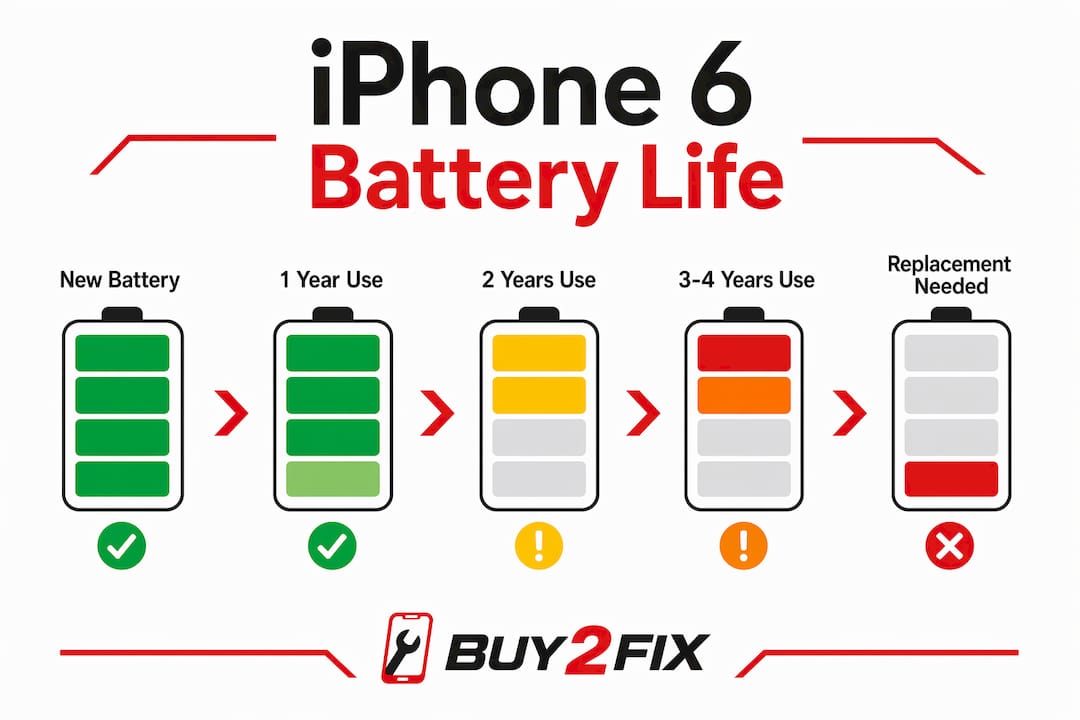
How long do iPhone 6 batteries last before degrading?
The iPhone 6 launched with a battery designed to handle a full day of moderate use. That original rating of 14 hours talk time and 250 hours standby reflects ideal conditions with a brand-new cell. Real-world battery longevity on the iPhone 6 sits closer to 8–10 hours of active screen time when the phone is new.
The more useful measure is lifespan rather than daily duration. iPhone batteries retain 80% capacity after approximately 500 full charge cycles, which translates to roughly two to four years of typical use. That 500-cycle figure is Apple’s design benchmark, not a cliff edge. Capacity loss is gradual, not sudden.

By year three or four, most iPhone 6 users notice the phone needs charging by early afternoon rather than evening. That shift is the clearest signal that battery longevity has declined meaningfully. The phone still works. It just works for fewer hours per charge.
What causes iPhone 6 battery degradation?
Lithium-ion chemistry ages through a process called capacity fade. Every charge cycle causes minor chemical changes inside the cell that permanently reduce how much energy it can store. This is not a flaw. It is how all lithium-ion batteries behave, including those in Samsung Galaxy devices, Huawei phones, and laptops.
Several factors accelerate this process on the iPhone 6:
- Full discharge cycles. Draining the battery to 0% repeatedly stresses the cell more than partial discharges. Each deep discharge counts as a full cycle and adds chemical wear.
- Heat exposure. Leaving your iPhone 6 in a hot car or using it heavily while charging generates heat that speeds up capacity loss. Battery health decline accelerates with sustained heat exposure above normal operating temperatures.
- Charging habits. Keeping the phone at 100% for extended periods adds low-level stress to the cell over time.
- Age alone. Even a stored iPhone 6 that is rarely used will lose some capacity over years due to the natural chemical ageing of lithium-ion cells.
iOS also responds to battery ageing through dynamic performance management. When the battery can no longer deliver the peak power needed for demanding tasks, iOS reduces processor speed to prevent unexpected shutdowns. The phone stays stable, but feels slower. This is not a hardware fault. It is iOS protecting the device.
Pro Tip: If your iPhone 6 runs noticeably faster when plugged into a charger than on battery, that is a reliable sign that iOS performance management has activated due to battery ageing.
How to check your iPhone 6 battery health
The Battery Health feature in iOS Settings gives you a direct reading of your battery’s current condition. Access it by going to Settings, then Battery, then Battery Health. The key figure is Maximum Capacity, expressed as a percentage of the original battery capacity.
Here is how to read that number:
- 100% to 90%. The battery is in good condition. Daily performance should match the original ratings closely.
- 89% to 80%. Capacity loss is noticeable but manageable. 80% health means roughly 20% less usage per charge, but many users still get through a full day at this level.
- Below 80%. Apple recommends battery replacement at this threshold. Daily charge duration shortens significantly, and performance management is likely active.
- Unexpected shutdowns at 20–30% charge. This is a critical warning sign. Apple flags shutdowns at 20–30% charge as a clear indicator that the battery needs replacing.
- Excessive heat during charging. Abnormal warmth while charging points to a cell that is struggling to accept charge efficiently.
A common mistake is assuming 80% health means the phone is about to fail. It does not. It means the battery holds less charge than it once did. Whether that matters depends on your daily usage. Light users may find 80% perfectly acceptable. Heavy users will feel the difference much sooner.
Practical tips to extend iPhone 6 battery life
Good habits make a real difference to how long your iPhone 6 lasts between charges and how slowly the battery ages overall. The most effective approach is to keep charge between 20% and 80% rather than running the phone flat and charging to 100% every cycle. This reduces chemical stress on the cell and slows capacity fade over time.
Beyond charging habits, these adjustments reduce daily battery drain:
- Lower screen brightness. The display is the single largest drain on iPhone 6 battery life. Reducing brightness manually or enabling Auto-Brightness in Accessibility settings makes a measurable difference.
- Disable Background App Refresh. Go to Settings, then General, then Background App Refresh, and turn it off for apps that do not need live updates.
- Turn on Low Power Mode. Available in Settings under Battery, Low Power Mode reduces background activity, mail fetch, and visual effects. It extends charge duration noticeably.
- Limit location services. Apps that constantly access GPS drain the battery faster. Set location access to “While Using” rather than “Always” for non-essential apps.
- Avoid extreme temperatures. Cold weather temporarily reduces battery output. Heat causes permanent damage. Keep the phone away from direct sunlight and hot surfaces.
For broader device care advice, the battery longevity tips at Buy2fix cover charging habits and settings adjustments that apply across iPhone models.
Pro Tip: Overnight charging is generally safe for the iPhone 6. The device’s smart circuitry stops charging at 100%, so leaving it plugged in overnight does not overcharge the cell. The bigger risk is sustained heat from a case that traps warmth while charging.
When and how to replace your iPhone 6 battery
Battery replacement is the single most cost-effective way to extend how long your iPhone 6 lasts. A new battery typically adds one to two years of daily use and restores peak performance by removing the need for iOS performance management. That is a significant return for a fraction of the cost of a new phone.
The clearest signs you need a replacement:
- Battery health reads below 80% in Settings
- The phone shuts down unexpectedly before the battery reaches 0%
- Performance improves noticeably when plugged in
- The phone runs warm during normal use or charging
When it comes to replacement options, the choice is between authorised repair and third-party repair. Here is a direct comparison:
| Option | Cost | Quality | Warranty |
|---|---|---|---|
| Apple authorised repair | Higher | OEM battery, guaranteed fit | Apple warranty |
| Reputable third-party repair | Lower | Quality varies by supplier | Depends on repairer |
| DIY with quality replacement part | Lowest upfront | Depends on part quality | None unless part has own warranty |
The DIY route suits confident users who source parts from reliable suppliers. The key is using a quality replacement cell rather than the cheapest available option. A poor-quality battery can cause the same symptoms as a degraded original. For iPhone 6 battery replacement parts and related accessories, Buy2fix stocks replacement components with quality checks before dispatch and free UK mainland shipping.
If you are comparing the iPhone 6 and iPhone 6s, the 6s uses a different battery with its own lifespan profile. The iPhone 6s battery guide at Buy2fix covers that model separately.
Key takeaways
A replaced iPhone 6 battery restores peak performance and extends daily use by one to two years, making it the most practical way to maintain the device without upgrading.
| Point | Details |
|---|---|
| Original battery rating | The iPhone 6 offers up to 14 hours talk time and 250 hours standby when new. |
| Expected lifespan | Most iPhone 6 batteries last two to four years before capacity drops below 80%. |
| Check battery health | Go to Settings, Battery, Battery Health to see Maximum Capacity percentage. |
| Replace below 80% | Apple recommends replacement when health falls below 80% or shutdowns occur. |
| Extend life with habits | Keep charge between 20% and 80% and avoid heat to slow capacity fade. |
The iPhone 6 battery in 2026: what I have actually seen
I have handled a lot of older iPhones over the years, and the iPhone 6 comes up more than you might expect. People still use them. Some use them as backup devices. Others simply cannot justify upgrading when the phone otherwise works fine. The battery is almost always the sticking point.
What strikes me is how often users blame the phone when the battery is the real problem. A sluggish iPhone 6 that struggles through the afternoon is not a dying device. It is a device with a tired battery that iOS is throttling to prevent shutdowns. Replace the battery and the phone often feels like a different machine.
The mistake I see most is waiting too long. Users tolerate months of poor battery performance, carrying chargers everywhere, before they act. By that point they have convinced themselves the phone is beyond saving. A battery replacement at the 80% health mark, before things get frustrating, is a far better experience than waiting until the phone shuts off mid-call.
My honest view is that the iPhone 6 is worth maintaining in 2026 if it meets your needs. The hardware is capable. The battery is the weak point, and it is a fixable one. Spending on a quality replacement part costs a fraction of a new handset and buys you real extra time with a device you already know. For users who want to get more out of their existing device, the battery care tips at Buy2fix are worth reading before you decide anything.
— Adewale
iPhone 6 battery replacements at Buy2fix
Buy2fix supplies replacement batteries and repair parts for iPhone models including the iPhone 6, with quality checks before dispatch and free UK mainland shipping across the UK mainland. If your iPhone 6 battery health has dropped below 80% or you are dealing with unexpected shutdowns, a replacement part is the practical next step. Buy2fix offers a 30-day return policy and warranty support on eligible items, so you are not taking a risk on quality. Browse the full range of iPhone repair parts at Buy2fix and get your device back to full daily performance without the cost of a new phone.
FAQ
How long does an iPhone 6 battery last on a full charge?
A new iPhone 6 battery delivers up to 14 hours of talk time on 3G and around 8–10 hours of active screen use. After two to four years of use, that daily duration shortens noticeably as capacity fades.
What percentage of battery health should trigger replacement?
Apple recommends replacing the battery when Maximum Capacity falls below 80%. Unexpected shutdowns at 20–30% charge are also a clear sign that replacement is needed.
Is overnight charging bad for the iPhone 6 battery?
Overnight charging is generally safe. The iPhone 6 stops drawing charge once the battery reaches 100%, so overcharging is not a risk. Sustained heat from a case during charging is the bigger concern.
Can replacing the battery improve iPhone 6 performance?
Yes. A new battery removes the need for iOS performance management, which throttles processor speed to prevent shutdowns on aged batteries. Performance typically improves noticeably after replacement.
How do I check my iPhone 6 battery health?
Go to Settings, then Battery, then Battery Health. The Maximum Capacity figure shows your battery’s current capacity as a percentage of its original rating.
Recommended
Let customers speak for us
The acid test of any company is how they respond when things go wrong. The Buy2Fix team were efficient in dealing with my emails and resolved the issue to my complete satisfaction

For Samsung Galaxy A26 SM-A266B Original Earpiece Speaker with Cable

Very good communication throught. Good product

Well made part very strong easy to fit great value for the money

Well packed, with fast shipping :)

Exactly what the doctor ordered…great color, comfort, and durability. Trust this watch band!

Brilliant strap, second purchase, bought bracelet before. Excellent value. Thank you

Great item for splitting your Audio signal

Outstanding product!
Next level customer service.

Very satisfied but the delivery needs to get more faster...

Good price,quick delivery

Best phone case ever! This is my second one as I broke my first. Would defo recommend

Great fitting Apple Watch bands

For Apple Watch Ultra 3 / 2 / 1 49mm RedPepper Armor Metal Case Integrated Silicone Watch Band(Steel Black White)

Good price and quick postage
