

How to choose phone batteries: a DIY buyer's guide
TL;DR:
- Choosing the correct replacement phone battery involves matching exact voltage specifications, verifying safety certifications, and purchasing from reputable sellers with warranties.
- Faulty or counterfeit batteries can cause damage, overheating, or fire hazards if not properly vetted through certification databases and careful inspection.
Choosing the right replacement phone battery means matching exact specifications, verifying safety certifications such as CE, RoHS, and UL 2054, and buying from a seller with a proven track record. Get any one of those three wrong and you risk a battery that drains fast, damages your phone’s circuitry, or in the worst cases, poses a genuine fire hazard. This guide walks you through every factor that matters, from reading a battery label correctly to spotting a counterfeit before it reaches your device.
How to choose phone batteries: what specs actually matter
The single most critical specification is voltage. Exact voltage matching protects your phone’s charging circuitry from damage. Most smartphone batteries run at 3.7V or 3.8V, and even a small deviation can cause charging failures or permanent circuit damage. Check the original battery label or your phone’s service manual before you search for a replacement.
Capacity, measured in milliampere-hours (mAh), tells you how much charge a battery holds. Matching the original figure is the safest approach. You can go slightly higher, but treat any listing that claims dramatically more mAh than the original with scepticism. Inflated capacity figures are one of the most common tricks used by low-quality suppliers.
Chemistry type matters more than most buyers realise. Lithium-ion (Li-ion) and lithium-polymer (Li-Po) batteries behave differently in terms of form factor and discharge characteristics. Li-Po batteries are thinner and more flexible in shape, which is why they dominate modern slim handsets. Fitting a Li-ion cell into a device designed for Li-Po can cause physical fit problems and thermal issues.
- Voltage: must match the original exactly (e.g., 3.7V or 3.8V)
- Capacity (mAh): match or slightly exceed; reject exaggerated claims
- Chemistry: confirm Li-ion or Li-Po to match the original design
- Physical dimensions: measure length, width, and depth before ordering
- Connector type: verify the connector matches your phone’s battery port
Pro Tip: Take a photo of your original battery label before removing it. The model number, voltage, and capacity are all printed there and will save you time when searching for a replacement.
How do you know if a phone battery is safe and genuine?
Safety certifications are the most reliable indicator of a battery’s quality. The CE mark confirms compliance with European health and safety standards. RoHS restricts hazardous substances such as lead and mercury. UL 2054 certification is the North American standard for household and commercial batteries, covering electrical and fire safety. UN38.3 is the international transit test that all lithium cells must pass before being shipped. A battery carrying all four marks has been through meaningful independent testing.

The protection circuit module (PCM) is the small electronic board attached to the battery cell itself. PCMs prevent overcharge, short circuits, and thermal runaway by disconnecting the battery when conditions become hazardous. Cheap batteries frequently cut costs by using inadequate PCMs or none at all. That is the reason budget batteries sometimes swell, overheat, or fail suddenly.
Here is the part that catches many buyers off guard:
Counterfeiters routinely print CE, RoHS, and UL logos onto batteries that have never been tested. The presence of a logo alone proves nothing. Cross-referencing the battery’s model number against official certification databases is the only reliable way to confirm authenticity.
- Locate the battery’s model number on the label or packaging.
- Visit the official certification body’s database (e.g., the UL Product iQ database for UL 2054).
- Search the model number and confirm the listing matches the product you have.
- Check the manufacturer’s name on the certificate against the name printed on the battery.
- If no listing exists, treat the battery as unverified and do not use it.
Manufacturing date is another factor buyers overlook. Lithium batteries degrade chemically from the moment they are made, even when sitting unused on a shelf. A battery manufactured two or more years ago has already lost a portion of its effective capacity and cycle life. Always check the manufacture date on the label and avoid old stock wherever possible. Reputable sellers rotate their inventory regularly; those who do not often sell batteries that are already past their prime.
For more on spotting authentic components, the Buy2fix guide on identifying genuine parts covers the key visual and technical checks in detail.
What makes a phone battery seller trustworthy?
Seller reputation is a direct proxy for product safety. Retailers with 4-star-plus ratings and transparent returns policies consistently supply lower-risk batteries. The logic is straightforward: a seller who stands behind their product with a clear returns process has a financial incentive to stock quality parts. One who offers no returns has no such incentive.
Warranty length is a reliable signal of a supplier’s confidence in their stock. A 6 to 12-month warranty is the industry standard for replacement phone batteries. A seller offering less than six months is either uncertain about their product’s durability or sourcing from manufacturers who are. No warranty at all is a clear warning sign.
Price is the most visible indicator of risk. A battery priced significantly below the market average almost always signals a counterfeit or a cell built with substandard materials. The cost of a quality lithium cell, a proper PCM, and compliant packaging has a floor. Anything priced well below that floor is cutting corners somewhere.
- Check ratings: look for 4 stars or above across multiple verified reviews
- Read the returns policy: a 30-day return window is a minimum standard
- Verify warranty terms: 6–12 months is normal; less than 6 months is a red flag
- Compare prices: a price far below average signals quality or authenticity issues
- Look for contact details: a legitimate seller publishes a phone number or live chat
Pro Tip: Search the seller’s name alongside the word “review” on independent forums or communities. Real buyers often share experiences that do not appear on the seller’s own platform.
Step-by-step guide to selecting and fitting a replacement battery
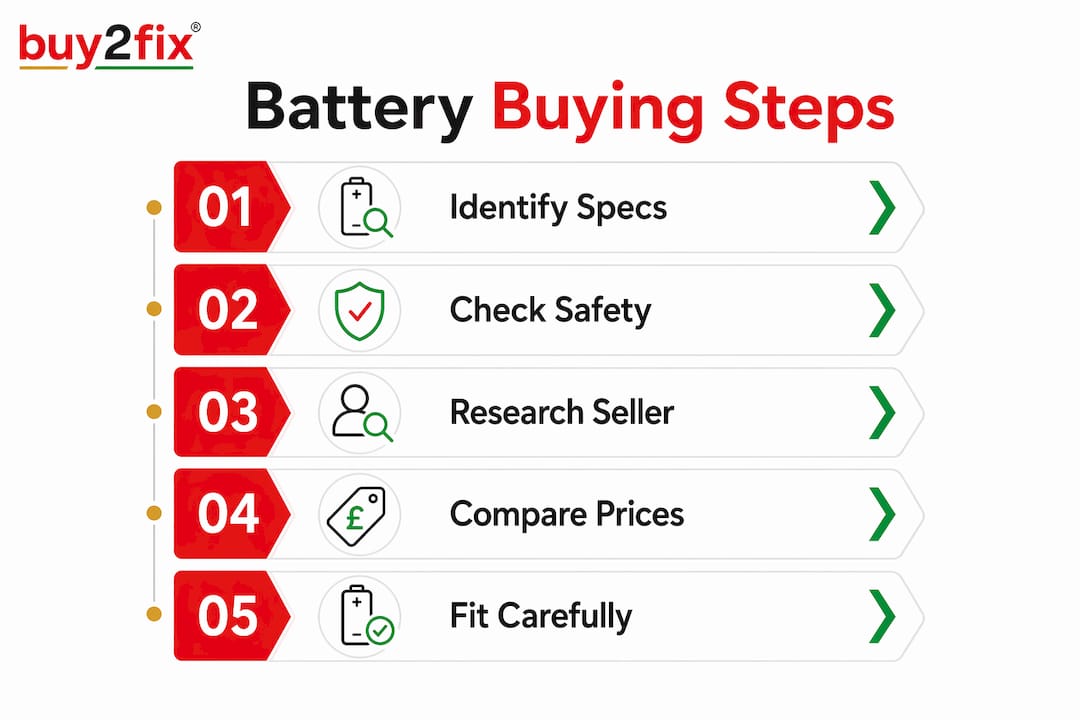
A structured approach reduces the chance of buying the wrong part or damaging your device during installation.
- Record your original battery’s specifications. Note the model number, voltage, capacity in mAh, and chemistry type from the existing battery label.
- Search for a replacement using those exact specifications. Use the model number as your primary search term, not just the phone model, since some handsets have used multiple battery variants across production runs.
- Verify certifications before purchasing. Confirm CE, RoHS, and where applicable UL 2054 markings, then cross-check the model number in the relevant certification database.
- Inspect the packaging on arrival. Genuine batteries arrive in sealed, professionally printed packaging. Loose batteries in plain bags or with handwritten labels are a warning sign.
- Test voltage before fitting. A basic multimeter lets you confirm the battery’s resting voltage matches the stated figure. A new 3.8V battery should read close to 3.8V at rest.
- Follow device-specific installation guidance. Use the correct tools, work on a clean surface, and avoid bending or puncturing the battery cell during fitting.
The table below summarises the key checks at each stage.
| Stage | What to check | Why it matters |
|---|---|---|
| Before buying | Voltage, mAh, chemistry, dimensions | Prevents incompatibility and circuit damage |
| Before buying | Certifications and seller rating | Confirms safety and reduces counterfeit risk |
| On arrival | Packaging condition and manufacture date | Identifies old stock or suspicious sourcing |
| Before fitting | Resting voltage with a multimeter | Confirms the cell is functional and correctly rated |
| During fitting | Connector alignment and physical fit | Prevents damage to the battery port and casing |
If you are unsure whether your current battery is the problem, the Buy2fix guide on diagnosing battery issues walks through the diagnostic process before you commit to a replacement.
Common myths about phone batteries that cost buyers money
Higher mAh always means better battery life. This is the most persistent myth in phone battery selection. Battery life depends on chipset efficiency, display technology, and software management, not raw capacity alone. A 5,000mAh battery in a poorly optimised device will drain faster than a 4,000mAh cell in an efficient one. Chasing the highest mAh figure in a replacement battery is not the right goal.
- Myth: Fast charging destroys batteries. Modern charging controllers manage current carefully. Fast charging has minimal impact on long-term degradation when the charger and battery are both rated for it.
- Myth: Closing apps manually saves battery. Reopening apps from scratch uses more power than leaving them in memory. Software power management handles this better than manual intervention.
- Myth: New-old stock is as good as fresh stock. Lithium cells degrade from manufacture date regardless of use. A battery made three years ago and never installed has still lost capacity.
- Myth: Any battery that fits physically is compatible. Physical fit and electrical compatibility are separate things. A battery can slot in perfectly and still deliver the wrong voltage.
Understanding these myths saves money and prevents damage. The phone battery replacement tips guide at Buy2fix covers maintenance practices that extend the life of a correctly chosen replacement.
Key takeaways
Choosing a safe, compatible replacement battery requires matching exact voltage and chemistry, verifying certifications against official databases, and buying from sellers who offer a minimum 6-month warranty and a clear returns policy.
| Point | Details |
|---|---|
| Voltage matching is non-negotiable | Always match the original voltage exactly to protect your phone’s circuitry. |
| Certifications require verification | CE, RoHS, and UL 2054 logos must be cross-checked in official databases, not taken at face value. |
| Warranty signals quality | A 6 to 12-month warranty is the standard; anything shorter warrants caution. |
| Manufacturing date affects lifespan | Avoid batteries older than two years; chemical degradation begins at manufacture. |
| High mAh is not the only goal | Real-world battery life depends on chipset efficiency and software, not capacity alone. |
What I have learned from years of watching battery choices go wrong
The most dangerous battery I have ever seen came in a box that looked completely legitimate. Correct logos, printed specifications, sealed packaging. The buyer had done everything right on the surface. The problem was that the PCM was inadequate, and the battery swelled within three weeks of fitting. That experience shaped how I think about this topic.
The certification database check is the step most buyers skip because it feels excessive. It is not. Counterfeiters have become very good at packaging. The logos look right. The numbers look right. The only thing that exposes them is the absence of a real listing in the relevant database. That check takes five minutes and it is the single most protective thing you can do.
I also think buyers underestimate how much the seller matters. A reputable retailer with a genuine returns policy and a warranty has skin in the game. They cannot afford to stock batteries that fail, because the returns cost them money. That financial alignment between seller and buyer is worth more than any specification on a label.
Finally, do not ignore the manufacture date. A battery sitting in a warehouse for two years is not a new battery. It is a used battery that has never been installed. Treat it accordingly.
— Adewale
Reliable phone batteries from Buy2fix
Buy2fix stocks replacement batteries for iPhone, Samsung Galaxy, Huawei, Xiaomi, OPPO, and a wide range of other handsets. Every battery goes through quality checks before dispatch, and Buy2fix’s 30-day return policy and warranty support on eligible items mean you are not taking a risk on an unknown product. Free UK mainland shipping is included on qualifying orders. Whether you are replacing a battery yourself for the first time or you repair phones regularly, Buy2fix gives you the product information and support to make the right call. Visit Buy2fix to find the correct battery for your device.
FAQ
What voltage should a replacement phone battery be?
The replacement battery must match the original voltage exactly, typically 3.7V or 3.8V for most smartphones. An incorrect voltage can damage charging circuitry or cause the device to fail.
How do I verify a phone battery’s safety certifications?
Check for CE, RoHS, and UL 2054 markings on the label, then cross-check the model number in the relevant official certification database. A logo alone does not confirm authenticity.
What warranty should a replacement phone battery come with?
A standard replacement battery carries a 6 to 12-month warranty. Anything shorter than six months suggests the seller lacks confidence in the product’s durability.
Does a higher mAh battery always last longer?
Not necessarily. Actual battery life depends on chipset efficiency, display technology, and software management as much as raw capacity. Match the original mAh rather than chasing the highest available figure.
How old is too old for a replacement battery?
Avoid batteries manufactured more than two years before purchase. Lithium cells degrade chemically from the manufacture date, so old stock delivers less capacity and a shorter cycle life even when unused.
Recommended
Let customers speak for us
BC70 Car Bluetooth 5.0 FM Transmitter Radio Adapter Dual Display Wireless Handsfree Call MP3 Music Player QC3.0 PD USB Charger

A quite sturdy cover, if you are looking for full protection and a more business-like style, this cover perfectly fulfills its purpose.
The shipping was fast, and it was delivered in perfect condition.

For LG TV Bluetooth Handheld Infrared Voice Multi-Function Remote Control(AKB75855501)

Tusen tack för bästa service och produkt som jag vänlig önskar dig tack

Works correctly and no issues so far

Took a while to get here but it was all good, watch looks brand new after replacement

What a fantastic 👏🏻 stylish case that has helped my phones temperature in the heatwave!!
Perfect 👌🏻 also it's cool as f##k

I love it!

The acid test of any company is how they respond when things go wrong. The Buy2Fix team were efficient in dealing with my emails and resolved the issue to my complete satisfaction

For Samsung Galaxy A26 SM-A266B Original Earpiece Speaker with Cable

Very good communication throught. Good product

Well made part very strong easy to fit great value for the money

Well packed, with fast shipping :)

Exactly what the doctor ordered…great color, comfort, and durability. Trust this watch band!

Brilliant strap, second purchase, bought bracelet before. Excellent value. Thank you
