

How to identify a faulty LCD screen: 2026 guide
TL;DR:
- A faulty LCD displays symptoms like persistent lines, dead pixels, or dark spots, indicating hardware damage. Diagnostic tests such as the flashlight test and cable re-seating help identify whether the issue is panel, backlight, or connection related. Proper diagnosis before parts replacement ensures accurate repairs and cost-effective solutions.
A faulty LCD, or liquid crystal display panel, is defined as any screen assembly that fails to render images correctly due to hardware defects in the panel, backlight, or connected components. Knowing how to identify faulty LCD problems before ordering parts is the difference between a clean repair and a costly mistake. This guide covers the visual symptoms, diagnostic tools, and testing methods used by professional technicians working on devices from iPhone and Samsung Galaxy to Huawei, Xiaomi, and OPPO. You will learn to distinguish true panel failure from backlight faults, cable issues, and logic board problems.
What are the main signs of a faulty LCD screen?
Visual symptoms are your first and most reliable diagnostic signal. A display showing persistent coloured or black lines across all apps and screens points directly to internal LCD damage rather than a software glitch. The key word here is persistent. If the fault disappears after a restart or only appears in one app, you are likely dealing with software. If it stays regardless of what is on screen, the hardware is the problem.
The most common signs of a faulty LCD screen include:
- Dark or completely black screen. The device powers on (you can hear sounds or feel vibrations) but the display shows nothing. This points to backlight failure or a disconnected panel.
- Screen flickering. A ±5Hz refresh rate deviation increases flicker probability by 40%. Flickering that worsens under load or at certain brightness levels is a strong indicator of voltage instability.
- Dead or stuck pixels. Dead pixels appear as permanently black dots. Stuck pixels stay fixed on one colour, usually red, green, or blue.
- Fixed horizontal or vertical lines. These lines run edge to edge and do not shift or scroll with content. They are a classic sign of internal panel damage or a failing row/column driver.
- Dark spots or blotchy patches. These appear without any crack in the glass and indicate pressure damage or liquid ingress inside the panel layers.
- Uneven brightness or backlight bleed. Patches of the screen appear noticeably brighter or dimmer than surrounding areas, pointing to a failing backlight array.
Pro Tip: Run the affected device through several different apps and a phone call before concluding the fault is hardware. A symptom that only appears in one context is almost never a panel fault.
The distinction between backlight failure and LCD panel failure matters enormously for repair cost. A backlight fault means the panel itself may be intact. A panel fault means the full assembly needs replacing.
How do you test and diagnose a faulty LCD screen?
Systematic testing saves you from replacing the wrong part. Follow these steps in order, from the simplest to the most involved.
-
Perform the flashlight test. In a dark room, shine a torch directly onto the screen while the device is powered on. Faint images visible through the glass confirm the LCD panel is functioning and the backlight is the fault. No image at all suggests a panel or signal issue.
-
Test with varied background colours. Use a pixel testing tool such as HardwareTest or a dedicated pixel checker app. White backgrounds reveal dead pixels; black backgrounds expose stuck pixels; grey backgrounds highlight burn-in. Each background serves a different diagnostic purpose.
-
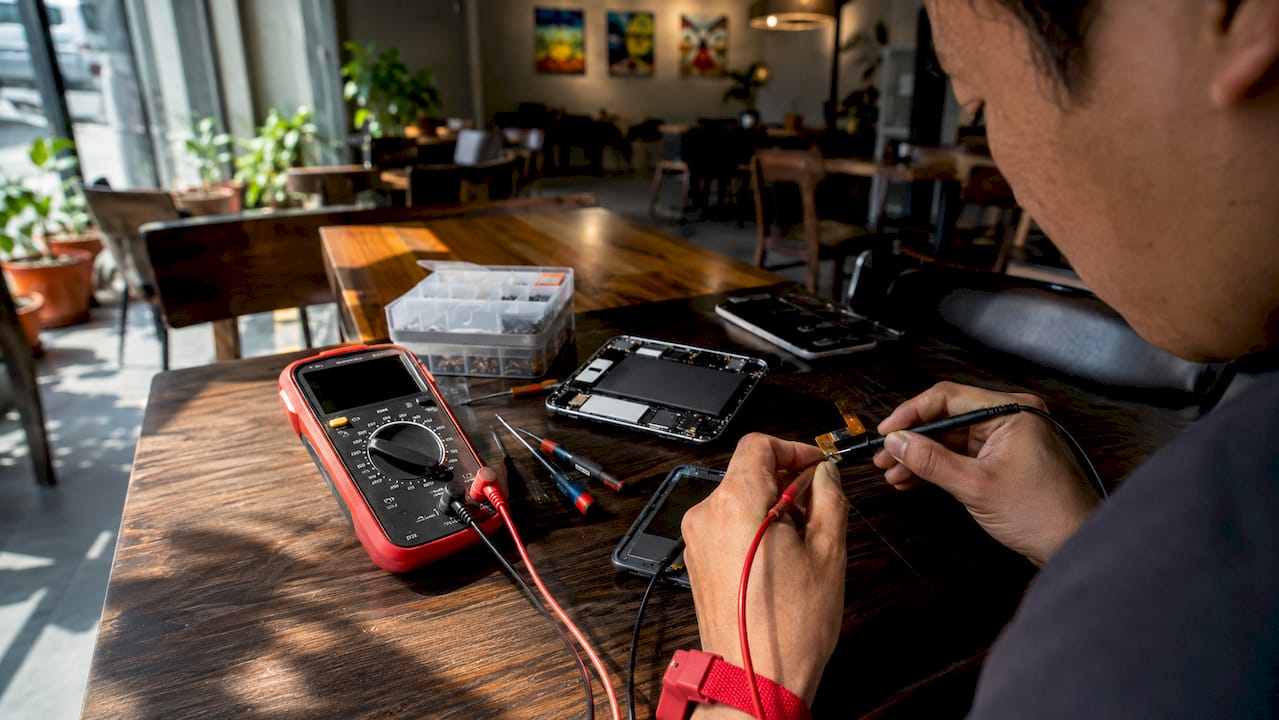
Re-seat and clean FPC cable connections. Before ordering any part, open the device and inspect the flat flexible printed circuit (FPC) cable connecting the display to the motherboard. Re-seating or cleaning FPC contacts resolves 30% of flicker problems. Use isopropyl alcohol and a soft brush on the connector pads.
-
Use a multimeter for voltage checks. Measure the supply voltage at the display connector. A ±0.8V voltage fluctuation increases backlight instability by 55%. Readings outside the manufacturer’s specified range point to a power delivery fault rather than a panel fault.
-
Cross-test with a known-good panel. Connect a confirmed working display to the device. If the fault disappears, the original panel is defective. If the fault persists, the problem lies with the motherboard or display driver. This swap testing method is standard practice in professional repair workshops.
Pro Tip: Always test the replacement panel before fully reassembling the device. Powering on with the screen loosely connected takes seconds and prevents you from discovering a DOA (dead on arrival) part after a full rebuild.
Here is a quick reference for matching symptoms to likely fault sources:
| Symptom | Most likely cause | First test to perform |
|---|---|---|
| Black screen, device powers on | Backlight failure | Flashlight test |
| Flickering at varying brightness | Voltage instability or FPC fault | Re-seat FPC cable, check voltage |
| Fixed coloured lines | Panel driver or internal damage | Cross-test with known-good panel |
| Dead or stuck pixels | Panel defect | Pixel test with HardwareTest |
| Dark spots, no glass crack | Internal pressure or liquid damage | Visual inspection, swap test |
How do you tell LCD faults apart from other hardware problems?
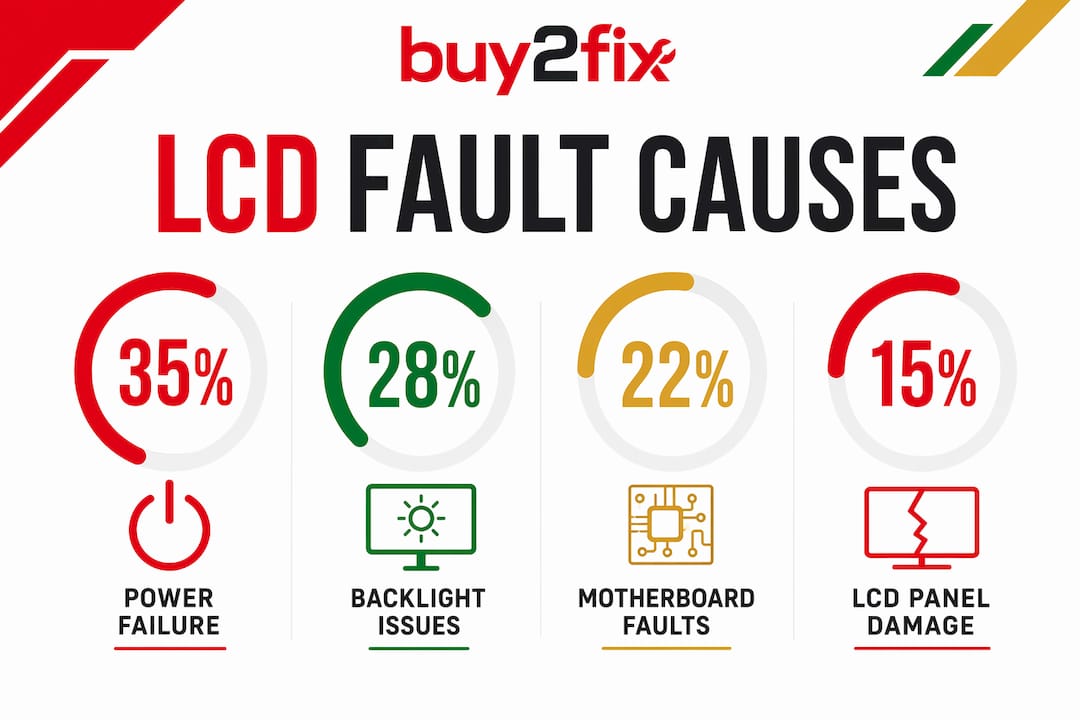
Approximately 65% of display issues originate from hardware components other than the LCD panel itself, such as cables or logic board faults. Only 5% are caused by physical panel damage. That statistic should change how you approach every diagnosis. Your default assumption should be that the panel is not the problem until you have ruled everything else out.
Power supply and backlight faults
Power failure accounts for 35% of display faults, and backlight system issues account for a further 28%. Together, they represent the most common cause of a dark or non-responsive screen. A device that shows a faint image under torchlight has a working panel and a failed backlight driver. Replacing the full LCD assembly in this scenario is an unnecessary expense.
Motherboard and logic board issues
Motherboard faults account for 22% of display problems, and logic board issues a further 10%. These typically present as a completely blank screen with no response to the flashlight test, random display corruption that changes with each boot, or a screen that works intermittently depending on device temperature. Connecting the device to an external monitor via a compatible adaptor (where the device supports video output) is a reliable way to confirm whether the display signal is leaving the motherboard at all.
Cable and connector faults
Loose or damaged FPC cables produce symptoms that closely mimic panel failure. Bright line faults are caused by FPC cable contact issues in 60% of cases, with only 15% involving irreversible panel damage. A single bright vertical line running the full height of the screen is more likely a cable problem than a dead panel. Always inspect and re-seat cables before condemning the display.
Here is a comparison to help you separate LCD faults from other hardware faults:
| Fault type | Typical symptoms | Distinguishing test |
|---|---|---|
| LCD panel failure | Fixed lines, dead pixels, dark spots | Swap with known-good panel |
| Backlight failure | Black screen, faint image under torch | Flashlight test |
| FPC cable fault | Bright lines, intermittent display | Re-seat cable, inspect contacts |
| Motherboard fault | No signal, random corruption | External monitor test |
| Power supply fault | Flickering, dim screen | Multimeter voltage check |
For a deeper look at how to diagnose mobile display problems accurately, the Buy2fix repair blog covers device-specific fault patterns in detail.
What do LCD repairs typically cost, and when is replacement worth it?
Repair costs vary significantly depending on what is actually broken. Glass-only repairs cost roughly £40–£120, while full LCD assembly replacements range from £120 to over £300 depending on the device model and parts quality. Misdiagnosing a backlight fault as a panel fault and ordering a full assembly is one of the most common and avoidable mistakes in mobile repair.
Key cost considerations include:
- Glass-only vs full assembly. If the LCD beneath a cracked screen is still functioning correctly (no lines, no dead pixels, normal brightness), a glass-only repair is sufficient and significantly cheaper.
- Device model. iPhone 15 Pro and Samsung Galaxy S24 assemblies cost considerably more than mid-range Xiaomi or OPPO panels. Always confirm the exact model before sourcing parts.
- Parts quality. OEM (original equipment manufacturer) panels, aftermarket grade A panels, and budget copies all carry different price points and performance levels. For professional repairs, OEM or grade A is the correct choice.
- Risk of misdiagnosis. Ordering a full LCD assembly for what turns out to be a cable fault wastes money and time. The diagnostic steps above exist precisely to prevent this.
When the repair cost exceeds 60–70% of the device’s current market value, replacement becomes the more sensible financial decision. For understanding which LCD panel type suits a given repair, Buy2fix has a dedicated guide covering the differences between IPS, AMOLED, and TFT panels.
Key takeaways
Accurate LCD diagnosis requires ruling out cables, power supply, and motherboard faults before concluding the panel itself has failed.
| Point | Details |
|---|---|
| Visual symptoms first | Fixed lines, dark spots, and dead pixels that persist across all apps indicate hardware faults. |
| Flashlight test is essential | A faint image under torchlight confirms the panel works and the backlight is the fault. |
| FPC cables cause most bright line faults | Re-seat and clean connectors before ordering any replacement panel. |
| Cross-test to confirm panel failure | Swap in a known-good display to isolate whether the fault is panel-side or motherboard-side. |
| Repair cost depends on fault type | Glass-only repairs cost far less than full assemblies; accurate diagnosis prevents unnecessary spend. |
Why I always start with the cable before touching the panel
After years of working through display faults on everything from budget Android handsets to flagship iPhones, the single most common mistake I see is technicians jumping straight to a panel replacement. The symptom looks obvious. A bright vertical line, a flickering screen, a dark patch. The instinct is to order a new display. But the data backs up what experience teaches: the panel is rarely the culprit.
The flashlight test takes about ten seconds. Re-seating an FPC cable takes two minutes. Running a pixel test with HardwareTest costs nothing. These steps, done in order, will save you from ordering the wrong part more often than you might expect. I have seen workshops waste money on full Samsung Galaxy assemblies when a 30-second cable re-seat would have fixed the fault entirely.
The other thing worth saying is that over 90% of TFT display failures cluster into signal or driver issues, brightness abnormalities, or environmental causes. That means the vast majority of faults follow predictable patterns. Learn those patterns, follow the diagnostic sequence, and you will get the right answer before you spend a penny on parts.
Patience is the real skill here. A technician who rushes to replacement is an expensive technician. One who works through the fault systematically is the one clients come back to.
— Adewale
Source your LCD replacement parts from Buy2fix
Once you have confirmed a panel fault through proper diagnosis, sourcing the right replacement matters as much as the diagnosis itself. Buy2fix stocks replacement LCD assemblies for iPhone, Samsung Galaxy, Huawei, Xiaomi, OPPO, and a wide range of tablets and laptops. Every part goes through quality checks before dispatch, and UK mainland orders ship free. The 30-day return policy means you are covered if a part arrives with a defect. Whether you are a DIY repairer or a professional technician running a workshop, Buy2fix has the parts, the pricing, and the support to keep your repairs moving. Browse the full range and find the exact panel for your device today.
FAQ
What is the quickest way to check if an LCD is faulty?
Perform the flashlight test in a dark room. If you can see a faint image on the screen, the LCD panel is working and the backlight is the fault. No image at all suggests a panel or signal problem.
Can a faulty LCD be caused by a cable rather than the panel itself?
Yes. Bright line faults are caused by FPC cable contact issues in 60% of cases, with only 15% involving actual panel damage. Always re-seat and clean the display cable before replacing the panel.
How do dead pixels differ from stuck pixels?
Dead pixels appear as permanently black dots and do not respond to any input. Stuck pixels remain fixed on one colour such as red, green, or blue, and can sometimes be resolved with pixel-cycling software.
Is it worth repairing a cracked LCD or should I replace the device?
If the repair cost exceeds 60–70% of the device’s current market value, replacement is usually the better financial decision. For devices with minor faults or high residual value, a targeted repair using quality parts is the right call.
What tools do I need to diagnose a faulty LCD at home?
A torch, a multimeter, isopropyl alcohol, and a free pixel testing app such as HardwareTest cover the majority of diagnostic scenarios. For advanced faults, a known-good replacement panel for swap testing is the most reliable confirmation tool.
Recommended
Let customers speak for us
The acid test of any company is how they respond when things go wrong. The Buy2Fix team were efficient in dealing with my emails and resolved the issue to my complete satisfaction

For Samsung Galaxy A26 SM-A266B Original Earpiece Speaker with Cable

Very good communication throught. Good product

Well made part very strong easy to fit great value for the money

Well packed, with fast shipping :)

Exactly what the doctor ordered…great color, comfort, and durability. Trust this watch band!

Brilliant strap, second purchase, bought bracelet before. Excellent value. Thank you

Great item for splitting your Audio signal

Outstanding product!
Next level customer service.

Very satisfied but the delivery needs to get more faster...

Good price,quick delivery

Best phone case ever! This is my second one as I broke my first. Would defo recommend

Great fitting Apple Watch bands

For Apple Watch Ultra 3 / 2 / 1 49mm RedPepper Armor Metal Case Integrated Silicone Watch Band(Steel Black White)

Good price and quick postage
