

How to identify your Samsung phone model code
TL;DR:
- Samsung model codes start with “SM-” and specify the exact device variant, including regional hardware. Knowing how to find your model code ensures compatibility for parts and firmware, especially when the device is inaccessible or has a broken screen. Always use the model code rather than the marketing name to avoid mismatched components.
Samsung model codes are alphanumeric identifiers that begin with “SM-” and tell you the exact variant of a device, down to its regional hardware configuration. Knowing how to identify your Samsung phone model code is not optional when you are ordering replacement parts or flashing firmware. The marketing name printed on the box, such as Galaxy S24 Ultra, does not carry enough information. Two phones sold under the same name in different countries can have entirely different internal components. Getting the model code right is the difference between a repair that works and a part that does not fit.
How to identify Samsung phone model code via device settings
The Settings menu is the most reliable place to find your Samsung model number. Navigate to Settings, scroll down to About phone, and look for the Model number field. The code displayed there starts with “SM-” and is the definitive identifier for your device variant. Samsung support confirms this as the primary method for verifying part compatibility.

The “About phone” screen also shows your IMEI, serial number, and Android version. Each of these serves a different purpose, but the model number is what you need for sourcing parts or checking firmware compatibility. A Galaxy S23 FE sold in the UK carries a different SM code than the same phone sold in the US, even though both look identical.
The Samsung Members app offers another route. Open the app, go to Get Help, and your device information including the model code appears automatically. This is useful if you want a quick reference without digging through the Settings menu.
Key details to note from the “About phone” screen:
- Model number: starts with “SM-”, e.g. SM-S918B
- Serial number: unique to your physical unit
- IMEI: 15-digit global identifier
- Software version: confirms firmware build
Pro Tip: The model number shown in Settings is the one to use when ordering parts or booking a repair. Physical labels and packaging can sometimes reflect an older or regional variant, but the Settings entry reflects the actual device configuration.
How to identify Samsung phone model with broken screen
A broken screen does not have to leave you guessing. Several practical methods let you retrieve the model code without a working display.
- Check the original packaging. The model code is printed on the box label, usually near the barcode. This is the fastest option if you kept the box.
- Look at your purchase receipt or invoice. Retailers and online stores list the full model number on receipts. A digital receipt from an email confirmation works just as well.
- Use an OTG adapter and USB mouse. If the touchscreen is unresponsive but the display still works, connecting a USB mouse via OTG lets you navigate to Settings and retrieve the model code without touching the screen.
- *Dial #06# from the keypad. If the screen responds enough to open the dialler, entering *#06# reveals the IMEI. You can then cross-reference that 15-digit number against an official IMEI database to confirm the model code.
- Inspect the SIM tray. Some Samsung devices have model info etched on the SIM tray itself. Eject the tray with a pin and look at the edge for small printed text.
- Use Bluetooth pairing. If the phone powers on partially, Bluetooth broadcast names can confirm the model name. Pair the device with another phone or laptop and check the device name that appears. This is a last resort, but it works when other methods fail.
Pro Tip: Keep the original box for every phone you own. It takes up minimal space and solves the identification problem instantly if the device becomes inaccessible. A photo of the box label stored in your cloud gallery works just as well.
Modern Samsung phones rarely print model codes on the back of the device. Sealed designs have shifted identification almost entirely to digital methods or packaging. This is worth knowing before you spend time searching the chassis for a label that is not there.
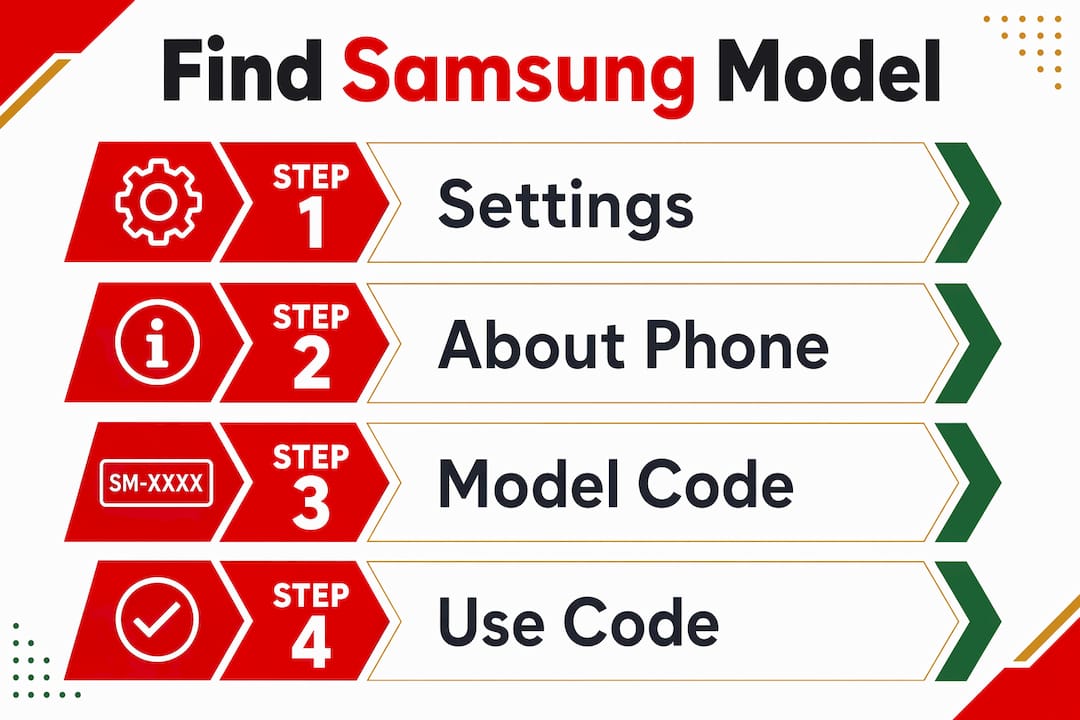
For more detailed guidance on diagnosing hardware issues alongside model identification, the Buy2fix guide on Samsung display problems covers both topics together.
Why marketing names mislead and model codes matter
The Galaxy Note 10+ is a good example of why relying on a product name causes problems. Samsung released multiple variants of that phone under the same marketing name, including SM-N975F for the global version and SM-N975U for the US carrier version. The two share a name but differ in modem hardware, display connectors, and compatible firmware. Ordering a screen assembly for one will not guarantee it fits the other.
Model numbers are the only accurate identifiers for firmware and hardware repairs. Marketing names exist to simplify retail communication, not to specify hardware. Repair technicians and part suppliers rely exclusively on SM codes.
The table below illustrates how the same marketing name can map to multiple model codes with different compatibility implications.
| Marketing name | Example model code | Region/carrier | Compatibility note |
|---|---|---|---|
| Galaxy S23 | SM-S911B | Global (UK/EU) | Exynos chipset variant |
| Galaxy S23 | SM-S911U | USA | Snapdragon chipset variant |
| Galaxy A54 5G | SM-A546B | Global | Standard EU/UK build |
| Galaxy A54 5G | SM-A546E | South/Southeast Asia | Different regional firmware |
| Galaxy Note 10+ | SM-N975F | Global | Exynos, standard parts |
The practical implication is clear. If you search for a replacement battery using “Galaxy S23” alone, you may receive a part designed for a different chipset configuration. Using the SM code removes that ambiguity entirely. The Buy2fix article on common repair mistakes covers this exact issue in more depth.
How do IMEI and serial numbers support device identification?
The IMEI, serial number, and model code each serve a distinct purpose. Understanding the difference helps you provide the right information when ordering parts or contacting support.
The model number identifies the class of device. Every SM-S918B unit in the world shares that code. The serial number is unique to your individual handset. The IMEI is a 15-digit global identifier tied to the physical device, used by carriers for network registration and theft reporting. Having all three ensures repair accuracy and helps suppliers confirm compatibility.
Here is where to find each one:
- Model number: Settings > About phone > Model number
- Serial number: Settings > About phone > Serial number
- IMEI: Settings > About phone > IMEI information, or dial *#06#
The IMEI is particularly useful when the Settings menu is inaccessible. Cross-referencing an IMEI against Samsung’s official device database or a reputable IMEI lookup service returns the model code in most cases. This works because each IMEI is registered against a specific device model at manufacture.
Pro Tip: The IMEI is your primary tool for theft protection and carrier unlocking, but it is not a substitute for the model number when ordering parts. Always confirm the SM code separately. A part supplier needs the model number, not the IMEI, to match components.
When submitting a part order or a repair request, provide the model number and serial number together. The model number confirms which part is compatible. The serial number helps the supplier verify the exact production batch if there are known hardware revisions within a model line. For a full checklist on what to prepare before ordering, the Buy2fix repair parts checklist is a practical reference.
Key takeaways
Identifying your Samsung model code via Settings is the single most reliable method, and every other approach exists to serve situations where that route is unavailable.
| Point | Details |
|---|---|
| Settings is the primary method | Navigate to Settings > About phone to find the SM code for your exact device variant. |
| Broken screen alternatives exist | Use original packaging, OTG adapter, *#06# IMEI dial, or SIM tray etching when the screen is unusable. |
| Marketing names are not enough | Regional variants share names but differ internally; always use the SM code for parts and firmware. |
| IMEI supports but does not replace model code | Use IMEI to look up the model code when Settings is inaccessible, but confirm the SM code before ordering. |
| Keep documentation | Storing a photo of your box label or receipt removes all guesswork if the device becomes inaccessible. |
The part that most people get wrong
I have seen this play out dozens of times. Someone orders a replacement screen for their Galaxy A52, receives it, and the connector is in the wrong position. They assumed the phone was an A52 because that is what the seller told them. The actual model code was SM-A525F, not SM-A526B. Those two phones share a name but use different display assemblies.
The frustrating part is that the correct information was always available. It was sitting in the Settings menu the whole time. People skip that step because the marketing name feels sufficient. It never is.
My honest advice: treat the SM code the way a mechanic treats a VIN number. You would not order engine parts for a car using only the model year and colour. The same logic applies here. The SM code is the VIN of your Samsung device.
I also think the SIM tray tip is genuinely underused. Most repair guides do not mention it, but I have retrieved model codes from completely dead phones using nothing but a SIM ejector pin and a magnifying glass. It takes thirty seconds and requires no power.
If your device is completely inaccessible and you have no packaging, the IMEI route via *#06# combined with a reliable lookup database is your best fallback. The step-by-step identification guide at Buy2fix walks through this process clearly if you need a structured reference.
— Adewale
Samsung parts at Buy2fix: get the right fit first time
Once you have your Samsung model code confirmed, Buy2fix makes it straightforward to find compatible replacement parts. Buy2fix stocks Samsung Galaxy screens, batteries, charging ports, and more, with parts catalogued by model number so you are not left guessing about compatibility. Every order comes with free UK mainland shipping and a 30-day return policy. Whether you are a DIY repairer replacing a cracked screen or a technician sourcing parts in bulk, the Buy2fix parts catalogue is organised to match your SM code directly to the right component. Get the model code right first, then let Buy2fix handle the rest.
FAQ
What does a Samsung model code look like?
A Samsung model code starts with “SM-” followed by a combination of letters and numbers, for example SM-S918B or SM-A546B. This alphanumeric string identifies the exact device variant, including its regional hardware configuration.
How do I find my Samsung model number without turning the phone on?
Check the original packaging or purchase receipt, both of which display the full model code. Some Samsung devices also have model information etched on the SIM tray, which is accessible without powering the device on.
Is the Samsung model number the same as the IMEI?
No. The model number identifies the class of device and starts with “SM-”. The IMEI is a unique 15-digit number tied to your individual handset. Both are useful for identification, but only the model number confirms part compatibility.
Can I use the Galaxy marketing name to order replacement parts?
Marketing names like Galaxy S24 or Galaxy A54 are not sufficient for ordering parts. Regional variants share marketing names but use different components. Always use the SM model code to confirm compatibility before purchasing.
Where is the model number on a Samsung phone with a broken screen?
If the screen is broken, dial *#06# to retrieve the IMEI and use it to look up the model code via an official database. Alternatively, check the original box, purchase receipt, or the SIM tray for a printed or etched model reference.
Recommended
Let customers speak for us
The acid test of any company is how they respond when things go wrong. The Buy2Fix team were efficient in dealing with my emails and resolved the issue to my complete satisfaction

For Samsung Galaxy A26 SM-A266B Original Earpiece Speaker with Cable

Very good communication throught. Good product

Well made part very strong easy to fit great value for the money

Well packed, with fast shipping :)

Exactly what the doctor ordered…great color, comfort, and durability. Trust this watch band!

Brilliant strap, second purchase, bought bracelet before. Excellent value. Thank you

Great item for splitting your Audio signal

Outstanding product!
Next level customer service.

Very satisfied but the delivery needs to get more faster...

Good price,quick delivery

Best phone case ever! This is my second one as I broke my first. Would defo recommend

Great fitting Apple Watch bands

For Apple Watch Ultra 3 / 2 / 1 49mm RedPepper Armor Metal Case Integrated Silicone Watch Band(Steel Black White)

Good price and quick postage
