

What is an LCD computer display? A clear guide
TL;DR:
- An LCD computer display is a flat-panel screen that uses liquid crystal technology to control light passing through it, forming images. Different panel types like IPS, TN, and VA offer various advantages in color accuracy, response time, and viewing angles, influencing their ideal use cases. Despite the rise of OLED, LCD remains popular due to its cost-effectiveness, high brightness, and wide repair availability.
An LCD computer display is a flat-panel screen that uses liquid crystal technology to modulate light and produce visible images. The industry standard term is Liquid Crystal Display, and it describes the screen technology found in the vast majority of laptops, desktop monitors, and tablets sold today. Unlike older cathode ray tube monitors, which fired electron beams at a phosphor-coated screen, LCD screens modulate light through a layer of liquid crystals sandwiched between polarising filters. Understanding how this works, and how it compares to LED and OLED alternatives, helps you make smarter decisions when buying, repairing, or upgrading any computer display.
What is an LCD computer display and how is it defined?
An LCD computer display is defined as a flat-panel screen that controls the passage of light through liquid crystal molecules to form images, rather than generating light itself. The phrase “LCD computer” simply refers to a computer whose screen uses this technology. It is not a separate category of machine. The display type is what matters, and LCD remains the dominant panel technology across consumer and professional computing.
Liquid crystals sit in a state between solid and liquid, which gives them a unique property: their molecular alignment changes when an electric field is applied. This change in alignment controls how much light passes through the panel. The result is a screen that can render millions of colours and sharp detail without generating any light of its own.
LCD replaced CRT monitors because it offered a dramatically thinner form factor, lower power draw, and no geometric distortion at the edges of the screen. A 24-inch CRT monitor could weigh over 25 kg and sit 50 cm deep on a desk. A modern LCD monitor of the same size weighs under 4 kg and sits less than 5 cm from the wall. That shift transformed how people work with computers.
How does LCD technology work in computer displays?
LCD technology works by placing a layer of liquid crystal molecules between two polarising filters that are oriented at 90 degrees to each other. Without any electrical input, the liquid crystals naturally twist the light passing through them, allowing it to pass through both polarisers and reach your eyes. When voltage is applied to a pixel, the crystals align with the electric field, stop twisting the light, and that pixel goes dark. Every image on screen is the result of millions of these tiny on/off decisions happening simultaneously.

The backlight is what makes this visible. LCD panels do not emit light on their own. They rely entirely on a light source behind the panel, historically cold cathode fluorescent lamps (CCFL), and now almost universally LEDs. The backlight shines through the liquid crystal layer, and the crystals act as a gate, controlling how much of that light reaches the front of the screen.
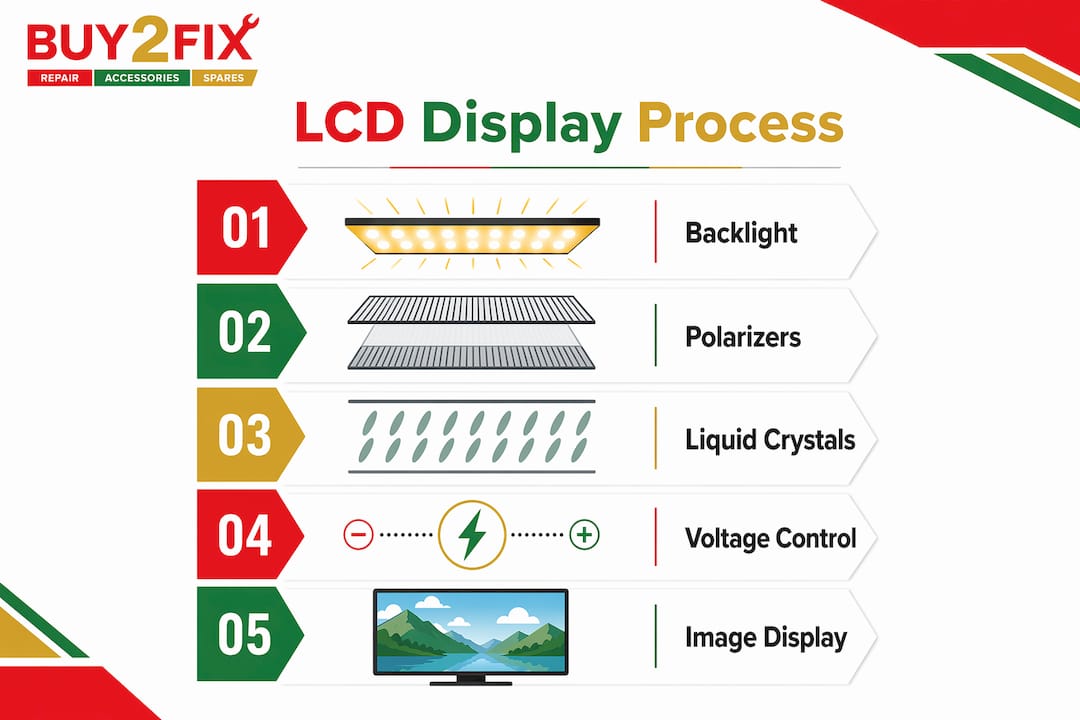
Colour is produced by dividing each pixel into three subpixels, each covered by a red, green, or blue filter. By varying the intensity of each subpixel, the display can reproduce a wide range of colours. A 1920x1080 Full HD screen contains over six million individual subpixels, each controlled independently.
The mechanism that makes this precise control possible is thin-film transistor technology. TFT LCDs use a grid of tiny transistors, one per subpixel, to switch each element on or off without affecting its neighbours. This is called active-matrix addressing, and it is why modern LCD screens can display fast-moving content without smearing or ghosting.
- Liquid crystals act as light gates, not light sources
- Polarising filters control which light passes through at each pixel
- LED backlight provides the illumination behind the panel
- TFT transistors address each subpixel individually for precise image control
- RGB subpixels combine to produce the full visible colour spectrum
Pro Tip: If your LCD screen looks washed out or dim, the backlight is often the culprit. A failing LED backlight strip is one of the most common and repairable LCD faults, and replacement strips are available for most laptop and monitor models.
What types of LCD panels are used in computers?
The term “LCD” covers several distinct panel technologies, each with different performance characteristics. The three types you will encounter most often in laptops and monitors are IPS, TN, and VA. Choosing between them depends on what you use your computer for.
| Panel type | Viewing angles | Colour accuracy | Response time | Typical use |
|---|---|---|---|---|
| IPS (In-Plane Switching) | Excellent (178°) | High | Moderate (4–8 ms) | Design, photo editing, general use |
| TN (Twisted Nematic) | Narrow (160°) | Lower | Very fast (1–5 ms) | Competitive gaming |
| VA (Vertical Alignment) | Good (178°) | Good | Slower (8–16 ms) | Media consumption, office work |
IPS, TN, and VA panels each represent a different engineering compromise. IPS panels deliver the most accurate colours and the widest viewing angles, which is why graphic designers and photographers favour them. If you look at an IPS screen from the side, the image remains consistent. On a TN panel, colours shift noticeably when viewed off-axis, and the image can invert at extreme angles.
TN panels compensate with speed. Their liquid crystals respond to voltage changes faster than IPS or VA, which translates to lower response times. For competitive gaming, where a 1 ms difference can matter, TN remains a viable choice despite its colour limitations.
VA panels occupy the middle ground. They produce deeper blacks than IPS because their liquid crystals block light more completely when switched off, giving them a higher native contrast ratio. The trade-off is slower pixel response, which can cause a visible smearing effect on fast-moving content. VA panels are well suited to watching films or working in spreadsheets, but less so for fast-paced gaming.
LCD vs LED computer displays: what is the actual difference?
The distinction between LCD and LED is one of the most misunderstood points in display technology. LED is a backlight type, not a separate panel technology. When a retailer labels a monitor as “LED”, they mean it is an LCD panel with an LED backlight rather than the older CCFL fluorescent backlight. The liquid crystal layer and the polarising filters are identical. The only difference is what sits behind the panel providing illumination.
This matters because LED backlights are more energy-efficient, thinner, and longer-lasting than CCFL. They also enable local dimming, where sections of the backlight can be dimmed independently to improve contrast in dark scenes. Mini-LED displays take this further by using thousands of smaller LED zones, giving much finer control over brightness and shadow detail.
OLED is a genuinely different technology. In an OLED screen, each pixel generates its own light and can switch off completely, producing true black. This gives OLED displays contrast ratios that LCD cannot match. The comparison below shows where each technology stands:
| Feature | LCD (LED backlit) | OLED |
|---|---|---|
| Contrast ratio | Limited by backlight bleed | Near-infinite (true black) |
| Peak brightness | High (600–1500 nits typical) | Moderate to high |
| Burn-in risk | None | Present with static images |
| Power consumption | Moderate | Lower at dark content |
| Cost | Lower | Higher |
LCD screens offer advantages that OLED cannot replicate at the same price point. They are significantly cheaper to manufacture, which is why a 27-inch LCD monitor can cost under £200 while an equivalent OLED remains above £500. LCD also carries no burn-in risk, making it the safer choice for office environments where the same taskbar or desktop icons sit on screen for hours every day.
What are the benefits and limitations of LCD computer displays?
LCD remains the most widely deployed display technology in computers for practical reasons that go beyond cost. Understanding both the strengths and the limitations helps you choose the right screen and maintain it properly.
Key benefits of LCD screens:
- Cost-effectiveness. LCD panels are manufactured at scale, keeping prices accessible across all budget levels from budget laptops to professional monitors.
- High brightness. LED-backlit LCD screens routinely achieve 300 to 1500 nits of peak brightness, making them readable in well-lit offices and even direct sunlight in some cases.
- No burn-in. Unlike OLED, LCD pixels do not degrade from displaying static content, which matters for productivity users and anyone running a display continuously.
- Energy efficiency. Modern LCD screens consume significantly less power than CRT monitors and compare favourably with OLED at high brightness levels.
- Wide availability. Replacement panels, backlights, and repair parts are readily available for most LCD laptops and monitors, keeping repair costs manageable.
Common limitations to be aware of:
LCD contrast is constrained by the backlight. Even when a pixel is switched off, some light leaks through the liquid crystal layer, which is why LCD blacks appear grey rather than truly black. This effect, known as backlight bleed, is most visible in dark rooms when viewing dark content. IPS panels are particularly prone to a related issue called IPS glow, where the corners of the screen appear brighter than the centre at certain angles.
Dead pixels are another known issue. A dead pixel is a subpixel that is permanently stuck in one state, either always on (bright dot) or always off (dark dot). Most manufacturers allow a small number of dead pixels before honouring a warranty claim, so check the specification before purchasing.
Pro Tip: When buying an LCD monitor or laptop, prioritise resolution and refresh rate for your use case. A 1440p IPS panel at 144 Hz suits most users far better than a 4K TN panel at 60 Hz, because the higher refresh rate makes everyday scrolling and cursor movement feel noticeably smoother.
Key takeaways
LCD computer displays use liquid crystal technology to modulate backlight illumination, and the choice of panel type (IPS, TN, or VA) determines the practical performance you experience every day.
| Point | Details |
|---|---|
| LCD definition | An LCD display uses liquid crystals between polarisers to control light from a backlight. |
| Panel types matter | IPS suits colour work, TN suits fast gaming, and VA suits media and general office use. |
| LED is not a separate panel | LED refers to the backlight technology inside an LCD screen, not a different display type. |
| LCD vs OLED | LCD costs less and avoids burn-in; OLED delivers superior contrast and true black. |
| Repair and longevity | LCD backlights and panels are widely replaceable, making LCD screens cost-effective to maintain. |
Why LCD still earns its place in 2026
I have been writing about consumer electronics long enough to remember when the shift from CRT to LCD felt like a revelation. Screens suddenly became thin enough to hang on a wall, and the heat and hum of a CRT disappeared overnight. What surprises me now is how many people assume LCD is a legacy technology on its way out, when the reality is more nuanced.
OLED gets the headlines, and rightly so. The contrast and colour saturation on a good OLED panel are genuinely impressive. But I would not recommend OLED to most office workers, students, or anyone running a display for eight or more hours a day. The burn-in risk is real, and the premium price is hard to justify when a well-chosen IPS LCD delivers excellent colour accuracy and zero burn-in risk at half the cost.
Where I think LCD genuinely struggles is in dark room viewing. If you watch a lot of films with the lights off, the backlight bleed on even a premium IPS panel becomes distracting. That is the one scenario where OLED or a Mini-LED panel with aggressive local dimming makes a meaningful difference. For everything else, a quality IPS LCD remains the most sensible choice for most people. You can explore LCD screen technology types in more detail to understand which risks apply to your specific use case before committing to a purchase.
— Adewale
Need help with an LCD screen repair or replacement?
If your laptop or monitor screen is cracked, dim, or showing dead pixels, Buy2fix stocks a broad range of LCD replacement panels for popular laptop brands including iPhone, Samsung Galaxy, Huawei, and Xiaomi devices, as well as tablets and laptops. Whether you are a DIY repairer or a professional technician, Buy2fix provides quality-checked parts with free UK mainland shipping and a 30-day return policy. If you are unsure which panel type suits your device, the Buy2fix team can point you in the right direction. You can also read the detailed guide on understanding LCD displays to confirm the specification you need before ordering.
FAQ
What does LCD mean in a computer?
LCD stands for Liquid Crystal Display. It describes the screen technology used in most laptops and monitors, where liquid crystals modulate backlight illumination to form images.
How does an LCD screen differ from an LED screen?
An LED screen is an LCD screen with an LED backlight. LED refers to the backlight type, not a separate panel technology. The liquid crystal layer functions identically in both.
Which LCD panel type is best for everyday computer use?
IPS panels offer the best balance of colour accuracy and viewing angles for general use. TN panels suit competitive gaming due to faster response times, while VA panels provide better contrast for media consumption.
Can LCD screens get burn-in?
LCD screens do not suffer from burn-in. This is a characteristic of self-emissive displays like OLED, where individual pixels degrade over time. LCD’s reliance on a backlight means the pixels themselves are not subject to the same degradation.
Is it worth repairing a cracked LCD screen?
Repairing a cracked LCD screen is often worth it, particularly for laptops where the panel cost is a fraction of the device’s value. Replacement panels for most common laptop models are widely available, and the repair can be completed without specialist tools using a guide such as this laptop screen replacement resource.
Recommended
Let customers speak for us
The acid test of any company is how they respond when things go wrong. The Buy2Fix team were efficient in dealing with my emails and resolved the issue to my complete satisfaction

For Samsung Galaxy A26 SM-A266B Original Earpiece Speaker with Cable

Very good communication throught. Good product

Well made part very strong easy to fit great value for the money

Well packed, with fast shipping :)

Exactly what the doctor ordered…great color, comfort, and durability. Trust this watch band!

Brilliant strap, second purchase, bought bracelet before. Excellent value. Thank you

Great item for splitting your Audio signal

Outstanding product!
Next level customer service.

Very satisfied but the delivery needs to get more faster...

Good price,quick delivery

Best phone case ever! This is my second one as I broke my first. Would defo recommend

Great fitting Apple Watch bands

For Apple Watch Ultra 3 / 2 / 1 49mm RedPepper Armor Metal Case Integrated Silicone Watch Band(Steel Black White)

Good price and quick postage
