

How to Fix Phone Screen Near Me Cheap: A Practical Guide
Broken screens are the most common smartphone issue facing British repair fans and small business owners today. With replacement parts costs rising by nearly 35 percent since last year, finding accurate information about repairs has never been more important. Whether you are tackling a DIY fix or searching for affordable local suppliers, knowing the right steps can save time, stress, and money. This guide highlights practical advice and insider tips to help you identify your exact phone screen model, find reliable parts, and ensure a flawless repair.
Table of Contents
- Step 1: Identify Exact Phone Screen Model And Damage
- Step 2: Source Affordable Genuine Or Aftermarket Parts Locally
- Step 3: Prepare Workspace And Gather Essential Tools
- Step 4: Replace Phone Screen With Recommended Techniques
- Step 5: Test Phone Functions And Inspect Screen Quality
Quick Summary
| Key Insight | Explanation |
|---|---|
| 1. Identify Your Phone Model | Check device settings, packaging, or the rear panel for the model number to ensure accurate repairs. |
| 2. Understand Damage Types | Document the exact damage type, such as cracks or pixel issues, to assist in sourcing appropriate parts. |
| 3. Choose Between OEM and Aftermarket | Weigh the benefits of genuine OEM parts against cheaper aftermarket options for compatibility and quality. |
| 4. Prepare Your Workspace | Use anti-static tools and maintain an organised area to minimise the risk of loss or additional damage during repairs. |
| 5. Test All Functions Post-Repair | After replacing the screen, check touch sensitivity and other functions to confirm a successful installation. |
Step 1: Identify exact phone screen model and damage
Identifying your precise phone screen model and understanding its damage is critical before attempting any repair. Modern smartphone repair requires pinpoint accuracy to ensure you source the correct replacement components and approach the fix strategically.
To determine your phone model, start by examining the physical device. Locate the model number typically found in these locations: device settings menu, original packaging, under the battery (if removable), or on the rear panel. Most smartphones store this information in System Settings under “About Phone” or “Device Information”. Advanced damage detection technologies now use machine learning algorithms to help technicians precisely assess screen damage types and characteristics.
Carefully document the specific damage configuration. Screen issues typically fall into several categories: hairline cracks, spider web fractures, complete shattering, touch sensitivity problems, or pixel discolouration. Take clear, well-lit photographs from multiple angles to capture the full extent of damage. These images will prove invaluable when sourcing replacement parts or consulting repair professionals.
Expert Tip: Photograph your phone screen damage under bright, direct light to reveal even the most subtle fracture lines and imperfections.
Step 2: Source affordable genuine or aftermarket parts locally
Sourcing the right phone screen parts locally requires strategic research and careful evaluation. Your goal is to find affordable components that balance quality and cost effectiveness while ensuring compatibility with your specific device model.
Selecting phone spare parts involves understanding the nuanced differences between original equipment manufacturer (OEM) and aftermarket components. Genuine OEM parts typically come directly from the phone manufacturer and guarantee precise fitment but often carry higher price tags. Aftermarket parts offer more budget friendly alternatives with varying quality levels. When exploring local options research independent mobile repair shops mobile phone accessory stores and online marketplaces that specialise in smartphone components.
Carefully compare pricing research the reputation of part suppliers and verify component compatibility before making a purchase. Check for warranty coverage exchange policies and request detailed specifications about the parts origin and quality grade. Local mobile repair shops often provide expert advice and can help you navigate complex component selection processes ensuring you find a suitable replacement that meets your budget and performance requirements.

Expert Tip: Bring your damaged phone or precise model details when shopping locally to enable technicians to recommend the most accurate replacement parts.
Here is a comparison of OEM and aftermarket phone screen parts to help guide your selection:
| Aspect | OEM (Genuine) | Aftermarket |
|---|---|---|
| Price | Higher cost | More budget friendly |
| Quality consistency | Manufacturer certified | Varies depending on supplier |
| Fit and compatibility | Precise, guaranteed fit | May require adjustments |
| Warranty availability | Usually included | Depends on seller, often limited |
| Impact on device value | Retains resale value | May decrease resale value |
Step 3: Prepare workspace and gather essential tools
Preparing a proper workspace and collecting the right tools are crucial first steps in successfully repairing a phone screen. A well organised environment will help you work efficiently and minimise the risk of causing additional damage to your device.
Your repair toolkit should include precision screwdrivers with multiple interchangeable bits specific to smartphone models essential tools like tweezers anti static wrist strap plastic pry tools suction cup screen separator and high quality work surface with adequate lighting. Consider using a magnetic project mat to keep small components organised and prevent losing critical screws during the repair process. Clean your workspace thoroughly and ensure you have a static free environment to protect sensitive electronic components.
Arrange your tools systematically before beginning the repair. Create designated zones for components you remove keep a small container nearby to store screws and smaller parts. Work in a well ventilated area with stable temperatures and minimal dust. Having a clean organised workspace will significantly improve your chances of a successful smartphone screen repair.
Expert Tip: Always work on a white or light coloured surface to help you easily track and locate tiny screws and components during your phone repair.
Below is a summary of essential tools and workspace elements for an efficient phone screen replacement:
| Tool or Setup Element | Purpose | Professional Tip |
|---|---|---|
| Precision screwdrivers | Remove device-specific screws | Select magnetic heads for convenience |
| Anti-static wrist strap | Prevent electrostatic damage | Always wear throughout repair |
| Plastic pry tools | Safely separate delicate components | Use gentle force to avoid breakage |
| Magnetic project mat | Organise and secure small parts | Label screw positions for clarity |
| Well-lit, clean workspace | Improve visibility and reduce mistakes | Use a light surface for easy tracking |
Step 4: Replace phone screen with recommended techniques
Replacing a phone screen requires precision technical skills and a methodical approach to ensure successful device restoration. Understanding the correct replacement techniques will help you minimise potential damage and achieve professional grade results.
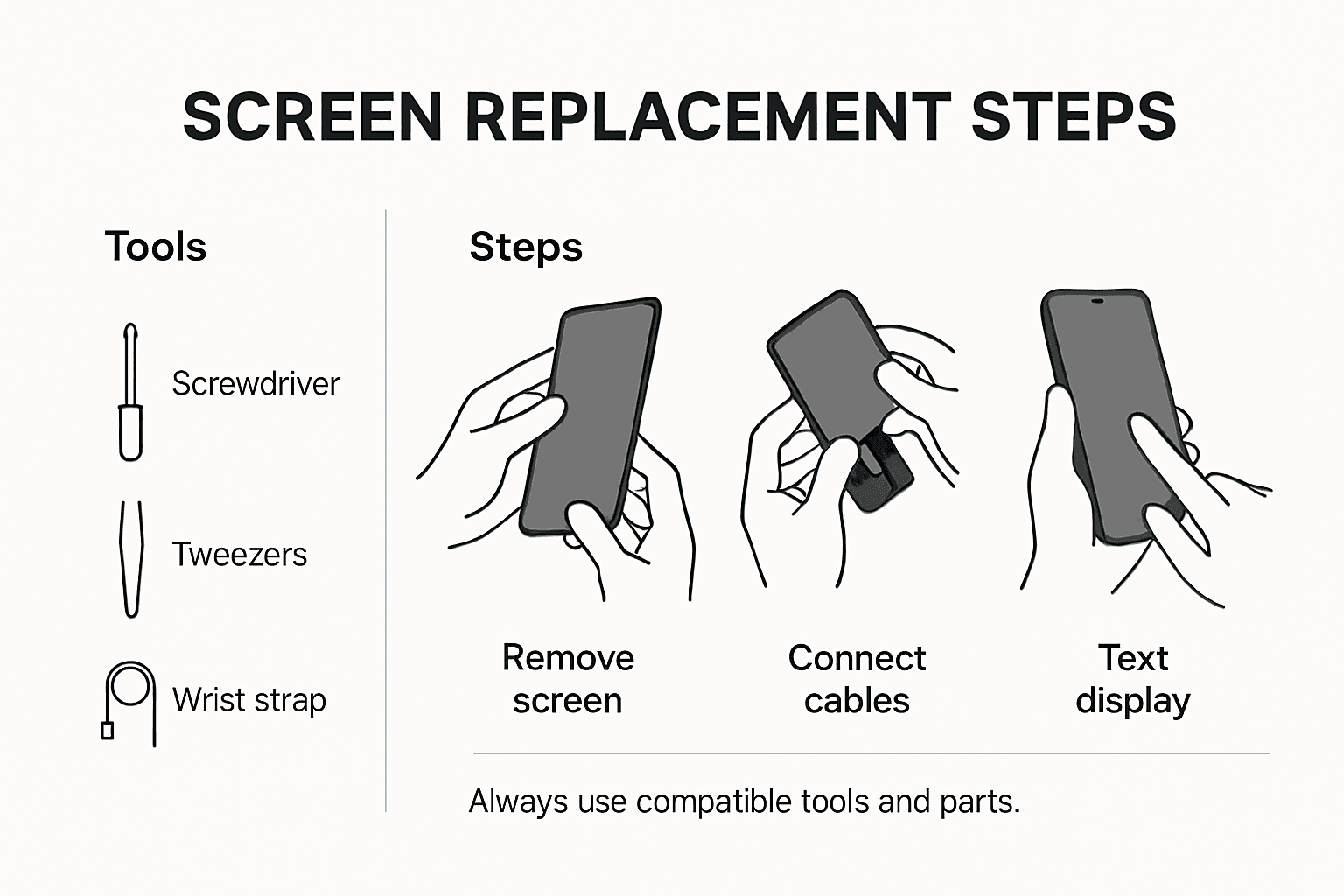
Comprehensive screen repair procedures involve carefully disconnecting internal components and applying strategic techniques to remove the damaged screen. Begin by powering down your device and removing any external components like protective cases or SIM cards. Use a heat gun or specialised warming tool to gently soften adhesive around the screen edges making the removal process smoother and reducing risk of internal component damage.
Carefully disconnect flex cables using precision tweezers and ensure you ground yourself with an anti static wrist strap to prevent electrostatic discharge. Clean the device frame meticulously removing old adhesive residue before applying new screen adhesive. Align the replacement screen precisely checking connections and functionality before final sealing. Test all touch sensitivity display colours and responsiveness thoroughly to confirm successful installation.
Expert Tip: Work in a well lit area with magnification and keep a photographic reference of your phones internal layout to help guide precise component reconnection.
Step 5: Test phone functions and inspect screen quality
After successfully replacing your phone screen, comprehensive testing is critical to ensure complete functionality and validate the quality of your repair. This final evaluation will confirm that every aspect of your device operates precisely as intended.
Begin by systematically checking each phone function. Screen replacement performance requires thorough examination of touch responsiveness across the entire display surface. Test multiple touch points simultaneously verify screen sensitivity and check for any dead zones or irregular response patterns. Cycle through various applications open multiple windows and perform complex gestures to confirm full tactile functionality.
Inspect the screen meticulously under different lighting conditions. Check colour reproduction contrast levels and pixel consistency. Examine the screen for potential alignment issues air bubbles or imperfections in the adhesive seal. Run diagnostic tests on critical functions like camera interfaces bluetooth connectivity mobile data and wireless charging. Ensure all sensors function correctly and that the display brightness adjusts appropriately under different environmental conditions.
Expert Tip: Use a bright white background during screen testing to reveal any subtle colour irregularities or pixel imperfections that might be missed under normal viewing conditions.
Get Your Phone Screen Fixed Quickly and Affordably with Buy2fix
The challenge of identifying the exact phone screen model and sourcing reliable parts locally can be daunting when you want to fix your phone screen near you cheap. This guide highlights common pain points like distinguishing between OEM and aftermarket parts, preparing the right tools, and mastering replacement techniques. If you are aiming to achieve professional-quality repairs without wasting time searching various suppliers, we offer the solution.
At Buy2fix, we provide an extensive range of genuine and aftermarket mobile phone repair parts including LCD screens, flex cables, and specialised components for all major brands like iPhone and Samsung Galaxy. Benefit from our competitive pricing, free UK mainland shipping, and rigorous quality assurance that ensures you get the right parts the first time. Whether you are a DIY enthusiast or a professional technician, our easy-to-navigate catalogue simplifies your repair journey.
Discover more about our Mobile Phone Repair Parts ranges and make your screen replacement seamless and cost effective. Take control of your phone repair today by visiting Buy2fix to find the perfect parts and accessories. Act now and turn a frustrating phone problem into a rewarding fix with confidence.
Frequently Asked Questions
How do I identify my phone screen model for a repair?
To identify your phone screen model, check your device settings under ‘About Phone’ or refer to the model number on the back panel or the original packaging. Document this information carefully to ensure you source compatible replacement parts.
What types of screen damage should I document before a repair?
You should document specific types of screen damage such as cracks, shattering, or touch sensitivity issues. Take clear photographs from multiple angles to capture the extent of the damage, which will assist in sourcing the proper parts or discussing the repair with professionals.
How can I find affordable phone screen parts locally?
To find affordable phone screen parts locally, research independent mobile repair shops and accessory retailers. Compare prices and check the compatibility of parts with your phone model, and ensure to inquire about warranty coverage before making a purchase.
What tools do I need for a DIY phone screen replacement?
Essential tools for a DIY phone screen replacement include precision screwdrivers, an anti-static wrist strap, and plastic pry tools. Collect these items and set up a clean, organised workspace to facilitate a smooth repair process.
How do I ensure the new phone screen functions correctly after replacement?
To ensure proper functionality after replacing the phone screen, thoroughly test touch responsiveness across the display and run diagnostic tests on all phone functions. Inspect for any alignment issues or adhesive imperfections, doing this within a few hours after the repair will provide you a clear evaluation of the outcome.
What should I do if the replacement screen does not work properly?
If the replacement screen does not function properly, first check all connections and ensure everything is correctly aligned. If the issues persist, consider consulting a professional technician for further assistance to avoid damaging the device further.
Recommended
- Complete Guide to Phone Screen Repair Costs – buy2fix
- Complete Guide to Fixing Your Phone Screen Cost – buy2fix
- How to Fix My Phone Screen: Complete Step-by-Step Guide – buy2fix
- How to Install a New Phone Screen Like a Pro – buy2fix
- Akkus reparieren Guide: So bringen Sie Ihre Akkus zurück ins Leben - accu.blog
Let customers speak for us
For Samsung Galaxy A26 SM-A266B Original Earpiece Speaker with Cable

Very good communication throught. Good product

Well made part very strong easy to fit great value for the money

Well packed, with fast shipping :)

Exactly what the doctor ordered…great color, comfort, and durability. Trust this watch band!

Brilliant strap, second purchase, bought bracelet before. Excellent value. Thank you

Great item for splitting your Audio signal

Outstanding product!
Next level customer service.

Very satisfied but the delivery needs to get more faster...

Good price,quick delivery

Best phone case ever! This is my second one as I broke my first. Would defo recommend

Great fitting Apple Watch bands

For Apple Watch Ultra 3 / 2 / 1 49mm RedPepper Armor Metal Case Integrated Silicone Watch Band(Steel Black White)

Good price and quick postage

