

Motherboard issues in smartphones: a repair guide for UK technicians
TL;DR:
- Many smartphone motherboard faults are misdiagnosed as battery or software issues when the underlying cause is often a hidden motherboard failure. Recognizing symptoms such as no power, random restarts, or connectivity loss early helps prevent unnecessary parts replacement and costly repairs. Proper diagnostics, preventive care, and careful component handling are essential for successful motherboard repairs and longevity.
Many smartphone faults get misdiagnosed as battery or software problems, when the real cause is a motherboard fault sitting quietly beneath the surface. Motherboard issues in smartphones are genuinely common, yet they are also the most frequently misidentified category of failure in both professional repair shops and DIY settings. The board hosts everything from power management circuits to radio transceivers, meaning a single damaged component or cracked solder joint can produce symptoms that mimic a dozen other problems. Getting the diagnosis right from the start saves time, money, and the frustration of replacing parts that were never actually broken.
Table of Contents
- Recognising the common signs of motherboard issues in smartphones
- Causes and mechanisms behind motherboard faults in smartphones
- Diagnosing motherboard faults accurately: tools and workflows
- Effective repair strategies and limitations for smartphone motherboards
- Practical preventive measures and maintenance to prolong motherboard lifespan
- Why many motherboard repairs fail and how UK technicians can avoid common pitfalls
- How buy2fix supports your smartphone motherboard repair journey
- Frequently asked questions
Key Takeaways
| Point | Details |
|---|---|
| Recognise motherboard symptoms | No power, restarts, network loss, charging problems, and intermittent hardware point to motherboard issues. |
| Understand damage causes | Liquid ingress, drops, power surges, and thermal stress commonly damage smartphone motherboards. |
| Follow precise diagnosis | Use known-good parts and multimeter tests before concluding motherboard failure. |
| Repair demands skill | Microsoldering and thorough cleaning are crucial; improper repair worsens faults. |
| Prevent damage proactively | Use certified chargers, avoid overheating, protect physically, and clean ports regularly. |
Recognising the common signs of motherboard issues in smartphones
Identifying a motherboard fault early is what separates an efficient repair from a costly chain of failed part swaps. The challenge is that smartphone motherboard symptoms rarely announce themselves clearly. Instead, they wear the disguise of other problems.
The most tell-tale signs are:
- No power despite a verified battery and charger. If a known-good battery and charger produce no response whatsoever, the fault lies upstream, almost always at the power management IC on the board itself.
- Random restarts and freezing. Unstable motherboard connections or failing voltage regulators cause the processor to lose consistent power, producing spontaneous reboots and lock-ups that no factory reset will cure.
- Loss of Wi-Fi, mobile data, or Bluetooth. These radio functions live on dedicated chips soldered directly to the motherboard. When corrosion or physical damage disrupts signal lines on the board, one or all three vanish without any software explanation.
- Charging problems that persist after port replacement. This is a critical diagnostic marker. If a new charge port does not fix charging, the power management ICs or charge controller on the motherboard are the next suspects.
- Intermittent touch or camera failure. Components that work sometimes and fail at others usually indicate broken signal traces or a damaged flex connector landing pad on the board rather than a faulty screen or camera module.
As outlined in this motherboard fault overview, a smartphone motherboard fault commonly presents across all five of these categories. Recognising the pattern quickly is what reduces wasted labour.
Pro Tip: Before concluding a fault is board-level, work through the common smartphone issues checklist first. Eliminating software, battery, and accessory causes in under ten minutes protects you from pursuing an expensive motherboard repair unnecessarily.
Once you can identify these symptoms confidently, cross-reference them against component test results. A solid phone component testing workflow will confirm whether a symptom is truly board-related before you go any further.
Causes and mechanisms behind motherboard faults in smartphones
Understanding these common signs leads us to examine why these faults occur at a component and structural level. Motherboard damage rarely has a single simple cause, and knowing the failure mechanism determines the right repair approach.
The primary causes of smartphone hardware failures at board level:
- Liquid ingress. Water does not instantly destroy a motherboard. Instead, it triggers electrolysis, where dissolved minerals in the liquid act as conductors across circuit paths, accelerating corrosion. Critically, liquid damage produces delayed failure because corrosion grows over time, eventually causing shorts or breaks in connections weeks after the original exposure. A phone that survived a dunking last month may fail today.
- Physical impact. Dropping a device does not need to shatter the screen to damage the board. Micro-cracks in solder joints or PCB laminate layers are invisible to the naked eye but break electrical continuity under thermal expansion and contraction over subsequent days.
- Power surges and poor charging habits. Cheap, uncertified chargers deliver inconsistent voltage. This stresses power ICs and voltage regulators every charge cycle, gradually degrading them until they fail outright.
- Thermal stress. Sustained heavy workloads cook the board. Thermal stress from intensive apps causes motherboard separation in multi-layer PCB designs, resulting in intermittent connectivity failures. Modern flagships with stacked PCB architectures are particularly vulnerable because the adhesive between board layers fatigues under repeated heat cycles.
- Latent faults. Perhaps the least intuitive cause. A device runs partially, losing one function at a time, before complete failure arrives. Technicians often inherit these cases after a previous repairer attributed each lost function to an unrelated component.
How these failures typically progress:
- An external event occurs: drop, liquid exposure, power surge, or thermal overload.
- The board sustains damage that may not immediately produce symptoms.
- Partial function is lost, often mistaken for a software glitch or minor hardware fault.
- Secondary damage, usually from continued use or further corrosion, compounds the initial injury.
- Full failure occurs, often blamed on the wrong cause entirely.
For deeper context on motherboard repair realities, understanding these progressive failure paths is what makes the difference between a successful repair and a repeat customer complaint.

Diagnosing motherboard faults accurately: tools and workflows
With a grasp of causes and symptoms, we now detail diagnostic workflows and repair best practices. Accurate diagnosis before committing to any repair is non-negotiable when dealing with smartphone hardware troubleshooting at board level.
Step-by-step diagnostic workflow:
- Substitute known-good components. Before treating any symptom as board-level, swap in a verified good battery and test with a certified charger. As diagnostic best practice confirms, verify battery and charging port with known-good parts before treating symptom clusters as board-first suspects.
- Measure current draw at boot. A USB ammeter connected between the charger and phone reveals instantly whether the board is drawing expected current. No current draw at all suggests a dead power circuit; excessive draw suggests a short somewhere on the board.
- Use a multimeter for continuity and voltage checks. Experienced technicians check voltage at key power rails using a multimeter. A missing voltage rail confirms which IC or regulator has failed without any guesswork.
- Isolate symptom clusters. Group failures by function: power, radios, touch, camera. Each group implicates a different region of the board, helping to localise the fault before unnecessary disassembly.
- Test subsystems immediately after reassembly. Wi-Fi, Bluetooth, and cellular must be checked the moment the board is reseated, before the device is fully closed. After motherboard replacement on Samsung Galaxy S24 Ultra, testing radios immediately is critical because poor antenna flex seating causes early radio failures.
Diagnostic tool summary:
| Tool | Primary use | Skill level required |
|---|---|---|
| USB ammeter | Current draw at boot | Beginner |
| Multimeter | Voltage rail and continuity checks | Intermediate |
| Thermal camera | Identifying hot or dead zones on board | Intermediate |
| DC power supply | Controlled boot voltage testing | Advanced |
| Ultrasonic cleaner | Corrosion removal before testing | Intermediate |
Pro Tip: Familiarise yourself with common repair terminology before working through a board-level fault. Misidentifying a power management IC as a charge controller, for example, leads to the wrong diagnosis entirely. Knowing the vocabulary makes every repair guide, schematic, and forum thread more useful.
Avoid jumping straight to board replacement when symptoms could still be connector-related. The most avoidable repair mistakes consistently involve misdiagnosis at this exact stage.
Effective repair strategies and limitations for smartphone motherboards
Knowing how to identify faults and diagnose problems informs decisions on appropriate repair methods and constraints. Motherboard repair in smartphones sits on a spectrum from a straightforward connector re-seat to full board replacement, and choosing the wrong level of intervention wastes time.
Key repair approaches and their appropriate contexts:
- Microsoldering. When damage is localised, a skilled technician can reflow or replace individual ICs, re-bridge broken traces, or re-solder lifted pads. This is the right approach for a single failed charging IC on an otherwise healthy board.
- Full board replacement. When the PCB itself is cracked, multiple layers are damaged, or the repair cost of microsoldering exceeds the board replacement cost, complete logic board replacement is the sensible choice. Early testing after reassembly is still essential to catch antenna flex seating problems.
- Liquid damage cleaning protocol. Ultrasonic cleaning in isopropyl alcohol removes corrosion from board surfaces. However, delayed corrosion under BGA regions can make cleaning insufficient after too much time has passed. Prompt extraction of the board after a liquid event, ideally within hours, dramatically improves the chance of successful remediation.
- Flex cable and connector management. During any board-level repair, flex cables are the most common source of secondary damage. Work them free with a flat plastic spudger, never a metal tool, and never force a ZIF connector closed before confirming the cable is fully and correctly seated.
Repair limitations are real and worth stating plainly. Biometric data tied to a specific board, such as Face ID on iPhones or fingerprint pairing on certain Samsung devices, may not transfer when swapping boards. Data loss is a genuine risk during board swaps and customers must be warned. Understanding the full scope of motherboard components and architecture before starting any board-level work prevents expensive misunderstandings.
Pro Tip: When dealing with water-damaged devices, disassemble and dry the board within the first two hours of exposure if at all possible. Every hour of continued use after liquid ingress accelerates corrosion under chips where cleaning cannot reach.
Practical preventive measures and maintenance to prolong motherboard lifespan
Beyond repairs, adopting proper care extends device usability and prevents motherboard failures before they start. These habits apply equally whether you are advising customers or maintaining your own devices.
Preventive practices worth enforcing:
- Avoid using phones in direct sunlight or leaving them on warm surfaces during charging. Overheating and physical impact are primary causes of motherboard faults, alongside faulty chargers and liquid ingress.
- Use only certified chargers and cables. The few pounds saved on a cheap cable can cost hundreds in board damage.
- Fit a high-quality protective case, particularly one with raised edges that absorb drop impact before it transfers to the board.
- Clean charging ports with a dry toothpick or compressed air monthly. Lint compaction causes intermittent charging, which leads to repeated partial charge cycles that stress the power management IC.
- Disable performance-boosting modes during prolonged gaming or video editing sessions. The thermal load during sustained peak performance is the single biggest accelerator of long-term solder fatigue.
Charging habit comparison:
| Habit | Motherboard risk | Recommended practice |
|---|---|---|
| Cheap, uncertified charger | High: inconsistent voltage damages power ICs | Use certified chargers only |
| Charging overnight repeatedly | Medium: thermal and power cycling stress | Unplug once charged |
| Charging during heavy gaming | High: combined thermal and current load | Charge at idle or low use |
| Using original accessories | Low | Always preferred |
| Wireless charging on hot surfaces | Medium: compounding thermal stress | Use in cool, ventilated space |
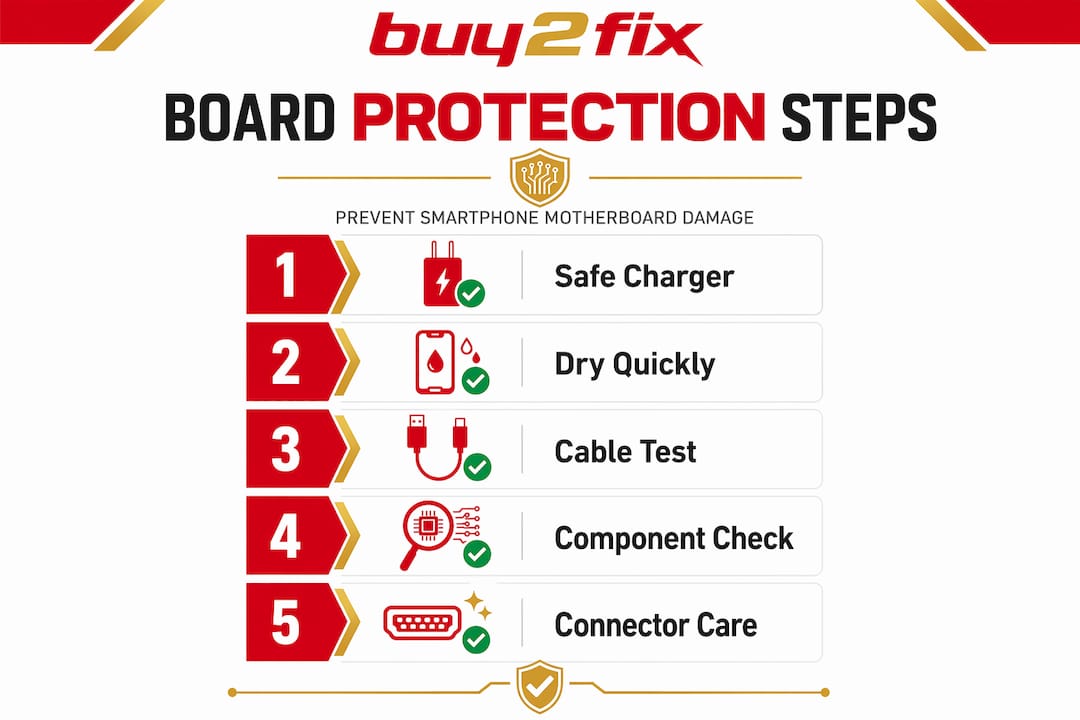
For additional guidance on sourcing reliable accessories and parts that protect rather than damage your devices, the replacement parts advice for UK users article is worth bookmarking.
Pro Tip: When a customer brings in a device that “just stopped working” with no obvious cause, ask about recent charging habits and accessories first. A failed power management IC after six months of cheap charging is one of the most common patterns in independent repair shops across the UK.
Why many motherboard repairs fail and how UK technicians can avoid common pitfalls
Here is where honest experience diverges from most repair guides. The failure rate on smartphone motherboard repairs, both DIY and professional, is higher than it should be. Not because the repair itself is inherently difficult, but because the failure points are mechanical and procedural rather than technical.
The most common cause of a failed motherboard swap is not the board itself. It is the antenna flex cable. After installing what is perfectly good replacement hardware, a technician closes the device and hands it back, only to get it returned an hour later with no mobile signal. Board swaps frequently fail due to antenna flex mis-seating, and immediate radio testing post-reassembly is the only reliable way to catch this before the customer leaves.
There is also the persistent tendency to assume software or battery causes in cases that are actually early-stage board failure. A phone that loses Wi-Fi after a drop does not have a software fault. A phone that restarts after charging does not need a new battery. Chasing these ghost diagnoses creates cycles of unnecessary work and customer distrust.
Water damage is the most time-sensitive category of all. Corrosion progresses under BGA chips where cleaning cannot reach effectively, and every day the board sits uncleaned compounds the problem. UK repairers working on liquid-damaged devices should treat the first two hours after ingress as the critical intervention window, not the next available appointment slot.
The repair discipline that actually works looks like this: eliminate external components first, test subsystems in isolation, verify every connector before reassembly, test radios and charging before closing the device, and document every step. Review the most avoidable repair mistakes before taking on any board-level job, and treat that list as a pre-repair checklist rather than a post-mortem exercise. That single shift in approach will improve first-time repair success rates more than any new tool you buy.
How buy2fix supports your smartphone motherboard repair journey
At buy2fix, we stock the parts, tools, and accessories that UK repair technicians and DIY enthusiasts actually need for motherboard-level work. Whether you need replacement boards for iPhone, Samsung Galaxy, Huawei, Xiaomi, or OPPO devices, or precision tools to carry out microsoldering and diagnostics, you will find a curated selection backed by quality checks before dispatch. We also offer free UK mainland shipping, a 30-day returns policy, and warranty support on eligible items, so you can order with confidence. Beyond parts, our growing library of repair guides and technical articles is designed to complement your diagnostic workflow and reduce the chance of costly errors.
Frequently asked questions
What are the most common signs that indicate a motherboard issue in a smartphone?
Common signs include the phone refusing to power on despite a good battery, random restarts or freezing, loss of network connectivity, charging problems that persist after port replacement, and intermittent touchscreen or camera failures. As motherboard fault diagnosis confirms, these five symptom categories reliably point to board-level problems rather than peripheral component faults.
Why does a phone sometimes fail weeks after liquid exposure?
Water causes corrosion inside the motherboard that grows progressively over time, weakening connections and eventually causing shorts or breaks. Delayed corrosion after liquid ingress snaps or shorts motherboard connections causing failure days or weeks after the initial event.
Can software fixes resolve motherboard hardware problems?
No. Motherboard damage is a physical fault and software updates cannot repair cracked solder joints, failed power ICs, or board layer separation caused by thermal stress. Hardware repair or full board replacement is required.
How can technicians prevent motherboard repair failures after a swap?
Carefully seat all antenna flex cables and connectors, perform immediate radio and charging tests before fully reassembling the device, and verify power behaviour at each stage. Immediate radio testing post-reassembly detects antenna flex seating errors before the customer takes the device away.
What are safe charging practices to protect a smartphone motherboard?
Use certified chargers and cables, avoid heavy app use during charging, keep ports clean of debris, and unplug once the device is fully charged. Using certified chargers and avoiding combined thermal and charging loads are the most effective ways to prevent power management IC damage over time.
Recommended
Let customers speak for us
Well made part very strong easy to fit great value for the money

Well packed, with fast shipping :)

Exactly what the doctor ordered…great color, comfort, and durability. Trust this watch band!

Brilliant strap, second purchase, bought bracelet before. Excellent value. Thank you

Great item for splitting your Audio signal

Outstanding product!
Next level customer service.

Very satisfied but the delivery needs to get more faster...

Good price,quick delivery

Best phone case ever! This is my second one as I broke my first. Would defo recommend

Great fitting Apple Watch bands

For Apple Watch Ultra 3 / 2 / 1 49mm RedPepper Armor Metal Case Integrated Silicone Watch Band(Steel Black White)

Good price and quick postage

Perfect fit.

Absolutely necessary

Second Purchase and still a very happy customer. Keep up the good work.
