

How long does the iPhone 11 Pro battery last?
TL;DR:
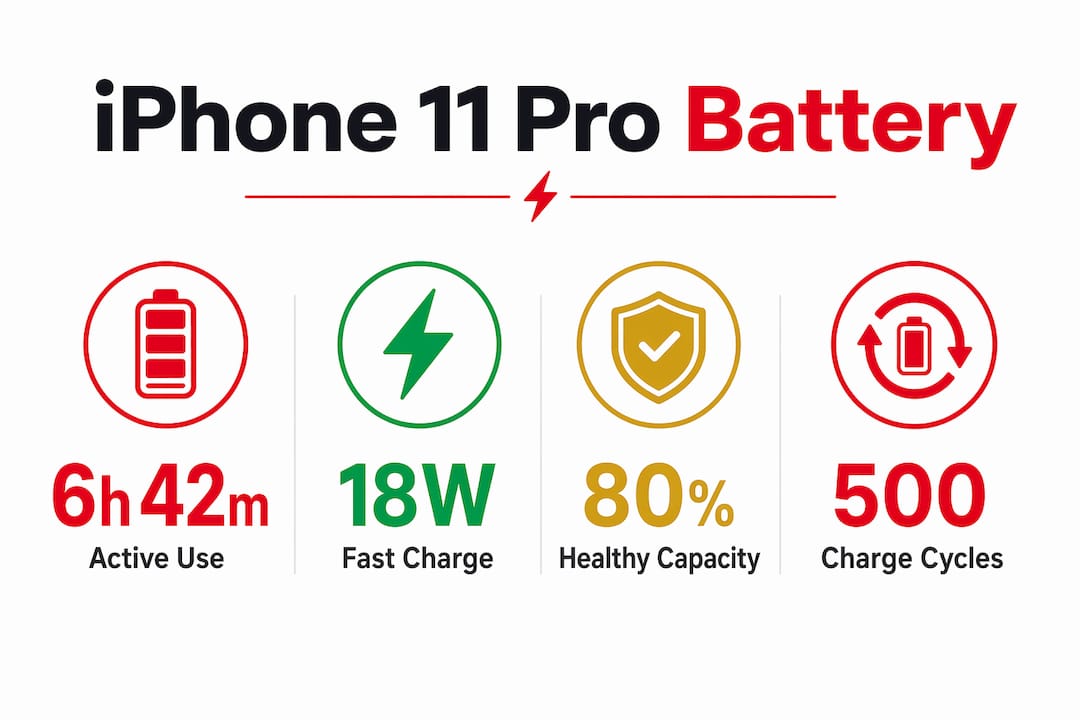
- The iPhone 11 Pro lasts around 6 hours and 42 minutes during continuous active use. Its battery health and charging habits significantly influence daily endurance and long-term performance. Replacing the battery at 80% capacity restores full function and extends the device’s lifespan.
The iPhone 11 Pro battery delivers approximately 6 hours and 42 minutes of continuous active usage on a full charge. That figure comes from endurance testing and represents real-world screen-on time, not standby. Apple defines a healthy battery as one retaining at least 80% capacity after 500 charge cycles, which equates to roughly 24–36 months of standard use. Once a battery drops below that threshold, daily runtime shrinks and iOS may begin throttling the A13 Bionic processor to prevent unexpected shutdowns. Understanding where your battery sits on that scale is the first step to managing your device properly.
How long does the iPhone 11 Pro battery last in daily use?
Real-world iPhone 11 Pro battery duration depends heavily on what you are actually doing with the phone. Streaming video, running navigation, or keeping the screen at full brightness all drain the cell far faster than reading emails or listening to music.
For most users with moderate habits, a full day of use is achievable. That means a mix of social media, messaging, some video, and calls without needing a midday top-up. Heavy users, those gaming, video calling, or using GPS for extended periods, will likely need to recharge before the evening. With battery health around 80%, moderate users can still expect a full day, though heavy use will push them toward a midday charge.
Screen-on time is the most honest metric for comparing phones. The iPhone 11 Pro’s 6 hours and 42 minutes of continuous active use places it well above the standard iPhone 11. That gap matters when you are deciding whether to upgrade or simply replace the battery.
Key daily use patterns and their impact on battery duration:
- Light use (calls, messaging, occasional browsing): battery typically lasts a full day with charge to spare
- Moderate use (social media, music, some video): expect a full day with 10–20% remaining by bedtime
- Heavy use (gaming, navigation, video streaming): plan for a midday charge or carry a power bank
- Background app refresh and push notifications: these quietly drain the battery even when the screen is off
Pro Tip: The iPhone 11 Pro supports fast charging via an 18W adapter, which can deliver a substantial charge boost in around 30 minutes. A quick lunchtime top-up can add several hours of use, making fast charging one of the most practical tools for heavy users.
What causes battery health to degrade in the iPhone 11 Pro?
Battery degradation is a chemical process, not a software bug. Every lithium-ion cell loses capacity over time as charge cycles accumulate and the electrolyte inside the battery gradually breaks down. The iPhone 11 Pro is no exception.
Apple’s own standard sets the benchmark clearly. A battery is considered healthy when it retains 80% of its original capacity after 500 charge cycles. Below that point, the cell can no longer reliably deliver the peak current the A13 Bionic demands under load. iOS responds by activating performance management, which caps processor speed to prevent sudden shutdowns. The phone feels slower, but it is actually protecting itself.
Several factors accelerate degradation beyond normal ageing:
- Charging to 100% and leaving it plugged in overnight raises the battery’s average state of charge, which stresses the cell chemistry over time.
- Letting the battery drain to 0% regularly forces deep discharge cycles, which are harder on lithium-ion cells than partial cycles.
- Exposure to heat is the single biggest accelerant of battery wear. Leaving the phone in a hot car or using it while charging intensively both raise internal temperature and speed up chemical ageing.
- Using uncertified chargers can deliver inconsistent voltage, which stresses the battery management system.
A common misconception is that iOS updates cause permanent battery damage. Post-update battery drain is usually temporary as the system reindexes apps and content. If drain persists beyond a few days, the cause is almost always a misbehaving app rather than hardware failure. Check battery usage by app in Settings to identify the culprit.
Pro Tip: Go to Settings > Battery > Battery Health and Charging to see your current capacity percentage. If it reads below 80%, iOS will display a message recommending service. Do not wait for that message to appear before acting.
How does the iPhone 11 Pro compare to the other iPhone 11 models?
The iPhone 11 series launched with three distinct battery sizes, and the differences in daily runtime are meaningful. The table below summarises the key performance figures across the three models.
| Model | Continuous active use | Video playback | Audio playback |
|---|---|---|---|
| iPhone 11 | ~5 hours 2 minutes | Up to 17 hours | Up to 65 hours |
| iPhone 11 Pro | ~6 hours 42 minutes | Up to 18 hours | Up to 65 hours |
| iPhone 11 Pro Max | Over 8 hours 30 minutes | Up to 20 hours | Up to 80 hours |
The iPhone 11 Pro Max carries the largest battery in the series and leads by a significant margin in continuous use tests. That extra endurance comes at the cost of a larger, heavier chassis. The standard iPhone 11 trades battery capacity for a lower price point and a lighter build.
The iPhone 11 Pro sits in the middle, offering a compact form factor with meaningfully better battery duration than the standard model. For users who want a pocketable phone that still gets through a full working day, the Pro is the better fit. Users who regularly work long days away from a charger, or who travel frequently, are better served by the Pro Max’s larger cell.
Battery capacity differences between the models are real, but they are not the only variable. The Pro’s OLED display is more power-efficient than the iPhone 11’s LCD screen, which partially explains why the Pro outperforms the standard model by more than the raw capacity difference would suggest.
What can you do to extend iPhone 11 Pro battery life and lifespan?
Battery management splits into two distinct goals: getting more hours out of each charge today, and keeping the battery healthy for longer over months and years. Both matter, and the strategies for each are different.
For daily runtime, these habits make a measurable difference:
- Enable Low Power Mode when you drop below 30%. It reduces background activity, mail fetch, and visual effects without making the phone unusable.
- Lower screen brightness manually or set Auto-Brightness on. The display is the single largest drain on the battery during active use.
- Turn off Background App Refresh for apps that do not need live updates. Social media apps are the worst offenders.
- Disable location services for apps that do not genuinely need them. Check Settings > Privacy > Location Services and set non-essential apps to “Never” or “While Using.”
For long-term battery health, the approach is about charging habits. Keeping the battery between 20% and 80% for most of its life reduces stress on the cell. Apple’s Optimised Battery Charging feature, available in iOS 13 and later, learns your routine and slows charging past 80% overnight to reduce wear. Leave it switched on.
Pro Tip: Replacing the battery at the 80% capacity threshold, rather than waiting until the phone becomes unusable, extends device service life by over a year and eliminates iOS performance throttling immediately. Many users report that a fresh battery makes the iPhone 11 Pro feel like a new device.
Practical battery longevity tips from repair specialists can help you build habits that protect your battery from the first day of ownership.
Key takeaways
The iPhone 11 Pro battery lasts approximately 6 hours and 42 minutes of continuous active use, with longevity determined by battery health, charging habits, and usage intensity.
| Point | Details |
|---|---|
| Baseline battery duration | Endurance tests confirm approximately 6 hours 42 minutes of continuous active use on a full charge. |
| Apple’s health threshold | A battery retaining 80% capacity after 500 cycles is considered healthy; below this, throttling begins. |
| Fast charging advantage | An 18W adapter delivers a substantial charge boost in around 30 minutes, extending effective daily use. |
| Comparison across models | The iPhone 11 Pro Max exceeds 8 hours 30 minutes; the standard iPhone 11 manages around 5 hours 2 minutes. |
| Replacement timing | Replacing the battery at the 80% threshold restores full performance and extends device life by over a year. |
The iPhone 11 Pro in 2026: what I have learned about managing its battery
I have been watching the iPhone 11 Pro age in real time, and the battery story is more nuanced than most guides admit. The phone launched with genuinely good battery performance for its size. Seven years on, battery health is the central factor determining whether it remains a capable daily device or becomes a frustrating liability.
What surprises most people is how much of the perceived slowdown is battery-related rather than processor-related. I have seen users convinced their phone needed replacing, only to find that a battery swap restored the snappy performance they remembered. Replacing the battery often resolves performance issues that users had wrongly attributed to software or ageing hardware.
My honest advice: check your battery health figure today. If it is below 85%, start planning a replacement. Do not wait for the phone to become unreliable. A proactive swap at 82% is far less disruptive than an emergency replacement when the phone starts shutting down at 40% charge. The iPhone 11 Pro is still a capable device in 2026. A fresh battery is often all it needs to prove that.
— Adewale
Battery replacement and repair options from Buy2fix
If your iPhone 11 Pro battery health has dropped below 80%, a replacement is the most cost-effective way to restore its performance. Buy2fix stocks quality replacement parts for iPhone models including the 11 Pro, and the team understands what repair technicians and DIY buyers need from a parts supplier.
Knowing the iPhone 11 battery replacement cost before you commit helps you plan properly and avoid overpaying. Buy2fix offers free UK mainland shipping, a 30-day return policy, and warranty support on eligible items, making it a practical choice for anyone looking to extend their device’s working life rather than replace it outright.
FAQ
How long does the iPhone 11 Pro battery last on a single charge?
Endurance testing confirms approximately 6 hours and 42 minutes of continuous active use. Moderate daily users typically achieve a full day without recharging.
What is a healthy battery percentage for the iPhone 11 Pro?
Apple defines a healthy battery as one retaining at least 80% of its original capacity after 500 charge cycles. Below this level, iOS may throttle processor performance to prevent unexpected shutdowns.
Does replacing the iPhone 11 Pro battery improve performance?
Yes. A new battery eliminates iOS performance management throttling, which is triggered by degraded cells. Many users report the phone feeling significantly faster after a battery replacement.
How do I check my iPhone 11 Pro battery health?
Go to Settings > Battery > Battery Health and Charging. The percentage shown reflects your battery’s current maximum capacity relative to when it was new.
Is post-update battery drain on the iPhone 11 Pro a sign of battery failure?
Not usually. Battery drain after an iOS update is typically temporary as the system reindexes. If drain persists beyond a few days, a misbehaving app is the most likely cause, not the battery itself.
Recommended
Let customers speak for us
The acid test of any company is how they respond when things go wrong. The Buy2Fix team were efficient in dealing with my emails and resolved the issue to my complete satisfaction

For Samsung Galaxy A26 SM-A266B Original Earpiece Speaker with Cable

Very good communication throught. Good product

Well made part very strong easy to fit great value for the money

Well packed, with fast shipping :)

Exactly what the doctor ordered…great color, comfort, and durability. Trust this watch band!

Brilliant strap, second purchase, bought bracelet before. Excellent value. Thank you

Great item for splitting your Audio signal

Outstanding product!
Next level customer service.

Very satisfied but the delivery needs to get more faster...

Good price,quick delivery

Best phone case ever! This is my second one as I broke my first. Would defo recommend

Great fitting Apple Watch bands

For Apple Watch Ultra 3 / 2 / 1 49mm RedPepper Armor Metal Case Integrated Silicone Watch Band(Steel Black White)

Good price and quick postage
