


1
/
de
10
No reviews
HXSJ M333 Three Modes Transparent Wireless Mouse(White)
HXSJ M333 Three Modes Transparent Wireless Mouse(White)
SKU: EDA008162501A
Prix habituel
£21.29
Prix habituel
Prix promotionnel
£21.29
Frais d'expédition calculés à l'étape de paiement.
Duties & Import Tax Information
Duties are only included if shown at checkout. Otherwise, your local government may apply customs fees, which your courier will collect directly from you before delivery.
In Stock
CHN
This item is shipped from China.
Processed in 0–3 days
Quantité
Impossible de charger la disponibilité du service de retrait
Shipping info
To find all available shipping methods and exact delivery times, add the product to your cart and check using our shipping calculator.
30-day returns
Fast refunds: Once we receive and check your item, we aim to process your refund within 48 hours.
Return postage: Just changed your mind? You'll need to cover the return postage. If the item arrived faulty, we'll cover the cost to get it back to us.
Your details are safe
We treat your data the way we'd want ours treated. Your payment details are locked down with bank-level encryption. We never actually see your credit card numbers, and we will absolutely never sell your personal information.
Selling Point:
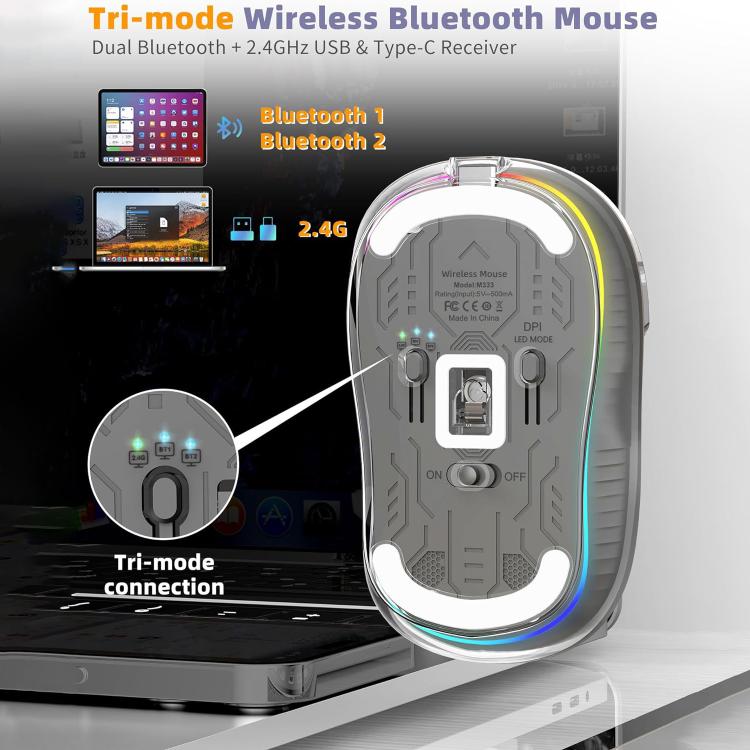
1. 1.2.4G + BT1 + BT2 wireless in the third mode, featuring a high-end PixArt 3212 IC design, ensuring smooth performance in both office work and gaming.
2. The fully transparent mouse has a beautiful and fashionable appearance, and comes in a variety of colors for your choice.
3. Four adjustable speeds of 2400, with a convenient 250Hz response speed.
4. Mute switch, with a lifespan of 10 million clicks, suitable for both men and women in office and gaming without disturbing others.
5. Built-in 400 milliampere rechargeable lithium battery, with a Type-C charging interface, and equipped with functions such as battery display light, energy-saving mode, and low battery prompt.
Product Parameters:
1. IC: Pix Art 3212
2. Working mode: 2.4G+BT1+BT2
3. Rate of return: 250HZ
4. Moving speed: 30inch/s
5. Refresh rate: 4800FPS
6. Acceleration: 10G
7. Number of switches: 5 Keys (Mute Design)
9. Switch life: 10 million times
10. Product material: PC+ABS+Colorful Roller
11. Voltage/current: 3.7V/30mA
12. Battery capacity: 400mAh
13. Working range: 10m
14. Length of charging line: 28cm (Type-c charging line)
15. Movement speed: 800/1200/1600/2400 Adjustable(Default 1600)
16. Movement speed light mode: Red(800) / Green(1200) / Blue(1600) / Purple(2400) Movement speed
17. Light mode:Colorful breathing light effect
18. Product size:10 x 6 x 3.8cm
19. Product weight: 81g
Package includes:
1. M333 Wireless Mouse(2.4G+BT5.1+BT5.1) x 1
2. USB & Type-C Receiver x 1
3. Charging cable(30cm Type-C) x 1
4. Instructions in English x 1
Suitable system:
1. The 2.4G usb version support Windows /Mac
2. The Bluetooth version support Windows /Mac /ios / android.
Light effect:
1. Light mode: Press and hold the movement speed button for 2 seconds to switch between 5 light modes, Colorful breathing.
Instructions:
1. USB connection
Step 1: Plug the receiverinto your computers USB port.
Step 2: Push the power switch at the bottom of the mouse to the "ON"and switch the button to 2.4G mode, the corresponding lightis flashing green, and then the green light off after connectingthe device, enterthe normal mode.
Step 3: Move the mouse or press the left/right button to use itnormally.
Bluetooth connection(BT1-BT2)
Step 1: Push the power switch at the bottom of the mouse to "ON"click the mouse three modes button , the blue lightscorresponding to the BT1/BT2 mode flashes, and start to enterthe code mode.
Step 2: Open the tablet/computer/phone, click the "Bluetoothinterface in the settings menu,Connect the pairing mouse(BT5.1Mouse).After the device is connected, the blue lightgoes off, Enter normal mode.
Step 3: Move the mouse or press the left/right button to use it normally.
Remarks:
Instructions and precautions:
1. When the mouse cursor moves slowly, please check whether the battery is low. It is recommended to charge it in time.
2. When the mouse cannot be connected, please check whether the power switch at the bottom of the mouse is turned on, and select the correct connection method or move the USB receiver to another USB port for use.
3. If you do not use the mouse for a long time, turn off the power switch manually to save power.
4. If the mouse is not used for a long time, it will automatically enter the sleep mode. Move the mouse or press any key to wake the mouse.
Three-mode Switching Method:
1. If the mouse is connected to three devices, you can press thethree-mode switch button to be flexible among the three devicesSwitch, the corresponding light will be on and flicker, then off, thedevice can work normally.
Charging Method:
It is recommended to use the USB interface of the computer tocharge the mouse.When the mouse is charged, the batterylightat the front ofthe6cell flashes. The battery light is alwayson when fully charged.
Battery Warning:
When the mouse is about to run out of power, the last bar of the battery light flashes an alarm prompt.
Please refer to the user manual for detailed instructions on how to use it.
1. 1.2.4G + BT1 + BT2 wireless in the third mode, featuring a high-end PixArt 3212 IC design, ensuring smooth performance in both office work and gaming.
2. The fully transparent mouse has a beautiful and fashionable appearance, and comes in a variety of colors for your choice.
3. Four adjustable speeds of 2400, with a convenient 250Hz response speed.
4. Mute switch, with a lifespan of 10 million clicks, suitable for both men and women in office and gaming without disturbing others.
5. Built-in 400 milliampere rechargeable lithium battery, with a Type-C charging interface, and equipped with functions such as battery display light, energy-saving mode, and low battery prompt.
Product Parameters:
1. IC: Pix Art 3212
2. Working mode: 2.4G+BT1+BT2
3. Rate of return: 250HZ
4. Moving speed: 30inch/s
5. Refresh rate: 4800FPS
6. Acceleration: 10G
7. Number of switches: 5 Keys (Mute Design)
9. Switch life: 10 million times
10. Product material: PC+ABS+Colorful Roller
11. Voltage/current: 3.7V/30mA
12. Battery capacity: 400mAh
13. Working range: 10m
14. Length of charging line: 28cm (Type-c charging line)
15. Movement speed: 800/1200/1600/2400 Adjustable(Default 1600)
16. Movement speed light mode: Red(800) / Green(1200) / Blue(1600) / Purple(2400) Movement speed
17. Light mode:Colorful breathing light effect
18. Product size:10 x 6 x 3.8cm
19. Product weight: 81g
Package includes:
1. M333 Wireless Mouse(2.4G+BT5.1+BT5.1) x 1
2. USB & Type-C Receiver x 1
3. Charging cable(30cm Type-C) x 1
4. Instructions in English x 1
Suitable system:
1. The 2.4G usb version support Windows /Mac
2. The Bluetooth version support Windows /Mac /ios / android.
Light effect:
1. Light mode: Press and hold the movement speed button for 2 seconds to switch between 5 light modes, Colorful breathing.
Instructions:
1. USB connection
Step 1: Plug the receiverinto your computers USB port.
Step 2: Push the power switch at the bottom of the mouse to the "ON"and switch the button to 2.4G mode, the corresponding lightis flashing green, and then the green light off after connectingthe device, enterthe normal mode.
Step 3: Move the mouse or press the left/right button to use itnormally.
Bluetooth connection(BT1-BT2)
Step 1: Push the power switch at the bottom of the mouse to "ON"click the mouse three modes button , the blue lightscorresponding to the BT1/BT2 mode flashes, and start to enterthe code mode.
Step 2: Open the tablet/computer/phone, click the "Bluetoothinterface in the settings menu,Connect the pairing mouse(BT5.1Mouse).After the device is connected, the blue lightgoes off, Enter normal mode.
Step 3: Move the mouse or press the left/right button to use it normally.
Remarks:
Instructions and precautions:
1. When the mouse cursor moves slowly, please check whether the battery is low. It is recommended to charge it in time.
2. When the mouse cannot be connected, please check whether the power switch at the bottom of the mouse is turned on, and select the correct connection method or move the USB receiver to another USB port for use.
3. If you do not use the mouse for a long time, turn off the power switch manually to save power.
4. If the mouse is not used for a long time, it will automatically enter the sleep mode. Move the mouse or press any key to wake the mouse.
Three-mode Switching Method:
1. If the mouse is connected to three devices, you can press thethree-mode switch button to be flexible among the three devicesSwitch, the corresponding light will be on and flicker, then off, thedevice can work normally.
Charging Method:
It is recommended to use the USB interface of the computer tocharge the mouse.When the mouse is charged, the batterylightat the front ofthe6cell flashes. The battery light is alwayson when fully charged.
Battery Warning:
When the mouse is about to run out of power, the last bar of the battery light flashes an alarm prompt.
Please refer to the user manual for detailed instructions on how to use it.
Verified Compatible
Guaranteed fit for device in the title. Wrong part? Full refund including shipping.
Partager


£21.29