


1
/
de
4
No reviews
KCEVE KC-KVM204DH 2 In 4 Out 8K 60Hz KVM Switch For 2 Computer 4 Monitors UK Plug
KCEVE KC-KVM204DH 2 In 4 Out 8K 60Hz KVM Switch For 2 Computer 4 Monitors UK Plug
SKU: TBD0606152604
Prix habituel
£81.79
Prix habituel
Prix promotionnel
£81.79
Frais d'expédition calculés à l'étape de paiement.
Duties & Import Tax Information
Duties are only included if shown at checkout. Otherwise, your local government may apply customs fees, which your courier will collect directly from you before delivery.
In Stock
CHN
This item is shipped from China.
Processed in 0–3 days
Quantité
Impossible de charger la disponibilité du service de retrait
Shipping info
To find all available shipping methods and exact delivery times, add the product to your cart and check using our shipping calculator.
30-day returns
Fast refunds: Once we receive and check your item, we aim to process your refund within 48 hours.
Return postage: Just changed your mind? You'll need to cover the return postage. If the item arrived faulty, we'll cover the cost to get it back to us.
Your details are safe
We treat your data the way we'd want ours treated. Your payment details are locked down with bank-level encryption. We never actually see your credit card numbers, and we will absolutely never sell your personal information.
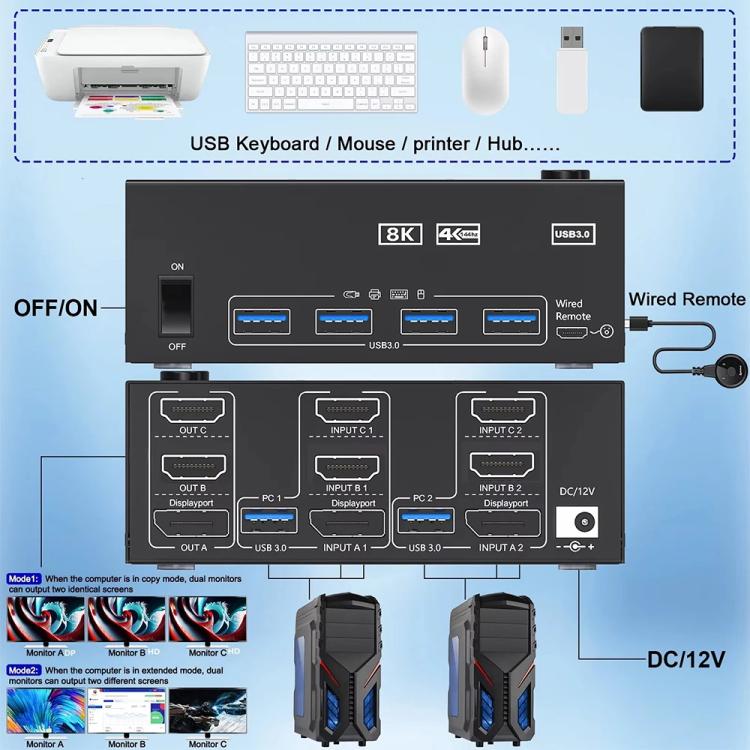
1. Allows 2 computers to share 4 displays and 4 USB3.0 ports (keyboard, mouse and other USB devices)
2. Supports 8K 60Hz / 4K 144Hz, please use HDMI2.1 and DP1.4 cables, if the set distance allows, the shorter the cable length, the better
3. With 4 USB3.0 ports, keyboard, mouse, printer, scanner and other USB devices can be recognized
4. USB 3.0 provides data transfer speeds up to 5Gbps, note that the USB input port must be connected to the computer, otherwise the keyboard and mouse will not be recognized
5. Supports extended display and duplicate display, press the P key on the keyboard and the Window key on the mouse at the same time to set, select the display mode you want
6. Plug and play, you can press the button on the panel or use the wired controller to switch computers, two colored lights indicate the active computer
7. Note: 2 DP + 2 HDMI cables and USB cables need to be connected to display four screens correctly. If the input USB3.0 port is not connected or connected incorrectly, the output USB device cannot be recognized. For desktops or laptops without 2 DP + 2 HDMI ports, a reliable adapter or docking station is required (not included)
8. Packing list: switcher x 1, USB3.0 cable x 2, wired controller x 1, user manual x 1, power adapter x 1
Verified Compatible
Guaranteed fit for device in the title. Wrong part? Full refund including shipping.
Partager


£81.79