


1
/
de
9
No reviews
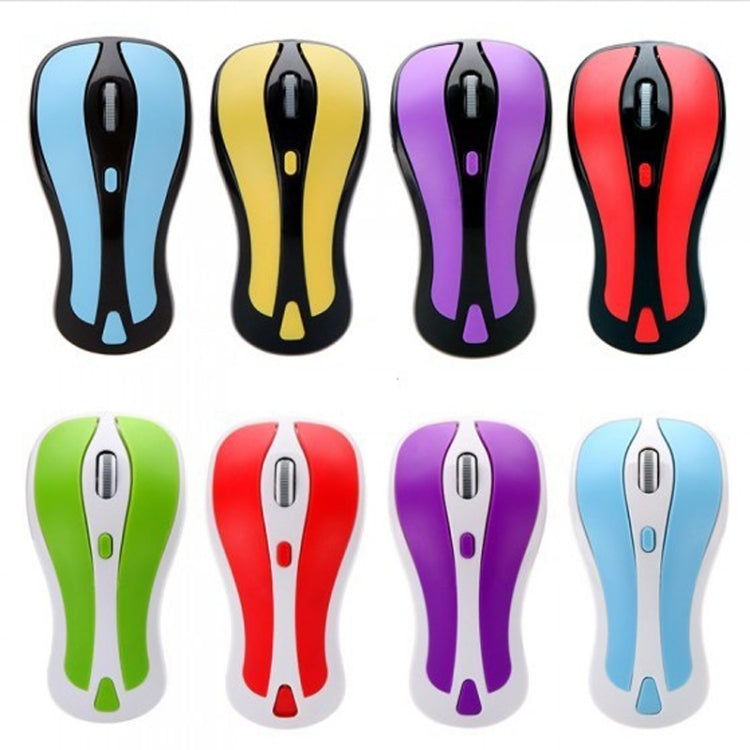
PR-01 6D Gyroscope Fly Air Mouse 2.4G USB Receiver 1600 DPI Wireless Optical Mouse for Computer PC Android Smart TV Box (Red + White)
PR-01 6D Gyroscope Fly Air Mouse 2.4G USB Receiver 1600 DPI Wireless Optical Mouse for Computer PC Android Smart TV Box (Red + White)
SKU: KB6572RW
Prix habituel
£28.89
Prix habituel
Prix promotionnel
£28.89
Frais d'expédition calculés à l'étape de paiement.
Duties & Import Tax Information
Duties are only included if shown at checkout. Otherwise, your local government may apply customs fees, which your courier will collect directly from you before delivery.
In Stock
CHN
This item is shipped from China.
Processed in 0–3 days
Quantité
Impossible de charger la disponibilité du service de retrait
Shipping info
To find all available shipping methods and exact delivery times, add the product to your cart and check using our shipping calculator.
30-day returns
Fast refunds: Once we receive and check your item, we aim to process your refund within 48 hours.
Return postage: Just changed your mind? You'll need to cover the return postage. If the item arrived faulty, we'll cover the cost to get it back to us.
Your details are safe
We treat your data the way we'd want ours treated. Your payment details are locked down with bank-level encryption. We never actually see your credit card numbers, and we will absolutely never sell your personal information.
Product Details
Type:
Wireless Mice
Main Features
1. 2 in 1 Mouse: 2.4GHz optical mouse + 6D gyroscope fly air mouse.
2. Wireless working distance: 10m.
3. 4-Levels DPI Adjustable: 600/800/1200/1600DPI.
4. Nano USB receiver, plug and play.
5. 6D gyroscope fly air mouse, control conveniently, easy to use.
6. Support system: Windows 2000 / XP / Vista / 7, Android, Mac OS etc.
7. Arched shape provides support for your hand in a natural and comfortable position.
8. Battery mode: 2 x AAA battery (not included).
Instruction for use
1. Press the Storage Key to open the battery compartment.
2. Take out the USB receiver form the battery compartment, plus it into a USB host on your PC.
3. Insert 2 AAA batteries with correct polarity (+/-).
4. Close the battery compartment.
5. Slide the power switch to the ON position.
6. After use, insert the USB receiver into your mouse battery compartment for storage.
Switch the mouse mode
1. The mouse is optical mouse default.
2. Click the Mode Select Key: The mouse goes to air mouse mode; Click the Mode Select Key again, the mouse returns to optical mouse mode.
Pairing the mouse
If the mouse not working while new batteries in the mouse, you should try to re-Pairing the mouse:
1. Click the pairing button one times, the mouse into pairing mode
2. Re-plug the USB wireless receiver into USB port of the PC
3. Wait 30 seconds, if the mouse still does not work, try again (1.2.), it may take several tries before you are successful.
1. 2 in 1 Mouse: 2.4GHz optical mouse + 6D gyroscope fly air mouse.
2. Wireless working distance: 10m.
3. 4-Levels DPI Adjustable: 600/800/1200/1600DPI.
4. Nano USB receiver, plug and play.
5. 6D gyroscope fly air mouse, control conveniently, easy to use.
6. Support system: Windows 2000 / XP / Vista / 7, Android, Mac OS etc.
7. Arched shape provides support for your hand in a natural and comfortable position.
8. Battery mode: 2 x AAA battery (not included).
Instruction for use
1. Press the Storage Key to open the battery compartment.
2. Take out the USB receiver form the battery compartment, plus it into a USB host on your PC.
3. Insert 2 AAA batteries with correct polarity (+/-).
4. Close the battery compartment.
5. Slide the power switch to the ON position.
6. After use, insert the USB receiver into your mouse battery compartment for storage.
Switch the mouse mode
1. The mouse is optical mouse default.
2. Click the Mode Select Key: The mouse goes to air mouse mode; Click the Mode Select Key again, the mouse returns to optical mouse mode.
Pairing the mouse
If the mouse not working while new batteries in the mouse, you should try to re-Pairing the mouse:
1. Click the pairing button one times, the mouse into pairing mode
2. Re-plug the USB wireless receiver into USB port of the PC
3. Wait 30 seconds, if the mouse still does not work, try again (1.2.), it may take several tries before you are successful.
Verified Compatible
Guaranteed fit for device in the title. Wrong part? Full refund including shipping.
Partager


£28.89