

Diagnose phone battery issues: a step-by-step UK guide
TL;DR:
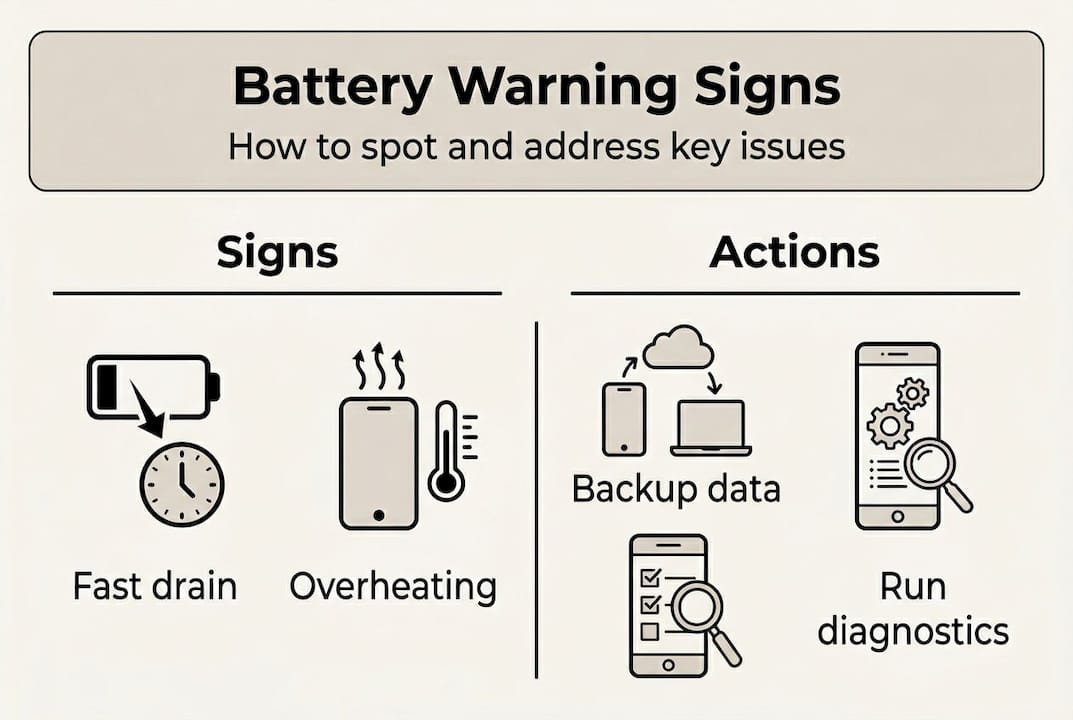
- Common battery issues include rapid drain, unexpected shutdowns, overheating, and swelling.
- Diagnostic tools and checking usage patterns help determine if a replacement is necessary.
- Battery replacement costs are generally cheaper than buying a new device and can extend phone lifespan.
Your phone’s battery drains unexpectedly, or it shuts down before the day is done. Sound familiar? Battery problems are among the most common complaints from smartphone owners in the UK, yet many people assume the worst and rush to buy a new device. The truth is, most battery symptoms including rapid drainage, unexpected shutdowns, overheating, and failure to charge properly, can be diagnosed at home with the right approach. This guide walks you through every step, from spotting the warning signs to interpreting results and deciding what to do next.
Table of Contents
- Recognising the signs of battery issues
- Preparing for a safe diagnostic process
- Step-by-step: Diagnosing battery health on your phone
- Interpreting results and deciding on next steps
- A practical perspective on phone battery diagnosis
- Expert help and next steps for battery replacement
- Frequently asked questions
Key Takeaways
| Point | Details |
|---|---|
| Spot major warning signs | Fast draining, overheating, or swelling signal common battery problems needing attention. |
| Use device diagnostics first | Always check your phone’s built-in battery tools for the most accurate health assessment. |
| Rule out soft faults | Apps and system settings can drain batteries, so verify software before blaming hardware. |
| Know when to replace | If your battery falls below 80% capacity or swells, replace it promptly for safety and performance. |
| Professional help is available | Seek a qualified technician if DIY solutions reveal serious battery issues or you need expert repair. |
Recognising the signs of battery issues
Before you start poking around in settings, it helps to know what you are actually looking for. Battery problems rarely appear out of nowhere. They tend to build gradually, and the symptoms are usually obvious once you know what to watch for.
Here are the most common warning signs to look out for:
- Rapid battery drain: Your phone loses charge far faster than it used to, even with light use.
- Unexpected shutdowns: The device switches off suddenly, often at 20% or higher charge remaining.
- Overheating: The phone becomes uncomfortably warm during normal tasks like browsing or calling.
- Failure to charge: The battery does not charge past a certain percentage, or charging is very slow.
- Swelling: The back cover bulges or the screen lifts slightly. This is a serious safety issue.
These phone battery symptoms cover the full range from mild inconvenience to genuine emergency. Swelling, in particular, must never be ignored.
Safety warning: A swollen or severely overheating battery is a fire risk. Do not charge the device, do not puncture the battery, and seek professional help immediately.
It is also worth understanding the difference between normal ageing and a sudden fault. Lithium-ion batteries degrade gradually over time, and 80% capacity after 800 cycles is what most manufacturers consider the end of a battery’s useful life, which typically falls around the two to three year mark. A sudden fault, by contrast, might appear after a drop, water exposure, or a charging incident.
Knowing which category your problem falls into shapes the entire diagnostic process. Gradual decline is predictable and manageable. Sudden faults can be trickier and may point to hardware damage beyond the battery itself. Either way, the battery replacement essentials are worth understanding before you make any decisions.
Preparing for a safe diagnostic process
Once you have spotted the warning signs, resist the urge to immediately start testing. A little preparation goes a long way, both for your safety and the accuracy of your results.
First, a firm rule: if your phone is swollen or getting dangerously hot, stop here. Do not run diagnostics on a device that poses a physical risk. Take it to a professional repair shop instead.
For everyone else, here is what you will need before starting:
- The original charger and cable (or a known working replacement)
- Access to your phone’s settings menu
- A battery health app if you are on Android (more on this shortly)
- Around 30 minutes of uninterrupted time
- Your phone charged to at least 20%
Overheating can indicate battery issues but it can equally be caused by demanding apps, a hot environment, or even a faulty charger. Ruling out these factors before assuming the battery is at fault saves you time and potentially money.
Here is a quick overview of the tools you might use and what each one does:
| Tool | Purpose |
|---|---|
| Built-in settings (iOS/Android) | Check battery percentage, usage, and health |
| Apple Diagnostics | Official battery health reading on iPhone |
| AccuBattery (Android) | Estimates capacity via charge cycles |
| Original charger and cable | Confirm charging hardware is not the issue |
| Third-party multimeter | Advanced users: test charge output |
Pro Tip: Back up your phone before running any advanced diagnostics or making changes. If something goes wrong during a repair or reset, you will not lose your photos, messages, or app data. Use iCloud, Google Drive, or a computer backup depending on your device.
Understanding how to prolong battery life is also useful context here. Some of what looks like a failing battery is actually poor charging habits that can be corrected without any hardware changes at all.
Step-by-step: Diagnosing battery health on your phone
With your tools ready, it is time to run the actual diagnosis. The process differs slightly between iOS and Android, but the core principles are the same.
For iPhone users:
- Open Settings and tap Battery.
- Tap Battery Health and Charging (or Battery Health on older models).
- Check the Maximum Capacity percentage shown. On Apple’s battery health page, anything below 80% is flagged as requiring replacement on iPhone 15 and newer.
- Look at the Battery Usage section to see which apps are consuming the most power.
- Review the Activity chart to spot unusual drain patterns over the last 24 hours or 10 days.
For Android users:
- Open Settings and navigate to Battery or Device Care (varies by manufacturer).
- Check the battery usage breakdown to identify heavy-draining apps.
- Download the AccuBattery app for a more detailed capacity estimate based on your charge cycles.
- Allow AccuBattery to run through at least three full charge cycles before trusting its capacity reading.
- Cross-reference the app result with your phone’s built-in battery stats.
Here is how official and third-party tools compare:
| Feature | Official diagnostics | Third-party apps (e.g. AccuBattery) |
|---|---|---|
| Accuracy | High | Moderate (improves over time) |
| Ease of use | Very easy | Easy after setup |
| Cost | Free | Free or small fee |
| Android support | Limited | Excellent |
| iOS support | Built-in | Limited |
Pro Tip: Before concluding the battery is faulty, check app battery usage on both iOS and Android. A single rogue app running in the background can drain a perfectly healthy battery in hours. Uninstall or restrict it and retest before assuming you need new hardware.
For further guidance on getting the most from your device, the tips on extending battery life are worth reading alongside your diagnostic results. And if you are already leaning towards a replacement, the battery replacement tips will prepare you well.
Interpreting results and deciding on next steps
You have run the diagnostics. Now what? The numbers and patterns you have gathered need to be translated into a clear decision.
Here is a straightforward way to think about it:
- Above 80% capacity, no unusual symptoms: Your battery is fine. Focus on software and charging habits.
- Between 80% and 70% capacity, with mild symptoms: Monitor closely. Consider optimising settings and usage patterns first.
- Below 80% capacity, with noticeable symptoms: Replacement is the sensible next step.
- Swelling, repeated sudden shutdowns, or failed diagnostics: Seek professional help immediately. Do not delay.
UK battery replacement costs typically run between £50 and £80, which is considerably cheaper than buying a new phone. If your device is still supported with software updates, a battery replacement can genuinely extend its life by two or more years.
That said, capacity percentage alone does not tell the whole story. As the battery diagnostics debate highlights, thermal performance and charge efficiency can vary significantly between two batteries showing identical capacity figures. A battery at 85% that runs hot under load may perform worse in practice than one at 78% that stays cool.
This is why behaviour matters as much as the number. If your phone shuts down at 30%, struggles in cold weather, or takes twice as long to charge as it once did, those are real-world signals that support the diagnostic data.
Understanding why replace your phone battery rather than the whole device is a decision worth thinking through carefully. For those curious about specific costs, the iPhone 11 battery replacement cost in the UK for 2026 is a useful reference point. And if you decide to go ahead yourself, the phone battery replacement guide covers the practical steps in detail.
A practical perspective on phone battery diagnosis
Having worked through countless repair scenarios, one pattern stands out clearly: most people misdiagnose their battery. They assume hardware failure when the real culprit is a poorly optimised app, an aggressive background sync setting, or a charging cable that is quietly underperforming.
The methodical approach matters more than most people realise. Rushing straight to a replacement without ruling out software issues first is an expensive shortcut. We have seen perfectly healthy batteries discarded because a single social media app was running location tracking around the clock.
There is also a subtler point worth making. Two phones with identical battery health readings can behave very differently in practice. Thermals, usage patterns, and even the age of the software all influence real-world performance. A battery that reads 82% but runs cool and charges efficiently will often outlast one at 88% that overheats regularly.
Patience and a structured process genuinely save money. Regular checks every six months, combined with good habits around extending your phone’s lifespan, keep devices running well for longer than most people expect.
Expert help and next steps for battery replacement
If your diagnostic results point clearly to a battery replacement, or if the process has surfaced symptoms you are not comfortable handling alone, professional support is the right call. At Buy2fix, we stock quality replacement batteries for iPhone, Samsung, Huawei, and many other major brands, with free UK mainland shipping and a one-year warranty on parts. Whether you are a confident DIY repairer or simply want to understand your options before visiting a technician, our range of repair parts and guides is designed to give you the information and components you need. A failing battery does not have to mean a new phone.
Frequently asked questions
How can I tell if my phone battery needs replacement?
If your battery capacity drops below 80% or you experience sudden shutdowns and swelling, replacement is strongly advised. These common battery symptoms are reliable indicators that the battery is no longer performing as it should.
Are third-party battery health apps reliable?
They can provide useful estimates, but official tools are preferred over third-party apps like AccuBattery for the most accurate readings. Use third-party apps as a guide, not a definitive verdict.
Can overheating always be blamed on the battery?
Not always. Overheating has multiple causes including demanding apps, hot environments, and faulty chargers. Always rule out these factors before concluding the battery is at fault.
How long do phone batteries usually last?
Most lithium-ion batteries retain acceptable performance for around two to three years, with 80% capacity after 800 charge cycles being the typical manufacturer benchmark for end of useful life.
Recommended
Let customers speak for us
Great phone case. Good quality. Exactly as described- thank you

Unfortunately after selecting the correct size of iPhone case for my iPhone 14, I without realising when selecting the colour clicked on the iPhone 14 Pro case.
Fortunately the case was slightly bigger so my phone still fits inside but I’ve had to remove the class from the rear so I still use my camera.

very happy with this item didn't take long to come

Potrivit

Battery direct replacement easy fix thanks to supplied tools.


For Samsung Galaxy Watch6 44mm SM-R940/R945 Original LCD Screen with Digitizer Full Assembly

For HMD Skyline 5G imak Shockproof Airbag TPU Phone Case(Matte Black)

Great product! Durable, light weight and easy to use. Stands up in high winds and weather storms. Covers all of my motorcycle and i have a VT1100. Over all im very happy with this.

Arrived in time, works perfectly.


LCD Flex Cable Adhesive Sticker For Apple Watch Series 5 44mm

For Samsung Galaxy S21 Ultra 5G SM-G998B Original 5G Flex Cable

No complaints at all, I got exactly what I needed, which was the genuine back cover of my mobile device. It was a perfect fit, the camera lenses functioning properly and so I now have a brand-new looking device in a perfect colour.

For Motorola Edge 30 Pro Kalebol Metal Hollow Lens Protection Ring
