

Tablet vs laptop repairs: What UK DIYers need to know
TL;DR:
- Repairing laptops is generally more cost-effective and has higher success rates for DIYers than attempting tablet repairs. Tablet repairs involve specialized tools, fused glass assemblies, and higher risks of failure, making professional repairs often the better choice. Considering device age, support status, and part costs are essential before deciding to repair or replace any device.
Many people assume that repairing a tablet is much the same as repairing a laptop. Both have screens, both have batteries, and both are common fixtures in homes and small businesses across the UK. That assumption, though, can cost you dearly. The reality is that success rates, part costs, tool requirements, and long-term value differ sharply between the two device types. Getting it wrong means stripped connectors, shattered glass, or a device that costs more to fix than to replace. This guide cuts through the confusion, giving you honest, practical advice grounded in real repair data.
Table of Contents
- Understanding the real differences: cost, complexity and outcomes
- Parts sourcing in the UK: Where value meets risk
- Repair success, device lifespan and when to reconsider
- DIY or professional repair: Making the right call for your device
- Why DIY tablet repairs are overrated—but laptops remain a smart fix
- Next steps: Making your repairs smarter and simpler
- Frequently asked questions
Key Takeaways
| Point | Details |
|---|---|
| Laptops offer easier repairs | Laptop screen and battery replacements are less risky and often cost less than comparable tablet fixes. |
| Parts sourcing matters | Buying UK-sourced, reputable parts is vital for both cost and reliability—especially for laptops. |
| Tablet repairs risk device loss | DIY tablet repairs fail more often due to delicate construction; pro repair or replacement is often the safer bet. |
| Factor in lifespan | Consider device support length and total costs before repairing, especially for ageing tablets. |
Understanding the real differences: cost, complexity and outcomes
Let’s be direct about something most repair guides gloss over: not all repairs are equal, and the gap between tablet and laptop repairs is wider than most DIYers expect.
Starting with cost, laptop screen replacement for parts alone runs £20 to £80 in the UK, with a full professional shop repair costing between £49 and £350 depending on the model. That’s a meaningful spread, but it’s generally predictable. Tablet repairs are a different story. Screen repairs for tablets cost between £60 and £350, with Android tablets typically falling in the £80 to £200 range and iPads commanding £150 to £350. Battery replacements add another £40 to £150 to the picture.
The tool requirement alone changes the risk profile significantly.
| Repair type | Typical DIY cost (parts) | Tools needed | DIY difficulty |
|---|---|---|---|
| Laptop screen | £20 to £80 | Screwdriver, spudger | Low to medium |
| Laptop battery | £20 to £60 | Screwdriver | Low |
| Tablet screen | £40 to £200 | Heat gun, suction cup, spudger | High |
| Tablet battery | £20 to £80 | Heat gun, prying tools | Medium to high |
Laptops, especially business-class models, are often designed with repairability in mind. Panels typically click or screw into bezels, and replacement is a matter of removing a few screws and swapping cables. Tablets, in contrast, use heat-activated adhesive to bond the glass and LCD into a fused assembly. Without a heat gun, you’re likely to crack the glass trying to remove it. Even with a heat gun, precision matters enormously: too much heat and you damage the display, not enough and the adhesive won’t release cleanly.
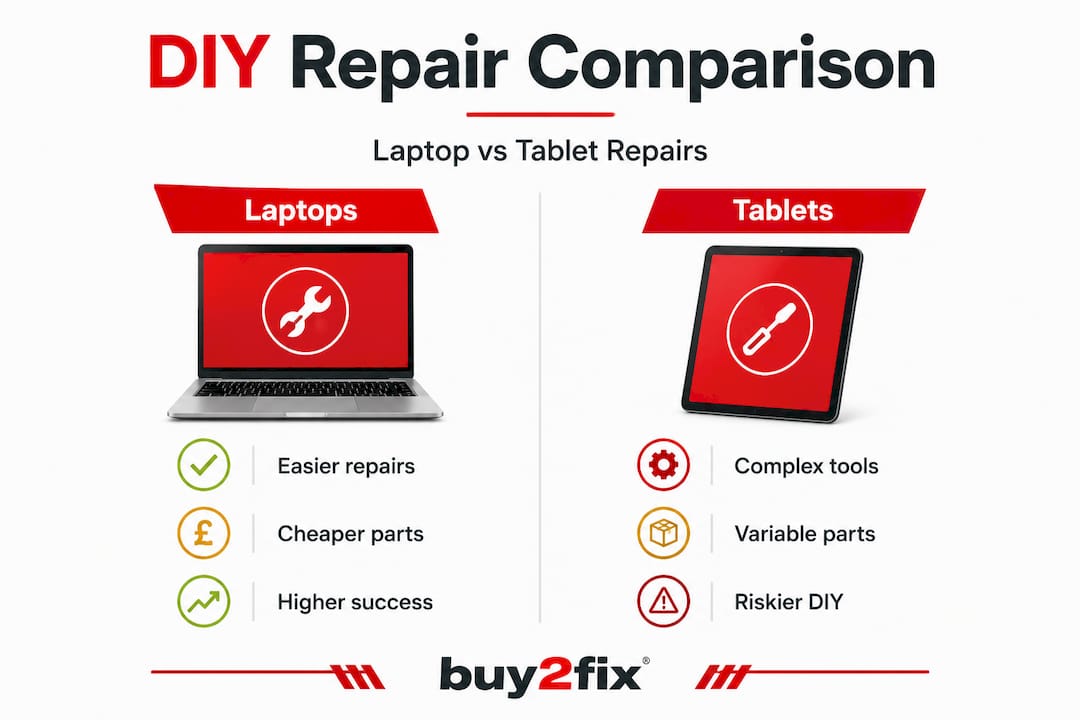
Which? data on laptop repair costs shows that costs range from £30 to £500, with modular designs offering clear savings for DIY. Sourcing laptop panels locally can cut costs by 40 to 60% compared to professional labour. Compare that experience to typical tablet repairs, and the difference in achievable savings becomes stark, especially once you account for the higher rate of DIY failures on glued assemblies.
For context on how tablet repair costs compare to phone screen repairs, UK phone vs tablet repair costs is worth checking before committing to either repair path.
“The success of any DIY repair starts before you pick up a tool. If the device design works against you from the start, no amount of skill fully compensates.”
Common failure points when things go wrong include:
- Torn display cables during tablet screen removal
- Cracked replacement glass from incorrect heat application
- Stripped screw heads on older laptops
- Connector damage from prying tools used too aggressively
- Adhesive residue interfering with replacement screen seating
Parts sourcing in the UK: Where value meets risk
Having seen the costs and challenges, next you need to know how to source the right parts without wasting money or risking device damage.
The UK parts market for laptops is well-supplied. Specialists stock panels starting from around £19, and because laptop displays follow more standardised sizing conventions (15.6 inch, 14 inch, 13.3 inch), finding a compatible replacement is generally straightforward. You need the screen size, resolution, and connector type, and most listings include all three.
Tablets are more problematic. Tablet parts availability via Amazon and iFixit is reasonable, but model-specific assemblies are considerably pricier relative to the device’s second-hand value. An older Android tablet worth £60 on the used market might require a £45 screen assembly, leaving almost no margin for error. One mistake and you’ve spent more than the device is worth.
| Parts factor | Laptop | Tablet |
|---|---|---|
| Part availability | High, wide range | Variable, model-specific |
| Cost relative to device value | Usually favourable | Often poor on older devices |
| Compatibility risk | Low with correct specs | Higher due to OEM variation |
| Quality tiers available | OEM, aftermarket, refurbished | Fewer genuine alternatives |
The quality tier issue deserves special attention. Off-brand laptop panels are widely available at low prices, and for everyday use, many perform adequately. But non-genuine tablet assemblies carry far greater risk. Colour accuracy, touch sensitivity, and brightness can all fall short of the original, and some cheap assemblies fail within months. For high-use devices, this false economy catches people out repeatedly.

Pro Tip: Before ordering any part, check the full part number from your device’s service manual or the original component. For tablets especially, even minor hardware revisions between production batches can mean a part listed as compatible simply does not fit.
For deeper guidance on finding the right components without overspending, our resources on DIY tablet parts sourcing and extending tablet life with the right parts cover common pitfalls and what to look for in a reputable UK supplier.
When deciding whether parts sourcing is worth the effort, always factor in the device’s remaining useful life, which leads neatly into the next question.
Repair success, device lifespan and when to reconsider
Knowing where and how to buy parts is vital, but is the repair even worth it? Here’s what UK DIYers should weigh up before starting any repair.
Device lifespan data tells a clear story. Laptop failure rates vary significantly by brand: a Lenovo ThinkPad, for example, shows roughly 8.3% failure over three years, with an average lifespan of 6.2 years. That kind of longevity makes a £50 battery replacement on a four-year-old business laptop an excellent investment.
Tablets age out of usefulness far more quickly, and software support is the main culprit. Android tablets typically receive three to four years of OS updates from the manufacturer, whereas Apple supports iPads for five to seven years. Once a device stops receiving security patches, using it for sensitive tasks (banking, email, business apps) becomes risky. Repairing an Android tablet that is already outside its support window is rarely a sound decision, even if the physical repair itself goes well.
Situations where laptop repair makes clear sense:
- Battery capacity has dropped below 60% but all other components work
- Hinge damage has caused screen cracks (fix typically costs £50 to £90 in the UK, per repair cost data)
- Keyboard or trackpad failure on a machine less than five years old
- Single RAM slot failure on a model with two slots
Red flags that suggest repair is not worthwhile:
- Motherboard or logic board faults on either device type
- Tablet software support has already ended
- Part cost exceeds 50% of the device’s replacement value
- Evidence of liquid damage beyond the original visible area
Pro Tip: Run a quick check on the device’s software support status before ordering any parts. For Android tablets, the manufacturer’s website lists end-of-support dates. For iPads, Apple’s support pages are definitive. A device that won’t receive security updates within six months is rarely worth a costly repair.
Tablet screen repairs specifically carry the lowest DIY success rates among common device repairs, largely because fused glass assemblies punish any technique errors severely. Compare this to a laptop hinge repair or screen swap, where a methodical approach with basic tools routinely succeeds even for first-timers. For a practical, detailed breakdown of the process, the step-by-step tablet repair guide gives you a realistic view of what each stage involves.
DIY or professional repair: Making the right call for your device
Factoring in lifespan and support, it’s time to decide: should you do the repair yourself or call in a pro? Let’s break it down.
The honest answer is that the right choice depends on four intersecting factors: the device’s value, your tool access, the part cost, and your own skill and risk tolerance. Getting even one of these wrong tips the balance.
Here’s a structured decision process that works for most UK DIY repair situations:
- Check the device value. Look up the current second-hand price for your exact model. If parts cost more than 40 to 50% of that value, the maths rarely favours repair.
- Assess your tool access. Laptop repairs need a precision screwdriver set and a spudger. Tablet repairs additionally require a heat gun and, ideally, a suction cup with a handle. If you don’t own a heat gun and plan to use it only once, factor in the purchase cost.
- Evaluate the part quality options. High-quality replacement parts matter enormously for tablets. Tablet screen repair costs from professionals run £60 to £350, partly because good technicians use better assemblies and carry liability if things go wrong.
- Consider warranty risk. Some devices, particularly newer iPads and premium Android tablets, lose any remaining warranty if opened. If you’re within the manufacturer warranty period, always exhaust that route first.
- Be honest about your skill level. Laptop screen swaps are genuinely beginner-friendly. Tablet repairs are not. Watching one YouTube tutorial does not prepare you for the resistance of a properly bonded glass assembly on the actual device.
“Professional repair costs more upfront, but a failed DIY repair on a tablet almost always costs more in total once you factor in the replacement assembly, tools, and ultimately the professional fee you still end up paying.”
For cost-saving tablet repair tips that work in real UK scenarios, practical guidance helps you identify which repairs are genuinely accessible versus which ones consistently go wrong for DIYers. If you’re weighing up the relative merits of different repair paths, the DIY vs pro repairs comparison is a useful further resource.
Why DIY tablet repairs are overrated—but laptops remain a smart fix
Now that we’ve weighed all the angles, here’s an honest insider view: the popularity of tablet DIY repair is built on wishful thinking more than practical evidence.
Tablet repairs look approachable in online videos. The presenter works confidently with a heat gun, the glass lifts cleanly, and the whole job wraps up in fifteen minutes. What those videos don’t show is the number of times that same repair went wrong before the footage worth publishing was captured. In practice, fused glass assemblies and fragile connectors mean that tablet screen repairs have the lowest DIY success rates of any common device repair. Even skilled technicians take care on these jobs.
Laptop repairs, by comparison, are consistently underestimated. A screen swap on a modular business laptop, a battery replacement on a mid-range consumer machine, or even a keyboard replacement on most Windows laptops are all jobs where a methodical DIYer can achieve professional-level results with under £80 in parts and an hour of careful work. The return on investment is excellent, especially for devices that still have several productive years ahead of them.
Our view, formed from working closely with both DIY buyers and professional repair technicians across the UK, is this: the best repairers know their limits. Spending £25 on a laptop screen and completing a successful repair is satisfying and genuinely cost-effective. Spending £60 on a tablet assembly, cracking it during removal, and then spending another £60 on a replacement before finally paying a professional is a hard lesson that arrives too late.
The common tablet repair limits are worth reading before committing to any tablet repair, particularly if you’re relatively new to device work. Understanding exactly what can go wrong is not pessimism. It’s preparation.
Practically, our recommendation is to treat laptop repairs as a strong DIY opportunity in most cases, approach tablet repairs conservatively, and reserve tablet DIY work for lower-risk jobs like battery replacements on devices with accessible rear panels. When the repair involves fused glass, seriously consider whether the professional route makes more financial sense overall.
Next steps: Making your repairs smarter and simpler
Armed with accurate cost data, parts sourcing guidance, and a realistic view of success rates, you’re in a much stronger position than most DIYers who start with a screwdriver and optimism. The difference between a successful repair and a costly mistake often comes down to having the right information before you start. At Buy2fix, we stock a broad range of tablet and laptop parts sourced for quality and dispatched with free UK mainland shipping. Whether you’re replacing a laptop screen, sourcing a tablet battery, or looking for a reliable component for a Samsung Galaxy Tab or iPad, our catalogue covers the parts UK DIYers and repair businesses actually need. Our 30-day return policy and warranty support on eligible items mean you’re not taking on unnecessary risk when you order from us.
Frequently asked questions
Which is cheaper to repair in the UK: tablets or laptops?
Laptop repairs are generally cheaper and more successful for DIY, with parts costing £20 to £80 for screens, while tablet screen repairs run £60 to £350 including professional labour.
Are tablet repairs riskier for DIYers?
Yes, most tablets require specialised tools and carry a higher DIY failure rate. Heat guns and suction cups are essential for adhesive-bonded assemblies, and connector damage is a common consequence of rushed or incorrect technique.
Where can I buy genuine parts for laptop or tablet repairs in the UK?
Specialist UK sites stock laptop panels from around £19, while tablet parts are available via Amazon, iFixit, and vetted UK retailers, though model-specific assemblies can be pricier relative to older device values.
How long do repaired laptops and tablets usually last?
Durable laptop brands average 6.2 years of use with failure rates as low as 8.3% over three years, while tablets offer three to seven years of software support depending on the manufacturer.
Is it ever better to replace instead of repair?
If Android tablet updates have ended or if part costs approach the device’s resale value, replacement is usually the smarter financial decision rather than investing in a repair with limited remaining useful life.
Recommended
Let customers speak for us
Well made part very strong easy to fit great value for the money

Well packed, with fast shipping :)

Exactly what the doctor ordered…great color, comfort, and durability. Trust this watch band!

Brilliant strap, second purchase, bought bracelet before. Excellent value. Thank you

Great item for splitting your Audio signal

Outstanding product!
Next level customer service.

Very satisfied but the delivery needs to get more faster...

Good price,quick delivery

Best phone case ever! This is my second one as I broke my first. Would defo recommend

Great fitting Apple Watch bands

For Apple Watch Ultra 3 / 2 / 1 49mm RedPepper Armor Metal Case Integrated Silicone Watch Band(Steel Black White)

Good price and quick postage

Perfect fit.

Absolutely necessary

Second Purchase and still a very happy customer. Keep up the good work.
