

Identify and fix ASUS battery issues for better performance
Recognising genuine ASUS battery problems early can save you hours of frustration and costly misdiagnoses. Many DIY repairers struggle to distinguish between a failing battery and other hardware faults, leading to unnecessary component replacements. ASUS smartphone batteries typically show degradation after 300-500 charge cycles, usually within 1.5 to 2 years of regular use. This guide provides clear evaluation criteria to help you accurately identify battery issues, compare repair solutions, and make informed decisions about whether to repair or replace your ASUS device’s power source.
Table of Contents
- Key takeaways
- Recognising and diagnosing common ASUS battery issues
- Top options for repairing and replacing ASUS smartphone batteries
- Comparison of replacement parts and tools for ASUS battery repair
- Deciding when to repair or replace an ASUS battery: practical advice
- Enhance your ASUS repair with quality parts and expert advice
- What causes ASUS battery swelling and how to prevent it?
- How long does an ASUS smartphone battery typically last?
- Can I replace my ASUS battery at home safely?
- What are signs that my ASUS battery needs replacing?
Key Takeaways
| Point | Details |
|---|---|
| Degradation timeframe | ASUS smartphone batteries typically degrade after 300 to 500 charge cycles, or about 18 to 24 months of regular use. |
| Common failure signs | Symptoms include rapid drain, swelling, overheating, unexpected shutdowns and not charging fully, which helps distinguish battery faults from other hardware issues. |
| Diagnostic approach | Accurate diagnosis uses battery health data to compare design capacity with current maximum capacity and includes checks for bulging or discolouration. |
| Replacement guidance | Replacement should be considered when capacity is below eighty per cent, using a matching model battery and proper adhesive removal and reapplication. |
Recognising and diagnosing common ASUS battery issues
Accurate diagnosis starts with understanding the specific symptoms that indicate battery failure rather than other hardware problems. Common ASUS smartphone battery issues include rapid drain, swelling, overheating, sudden shutdowns, and not charging fully, typically appearing after 1.5 to 2 years or 300 to 500 cycles. Physical swelling is perhaps the most obvious warning sign, often visible as a bulging back cover or screen separation. This occurs when internal chemical reactions produce gases that expand the battery cell, creating a serious safety hazard that requires immediate attention.
Rapid battery drain manifests differently from normal capacity reduction. You might notice your fully charged ASUS device depleting to 20% within just a few hours of light use, or the percentage dropping suddenly from 40% to 5% without warning. These behaviours suggest the battery management system can no longer accurately track charge levels or that internal resistance has increased significantly. Overheating during normal use or charging, particularly when the device becomes uncomfortably hot to touch, indicates potential cell damage or short circuits within the battery pack.
Unexpected shutdowns present another clear diagnostic criterion, especially when they occur at charge levels above 20%. Your device might power off suddenly during routine tasks, then refuse to restart until connected to a charger. This symptom often appears alongside charging problems, where the battery refuses to charge beyond a certain percentage or takes unusually long to reach full capacity. Understanding these battery replacement essentials helps you evaluate whether symptoms stem from the battery itself or from charging circuitry issues.
Measuring actual battery capacity provides objective data for diagnosis. You can use battery health apps that report design capacity versus current maximum capacity, revealing the extent of degradation. A battery showing less than 80% of its original capacity typically needs replacement, particularly if accompanied by other symptoms. Physical inspection complements software diagnostics. Remove the back cover carefully and examine the battery for bulging, discolouration, or unusual odours.
Pro Tip: Document your device’s behaviour patterns over several days before diagnosing battery failure. Note shutdown percentages, charging times, and temperature readings to distinguish between genuine battery issues and software-related power management problems that might resolve with a factory reset.
Top options for repairing and replacing ASUS smartphone batteries
Replacing a degraded or faulty battery represents the most effective solution for restoring your ASUS smartphone’s performance and safety. ASUS batteries typically degrade to 76% within under 2 years, provoking faster drain and shutdowns that compromise daily usability. The replacement process requires specific tools including plastic prying tools, spudgers, tweezers, and heat sources for softening adhesive. Quality replacement batteries matching your exact ASUS model specifications ensure compatibility and optimal performance.
Proper adhesive application is crucial for successful battery replacement. Old adhesive must be completely removed using isopropyl alcohol and plastic scrapers before installing new adhesive strips. These strips secure the battery firmly whilst allowing for potential future removal if needed. Temperature management during installation prevents damage to both the new battery and surrounding components. Never apply excessive heat that could warp the device frame or damage the display assembly.
Beyond replacement, several maintenance practices extend battery lifespan and optimise performance. Avoiding complete discharge cycles helps preserve battery chemistry, as lithium-ion cells experience less stress when maintained between 20% and 80% charge. Extreme temperature exposure accelerates degradation, so keep your device away from direct sunlight, hot vehicles, and freezing conditions. Regular calibration, performed by fully charging then completely discharging the battery once monthly, helps the battery management system maintain accurate charge level reporting.
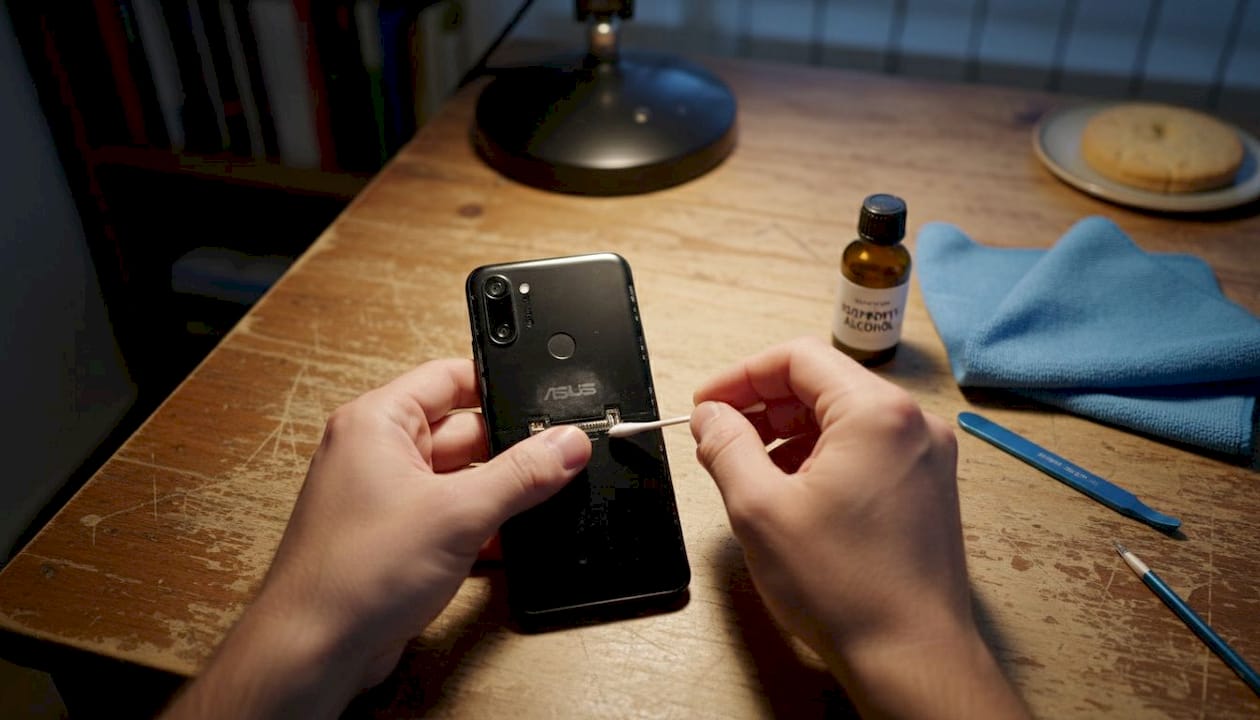
Cleaning battery contacts and connector pins removes oxidation and debris that can cause charging problems or poor electrical connections. Use a soft brush and isopropyl alcohol to gently clean these areas during battery replacement. This simple step often resolves intermittent charging issues that might otherwise be misattributed to battery failure. Following a comprehensive phone battery replacement guide ensures you complete each step correctly and safely.
Software optimisation complements physical battery care. Disabling unnecessary background processes, reducing screen brightness, and limiting location services when not needed all reduce power consumption. Battery saver modes built into ASUS devices intelligently manage performance to extend runtime, particularly useful whilst waiting for replacement parts to arrive. These battery replacement tips help you maintain optimal device performance throughout the battery’s usable life.
Pro Tip: Always disconnect the battery connector as your first step when opening an ASUS device for any repair work. This prevents short circuits and protects sensitive components from accidental damage during the repair process, even if you’re not specifically working on battery replacement.
Comparison of replacement parts and tools for ASUS battery repair
Selecting appropriate replacement components and tools directly impacts repair success and long-term device reliability. The table below compares popular options for ASUS battery repairs, helping you choose parts that match your specific model and repair requirements.
| Component | Specification | Compatibility | Key benefit |
|---|---|---|---|
| OEM battery | Original capacity, exact fit | Model-specific | Guaranteed compatibility and performance |
| Aftermarket battery | 10-20% higher capacity options | Multiple models | Cost-effective with good quality options |
| Adhesive strips | Pre-cut for specific models | ROG Phone series, Zenfone models | Precise fit and proper sealing |
| Universal adhesive | Cut-to-size sheets | All ASUS models | Flexibility for various repairs |
| Plastic prying tools | Non-conductive material | Universal | Prevents short circuits and scratches |
| Heat gun/mat | Controlled temperature | Universal | Safe adhesive softening |
Adhesive selection varies by model and repair complexity. Back housing adhesive for ROG Phone II provides pre-cut strips that match the exact dimensions needed for that gaming-focused device, ensuring proper sealing against dust and moisture. Similarly, front housing adhesive for Zenfone 3 Max offers model-specific dimensions for secure display attachment. For newer models, back housing adhesive for ROG Phone 3 maintains the device’s premium build quality whilst facilitating future repairs.
Battery capacity ratings require careful consideration. Battery degradation leads to about 20% capacity loss after 500 cycles on certain ASUS models, making higher-capacity replacements attractive. However, physical dimensions must match exactly to fit within the device’s battery compartment. Batteries with significantly higher capacity than original specifications may not fit properly or could generate excessive heat during charging.
Authenticity verification prevents purchasing counterfeit batteries that pose safety risks. Genuine replacement batteries include proper certification markings, detailed specifications printed on the cell, and protection circuits that prevent overcharging and overheating. Reputable suppliers provide warranty coverage and detailed compatibility information, reducing the risk of purchasing incorrect or substandard components.
Tool quality affects both repair difficulty and component safety. Professional-grade plastic prying tools flex without breaking, allowing you to work adhesive loose gradually without cracking the device housing. Metal tools, whilst more durable, conduct electricity and can easily scratch or dent aluminium frames. Magnetic mats help organise tiny screws during disassembly, preventing loss of critical fasteners.
User reviews and compatibility charts guide component selection. Pay particular attention to reviews mentioning specific ASUS models matching yours, as battery compartment dimensions and connector types vary significantly across the product range. Batteries marketed as universal rarely provide optimal fit or performance compared to model-specific options.
Deciding when to repair or replace an ASUS battery: practical advice
Making informed decisions about battery repair versus replacement requires evaluating multiple factors beyond simple symptom recognition. Consider these criteria systematically to choose the most appropriate and cost-effective solution for your situation.
-
Assess battery health metrics objectively using diagnostic software that reports actual capacity versus design capacity. Batteries retaining more than 80% capacity may benefit from maintenance and optimisation rather than immediate replacement. Those below 70% capacity typically require replacement to restore acceptable performance, particularly if experiencing multiple symptoms simultaneously.
-
Evaluate device age and overall condition before investing in battery replacement. Devices approaching 3 to 4 years old may have other components nearing end of life, making battery replacement a temporary fix. Conversely, relatively new devices with premature battery failure benefit significantly from replacement, potentially extending usable life by another 1 to 2 years.
-
Calculate cost-effectiveness by comparing replacement battery prices with the device’s current market value. If replacement costs exceed 30% of the device’s resale value, consider whether upgrading to a newer model might provide better long-term value. Factor in your technical skill level, as professional installation adds significant cost compared to DIY replacement.
-
Consider environmental impact when deciding between repair and replacement. Battery replacement significantly reduces electronic waste compared to discarding the entire device. Proper disposal of old batteries through certified recycling programmes ensures hazardous materials are handled safely whilst recovering valuable materials for reuse.
-
Examine symptom severity and safety implications carefully. Swollen batteries present immediate safety hazards requiring urgent replacement regardless of other factors. Devices with swelling should be powered off immediately and stored in a safe location away from flammable materials whilst awaiting repair. Less severe symptoms like moderate drain increase allow more time for decision-making and parts sourcing.
Rapid battery deterioration after 500 cycles or 1.5-2 years often necessitates replacement to avoid performance issues that impact productivity and device usability. Regular battery health monitoring helps you anticipate replacement needs before emergency situations arise. Schedule replacements proactively when capacity drops below 80% rather than waiting for complete failure.
Warranty status influences repair decisions significantly. Devices still under manufacturer warranty should be serviced through official channels to preserve coverage, even if DIY repair appears simpler. Unauthorised repairs typically void warranties, potentially costing more if subsequent failures occur. Check warranty terms carefully before proceeding with any repair work.
Your technical confidence and available tools matter considerably. Battery replacement requires careful work with delicate components and strong adhesives. If you lack experience with electronics repair or don’t have proper tools, professional service may prove more cost-effective than purchasing tools and risking device damage. However, following detailed guides and taking your time makes DIY replacement achievable for most technically-inclined individuals. Understanding the benefits of battery replacement helps you appreciate the value this repair provides.
Pro Tip: Create a decision matrix scoring factors like battery health percentage, device age, repair cost, and your technical skill level. Assign weights to each factor based on your priorities, then calculate a total score to guide your repair-versus-replace decision objectively rather than relying solely on intuition.
Enhance your ASUS repair with quality parts and expert advice
Successful ASUS battery repair depends on accessing reliable replacement components and proven repair techniques. Buy2fix UK specialises in mobile device repair parts, offering model-specific batteries and adhesives that ensure proper fit and performance for your ASUS smartphone. Whether you’re a DIY enthusiast tackling your first battery replacement or a professional repairer managing multiple devices, quality parts make the difference between successful repairs and frustrating failures.
Comprehensive repair guides walk you through each step of the battery replacement process, from initial disassembly to final testing. The detailed battery replacement guide covers safety precautions, tool requirements, and common pitfalls to avoid during ASUS repairs. Practical battery replacement tips help you work efficiently whilst minimising risk to your device’s delicate components. These resources support both learning and execution, building your confidence and capability for future repairs.
What causes ASUS battery swelling and how to prevent it?
Battery swelling results from gas buildup inside lithium-ion cells, typically caused by overcharging, excessive heat exposure, or natural degradation over time. Chemical reactions within aged batteries produce gases that expand the cell casing, creating visible bulging. Using non-original chargers that deliver incorrect voltage or current accelerates this process by stressing battery chemistry beyond safe parameters.
Prevention focuses on proper charging habits and environmental control. Always use original or certified replacement chargers that match your device’s specifications exactly. Avoid leaving your ASUS device charging overnight or in hot environments like vehicles during summer. Replace batteries proactively when they reach 1.5 to 2 years of age, before swelling begins.
How long does an ASUS smartphone battery typically last?
ASUS batteries degrade to around 76% capacity within two years, typically lasting 1.5 to 2 years or 300 to 500 charge cycles before experiencing significant performance decline. Actual lifespan varies based on usage patterns, charging habits, and environmental conditions. Heavy users who frequently deplete their battery completely or expose devices to temperature extremes see shorter lifespans.
Gaming-focused models like the ROG Phone series may experience faster degradation due to higher power demands and heat generation during intensive use. Regular monitoring of battery health metrics helps you anticipate replacement needs before performance becomes unacceptable. Proper care extends usable life closer to the upper end of the typical range.
Can I replace my ASUS battery at home safely?
Yes, home battery replacement is achievable with proper tools, quality adhesives, and detailed step-by-step instructions that guide you through the process safely. Following brand-specific phone battery replacement guides minimises risks associated with working on delicate electronics. Essential safety practices include disconnecting the battery immediately upon opening the device, working in a well-ventilated area, and having a fire extinguisher nearby.
Take your time during disassembly, applying heat gradually to soften adhesive rather than forcing components apart. Rushing increases the likelihood of cracking the display or damaging internal connectors. Most DIY repairers successfully complete battery replacements on their first attempt when following detailed guides carefully.
What are signs that my ASUS battery needs replacing?
Warning signs include rapid battery drain where charge depletes within hours of light use, physical swelling visible as bulging back covers or screen separation, and overheating during normal operation or charging. Random shutdowns at charge levels above 20%, incomplete charging that stops at lower percentages, and charging times exceeding several hours all indicate battery failure. Multiple symptoms appearing simultaneously confirm replacement necessity.
Early detection through regular battery health monitoring prevents more serious problems like swelling-induced screen damage or complete device failure. Address symptoms promptly rather than waiting for emergency situations that might compromise your data or device safety.
Recommended
Let customers speak for us
The acid test of any company is how they respond when things go wrong. The Buy2Fix team were efficient in dealing with my emails and resolved the issue to my complete satisfaction

For Samsung Galaxy A26 SM-A266B Original Earpiece Speaker with Cable

Very good communication throught. Good product

Well made part very strong easy to fit great value for the money

Well packed, with fast shipping :)

Exactly what the doctor ordered…great color, comfort, and durability. Trust this watch band!

Brilliant strap, second purchase, bought bracelet before. Excellent value. Thank you

Great item for splitting your Audio signal

Outstanding product!
Next level customer service.

Very satisfied but the delivery needs to get more faster...

Good price,quick delivery

Best phone case ever! This is my second one as I broke my first. Would defo recommend

Great fitting Apple Watch bands

For Apple Watch Ultra 3 / 2 / 1 49mm RedPepper Armor Metal Case Integrated Silicone Watch Band(Steel Black White)

Good price and quick postage
